GPT Image 2AIプロンプト
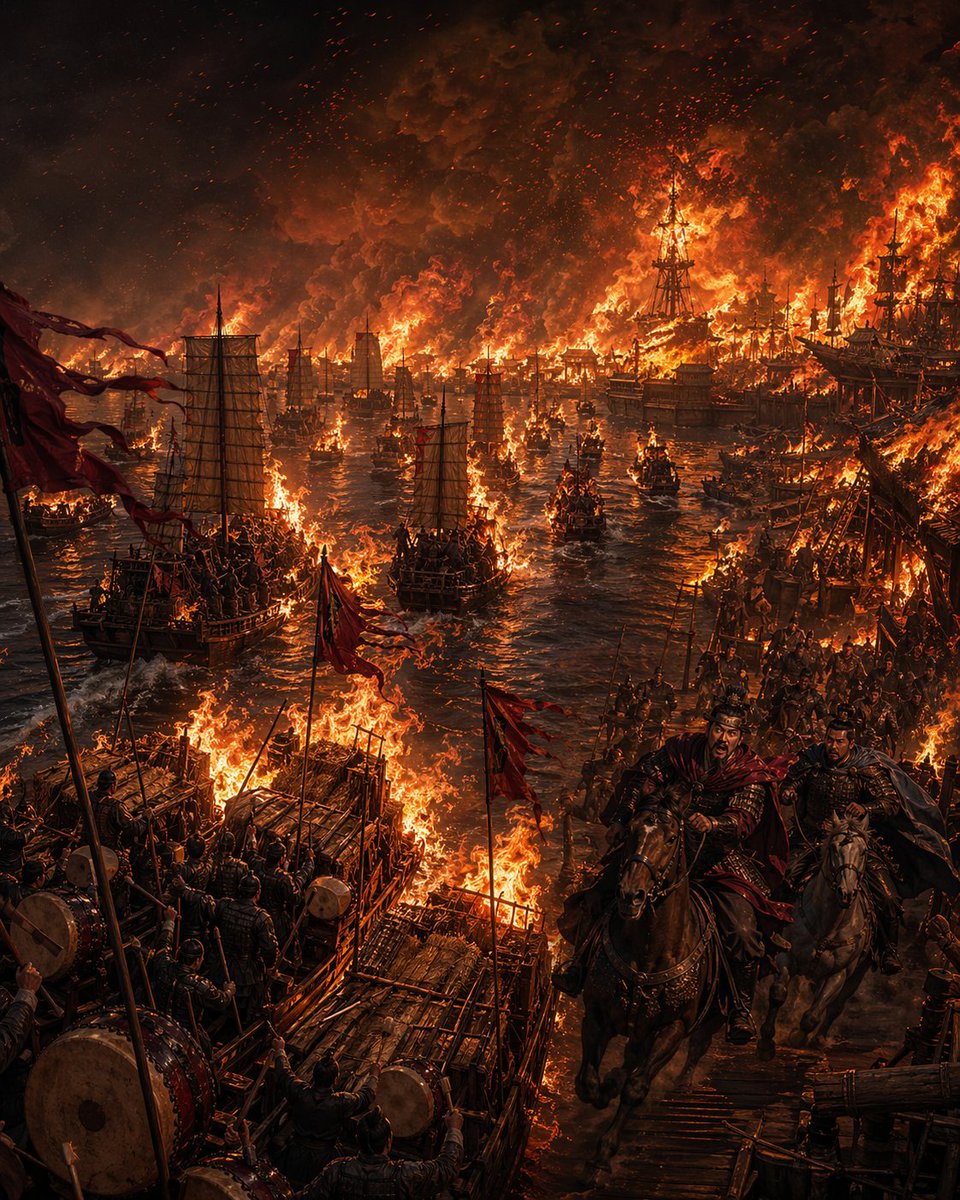
Flaming Fleet at Red Cliffs — Sora 2 Prompt
Create a dramatic cinematic portrayal of the Red Cliffs naval battle with this prompt, perfect for epic historical art.
プロンプト · EN
一幅宏大的电影感历史画作,描绘了赤壁之战的夜晚,展现了整支中国古代江上舰队被烈火吞噬的场景。构图采用高耸的竖构图,视角从略微升高的码头侧面俯瞰,河流向中心远方延伸,江面上挤满了燃烧的战舰。画面左下角和中心前景处需精确包含 3 个显眼的前景木筏状平台或甲板结构,均由粗糙木材制成并被火焰包围,士兵们肩并肩站立,周围环绕着战鼓、旗杆和红色战旗。画面右下角前景处需精确包含 2 名骑马的指挥官,正沿着木质码头或桥梁向观众疾驰而来:前方的骑手清晰可见,身穿深色札甲,披着被风吹起的深红色披风,正急切地呼喊;身旁的第二名骑手身形较暗,部分被遮挡。在中景处,包含数十艘中国古代帆船战舰和小型船只,许多已经起火,展现出传统的硬帆、木质船体、攻城塔楼般的上层建筑以及倒塌的桅杆。远处的岸线与舰队连成一片火海,冲天的橙色火焰和黑红色的烟云填满了天空,无数火星和灰烬在空中飘散。水面反射着熔岩般的橙色火光,船只之间交织着黑色的阴影。画面中应充满密集的士兵、索具、旗帜、战鼓、武器和混乱的战场细节,但整体视觉重点应保持在火光冲天的河流上。采用黑色、余烬红、焦橙色和青铜色的深沉戏剧性色调,呈现强烈的高对比度火光、体积感烟雾、史诗般的尺度、超精细的纹理、动态感以及三国传奇场景的宏大感。中国古代战争美学,冷峻、英勇、灾难性、写实绘画风格,无现代元素,无文字。
このプロンプトについて
Create a dramatic cinematic portrayal of the Red Cliffs naval battle with this prompt, perfect for epic historical art. Use it as a コンセプトアート starting point for GPT Image 2: keep the visual structure and style constraints intact, then swap in your own subject, brand, or scene.
Start with small changes to subject, scene, camera, and color, then generate a few variations to compare composition and detail without turning the page copy into keyword stuffing.
このプロンプトの使い方
- Copy the prompt text and paste it into your AI image generator (e.g., Sora 2, Midjourney, DALL·E).
- Select a model optimized for cinematic realism or historical art, such as Sora 2 or SDXL.
- (Optional) Adjust aspect ratio to vertical (e.g., 2:3 or 9:16) to match the intended composition.
- Tweak variables: you can modify details like the number of figures, intensity of fire, or color palette.
- Generate and refine: run the prompt, then upscale or re-generate with slight variations until satisfied.