
GPT Image 2AIプロンプト
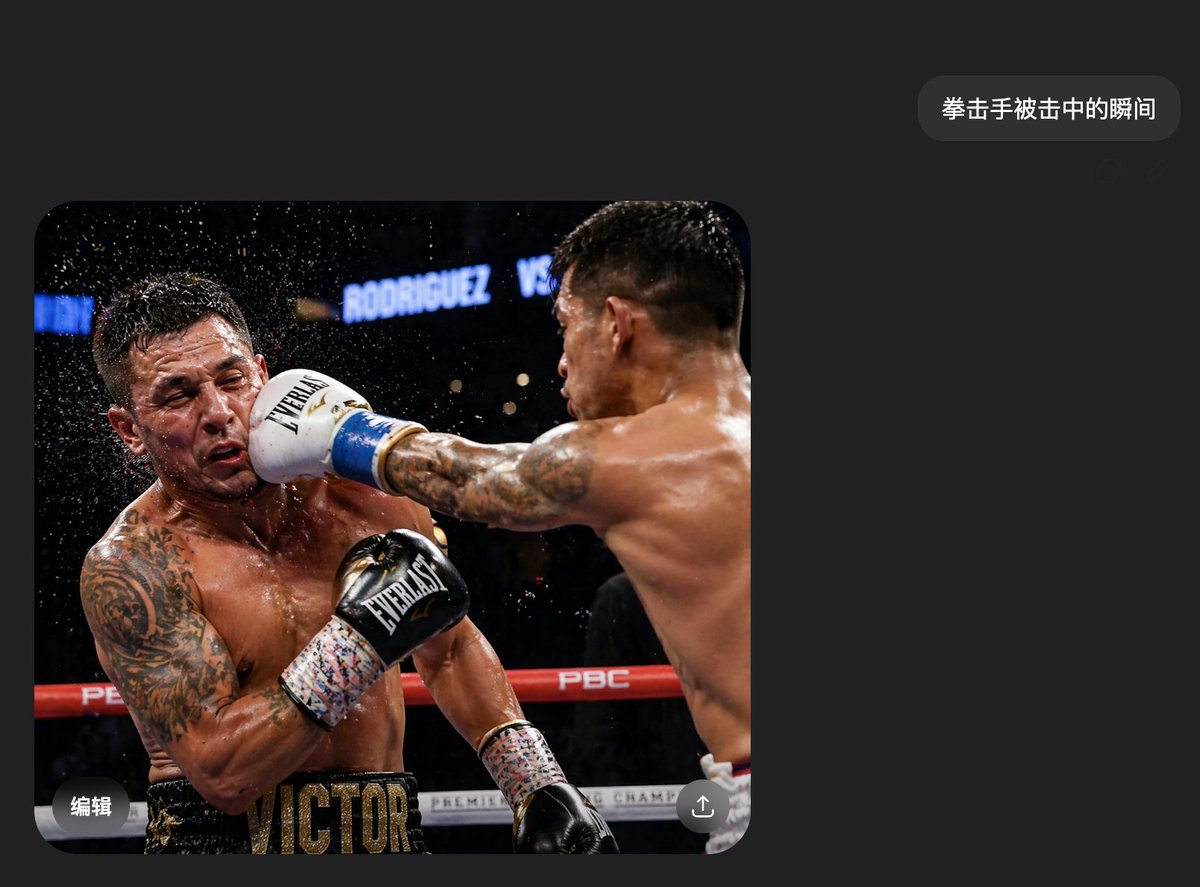
Realistic Boxing Impact Chat Screenshot — AI Prompt
Generate a hyper-realistic dark mode chat screenshot with a boxing impact scene, perfect for viral AI photo content.
プロンプト · EN
一张逼真的中文深色模式聊天界面手机截图,风格简约现代,采用炭黑色背景,留白充足。右上角附近有一个圆角深灰色消息气泡,内含白色中文字符 argmessage text: 拳击手被击中的瞬间。下方左侧嵌入一张占据屏幕左下半部分的大图,图片圆角处理。嵌入的照片展示了职业拳击比赛中,一名拳手重拳击中对方脸部的瞬间。两名赤裸上身的男性拳手肌肉发达、汗流浃背,置身于竞技场灯光下的拳击台内。右侧拳手主要呈现背侧面,右臂完全伸展横跨画面;其背部和肩部肌肉线条分明,留着深色短发,手臂有纹身。他戴着带有蓝色饰边的白色拳击手套,正猛烈击中左侧拳手的脸部。左侧拳手因冲击力向后仰,头部向侧面甩动,汗水和水珠从头部周围飞溅而出。他左臂和胸部有大面积纹身,躯干附近抬起一只黑色手套,穿着黑色短裤,腰带处印有醒目的金色字母 VICTOR。拳台围绳为红白相间,可见 PBC 等品牌标识,背景是模糊的深色竞技场,带有写着 RODRIGUEZ VS 的明亮标识。这张动作照片应呈现出高速运动摄影的定格感,画面戏剧性、清晰且高度逼真。两位拳手的脸部各覆盖一个矩形马赛克模糊遮挡块。在图片上添加细微的移动端 UI 叠加细节:照片左下角有白色中文字符“编辑”,右下角有一个圆形的分享/上传图标。整体构图应看起来就像在即时通讯应用中随手分享的 AI 生成图片,简洁、可信且极具真实感。
このプロンプトについて
Generate a hyper-realistic dark mode chat screenshot with a boxing impact scene, perfect for viral AI photo content. Use it as a コンセプトアート starting point for GPT Image 2: keep the visual structure and style constraints intact, then swap in your own subject, brand, or scene.
Start by replacing message text, then keep the camera, composition, and material cues in the same order. This makes the output easier to compare across variations.
このプロンプトの使い方
- Copy the full prompt text into your preferred AI image generation tool (e.g., Sora 2, Midjourney, DALL·E).
- Replace the
{message text}variable with your desired Chinese phrase, or keep the default "拳击手被击中的瞬间". - Select a photorealistic or cinematic style mode to enhance the realism of the output.
- Generate the image and use the result as a mock chat screenshot for social media or creative projects.


