
Sora2 Hub
Sora2 Hub
  • プロンプトライブラリ
  • 料金
  • ショーケース
Sora2 Hub
Sora2 Hub
Sora2 Hub

Sora2 Hub

Sora 2、Veo 3.1、Nano Banana Proを搭載したプロフェッショナルAI制作プラットフォーム。高度な制御、HD画質、透かしなしで、魅力的な動画とスタジオ品質の画像を作成できます。

Email:support@sora2hub.org

AI動画生成

  • テキストから動画
  • 画像から動画
  • Veo 3.1
  • Sora 2
  • Kling 3.0
  • Kling 2.6
  • Kling 2.5
  • Runway
  • Wan 2.6
  • Seedance 2.0
  • Hailuo 2.3
  • Grok Imagine
  • HappyHorse-1.0

AI画像生成

  • テキストから画像
  • 画像から画像
  • Nano Banana Pro
  • Nano Banana
  • 4o Image
  • Flux Kontext
  • Z Image
  • Seedream 4.5
  • Seedream 5.0 Lite
  • Nano Banana 2
  • GPT Image 2
  • AI画像アップスケーラー

AIエフェクト

  • AI年齢フィルター
  • AI性別変換
  • AIキス
  • AIハグ
  • ジブリ画像
  • AI人魚フィルター
  • AIボディシェイク
  • スマイルフィルター
  • AI太る
  • アクションフィギュア

製品

  • 機能
  • ショーケース
  • 価格

会社情報

  • 会社概要
  • お問い合わせ

© 2025 • Sora2 Hub ORG All rights reserved.

  • プライバシーポリシー
  • 利用規約
  • 返金ポリシー
  1. ホーム
  2. /
  3. プロンプト
  4. /
  5. GPT Image 2
  6. /
  7. Pink & Silver Fantasy Style Transfer — Sora 2 Prompt
GPT Image 2AIプロンプト

Pink & Silver Fantasy Style Transfer — Sora 2 Prompt

Transform any image into a highly detailed fantasy scene with soft pink, white, and silver hues, ethereal lighting, and ornate details.
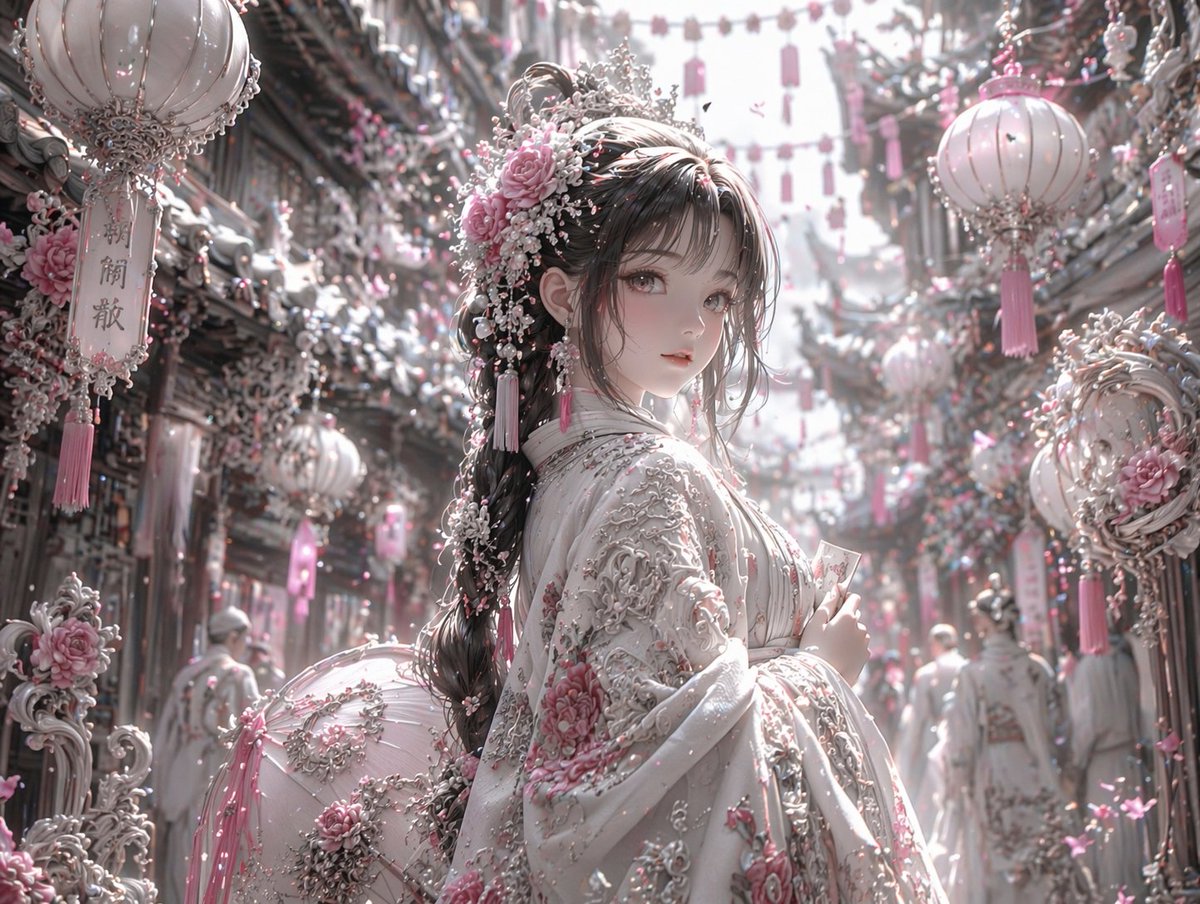
Pink & Silver Fantasy Style Transfer — Sora 2 Prompt
プロンプト · EN
使用 REFERENCE_0,将图像的美学风格转换为高度细腻的华丽奇幻风格。将整体色调从暖红色和黑色更改为 argcolor palette: 柔粉色、白色和银色。将角色的深色服装转换为带有 argclothing details: 粉色花卉刺绣和厚重银色金银丝细工 的奢华白色服饰。将其发饰替换为精致的粉色玫瑰、白色珍珠和银色装饰品。在背景中,将 3 个显眼的悬挂灯笼转换为 arglantern style: 带有流苏的白色和粉色华丽灯笼。用 argenvironment details: 白色和粉色花朵以及复杂的银色建筑元素 覆盖周围的街道和建筑物。将光照调整为 arglighting: 明亮、柔和、空灵的日光。保留角色原本的姿势、面部表情以及场景的整体结构构图。

このプロンプトについて

Transform any image into a highly detailed fantasy scene with soft pink, white, and silver hues, ethereal lighting, and ornate details. Use it as a コンセプトアート starting point for GPT Image 2: keep the visual structure and style constraints intact, then swap in your own subject, brand, or scene.

Start by replacing color palette, clothing details, lantern style, and environment details, then keep the camera, composition, and material cues in the same order. This makes the output easier to compare across variations.

このプロンプトの使い方

  1. Copy the prompt template from this page.
  2. Open an AI image model that supports style transfer (e.g., Stable Diffusion with ControlNet, Midjourney).
  3. Upload your reference image and replace the variables in parentheses with your preferred settings (color palette, clothing details, etc.).
  4. Generate the image and iterate by tweaking the arguments until you achieve the desired look.

FAQ

たねもみ 2.0 / Tanemomi Ver2.0

@Tanemomi_Ver2→

公開日
2026年4月25日
元の言語
EN
モデル
GPT Image 2
カテゴリ
コンセプトアート
GPT Image 2コンセプトアートgpt-image-2twitter
閲覧
59
コピー
4
いいね
1

共有

GPT Image 2 のその他

すべて見る
Dynamic Nike Ad Poster — Sora 2 Prompt with Sydney Sweeney

Dynamic Nike Ad Poster — Sora 2 Prompt with Sydney Sweeney

@im_shahid7
Japanese Cinematic Poster Prompt — 4-Panel Agency Ad

Japanese Cinematic Poster Prompt — 4-Panel Agency Ad

@kantamizutamari
Minimalist Skincare Brand Manual — Sora 2 Prompt

Minimalist Skincare Brand Manual — Sora 2 Prompt

@FranromeGraph

Sora2Hubプロンプトで制作を速く。

検索できるプロンプトページから始め、適切なモデル文脈のまま生成へ進めます。

プロンプトを探す

