
GPT Image 2AIプロンプト
Character Motion Reference Sheet — 4x4 Grid Prompt
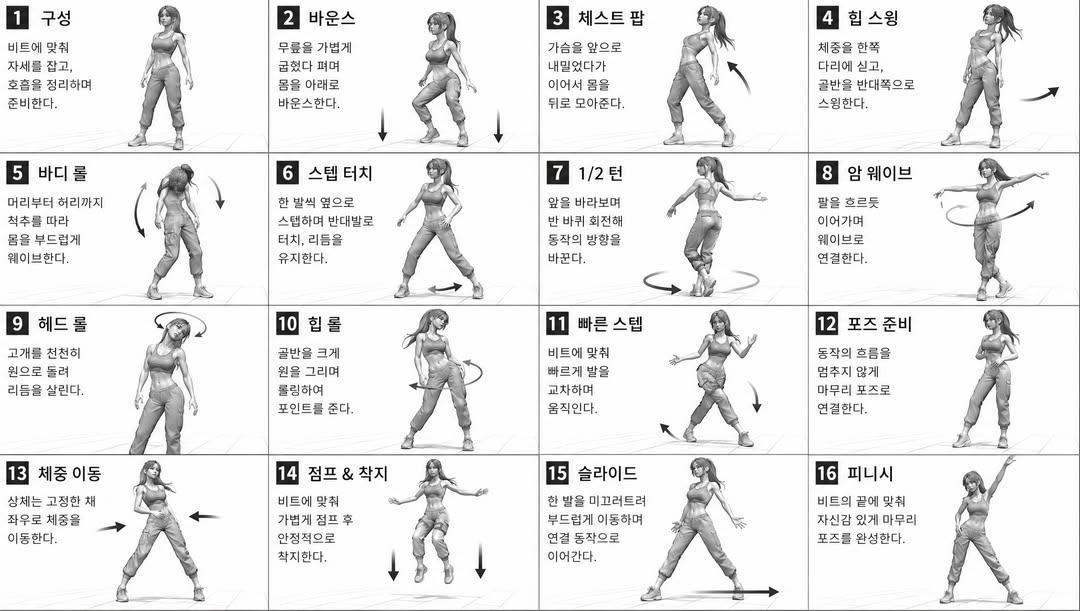
Generate a professional 16-panel character pose reference sheet in monochrome 3D style, perfect for animators and game artists.
プロンプト · EN
[STYLE]
单色灰度插图,3D 渲染角色,简洁的教学参考表,
白色背景,漫画风格网格布局,技术图表美学 [LAYOUT]
4x4 网格布局,共 16 个面板,每个面板由细黑边框分隔,
从 1 到 16 的编号单元格,面板尺寸一致 [CHARACTER]
argcharacter: 年轻女舞者,运动型身材,马尾发型,短款上衣和宽松长裤,运动鞋,所有面板中的角色保持一致 [PANEL STRUCTURE - per cell]
左上角:粗体数字徽章 + argtitle: 韩文标题文本
中心:全身角色姿势插图
左下角:argdescription: 韩文描述文本(3-4 行)
叠加层:指示运动方向的箭头 [ARROWS / MOTION INDICATORS]
曲线箭头、直线箭头、圆形旋转指示器,
放置在角色周围以显示运动流程和方向 [RENDERING STYLE]
高细节 3D 雕刻风格,柔和的摄影棚灯光,微妙的阴影,
无色彩,灰度渲染,干净的线条,游戏概念艺术品质 [NEGATIVE]
无背景场景,无色调,无额外角色,
无杂乱背景
このプロンプトについて
Generate a professional 16-panel character pose reference sheet in monochrome 3D style, perfect for animators and game artists. Use it as a コンセプトアート starting point for GPT Image 2: keep the visual structure and style constraints intact, then swap in your own subject, brand, or scene.
Start by replacing character, title, and description, then keep the camera, composition, and material cues in the same order. This makes the output easier to compare across variations.
このプロンプトの使い方
- Copy the Prompt: Click the 'Copy Prompt' button to save the full prompt text to your clipboard.
- Choose Your Model: Paste it into an AI image generator like Sora 2, Runway, or Midjourney that supports detailed, structured instructions.
- Customize the Variables: Edit the
{character}and{title}arguments to change the figure's description, outfit, or text overlays. - Generate and Refine: Submit the prompt. For best results, generate multiple times to find a version with clear, well-defined poses and grid lines.


