
Sora2 Hub
Sora2 Hub
  • プロンプトライブラリ
  • 料金
  • ショーケース
Sora2 Hub
Sora2 Hub
Sora2 Hub

Sora2 Hub

Sora 2、Veo 3.1、Nano Banana Proを搭載したプロフェッショナルAI制作プラットフォーム。高度な制御、HD画質、透かしなしで、魅力的な動画とスタジオ品質の画像を作成できます。

Email:support@sora2hub.org

AI動画生成

  • テキストから動画
  • 画像から動画
  • Veo 3.1
  • Sora 2
  • Kling 3.0
  • Kling 2.6
  • Kling 2.5
  • Runway
  • Wan 2.6
  • Seedance 2.0
  • Hailuo 2.3
  • Grok Imagine
  • HappyHorse-1.0

AI画像生成

  • テキストから画像
  • 画像から画像
  • Nano Banana Pro
  • Nano Banana
  • 4o Image
  • Flux Kontext
  • Z Image
  • Seedream 4.5
  • Seedream 5.0 Lite
  • Nano Banana 2
  • GPT Image 2
  • AI画像アップスケーラー

AIエフェクト

  • AI年齢フィルター
  • AI性別変換
  • AIキス
  • AIハグ
  • ジブリ画像
  • AI人魚フィルター
  • AIボディシェイク
  • スマイルフィルター
  • AI太る
  • アクションフィギュア

製品

  • 機能
  • ショーケース
  • 価格

会社情報

  • 会社概要
  • お問い合わせ

© 2025 • Sora2 Hub ORG All rights reserved.

  • プライバシーポリシー
  • 利用規約
  • 返金ポリシー
  1. ホーム
  2. /
  3. プロンプト
  4. /
  5. GPT Image 2
  6. /
  7. T-Rex Anatomical Cutaway Poster — Science Prompt
GPT Image 2AIプロンプト

T-Rex Anatomical Cutaway Poster — Science Prompt

Create a detailed, publication-quality educational poster of a Tyrannosaurus Rex with labeled internal anatomy, scientific facts, and a vintage natural history style.
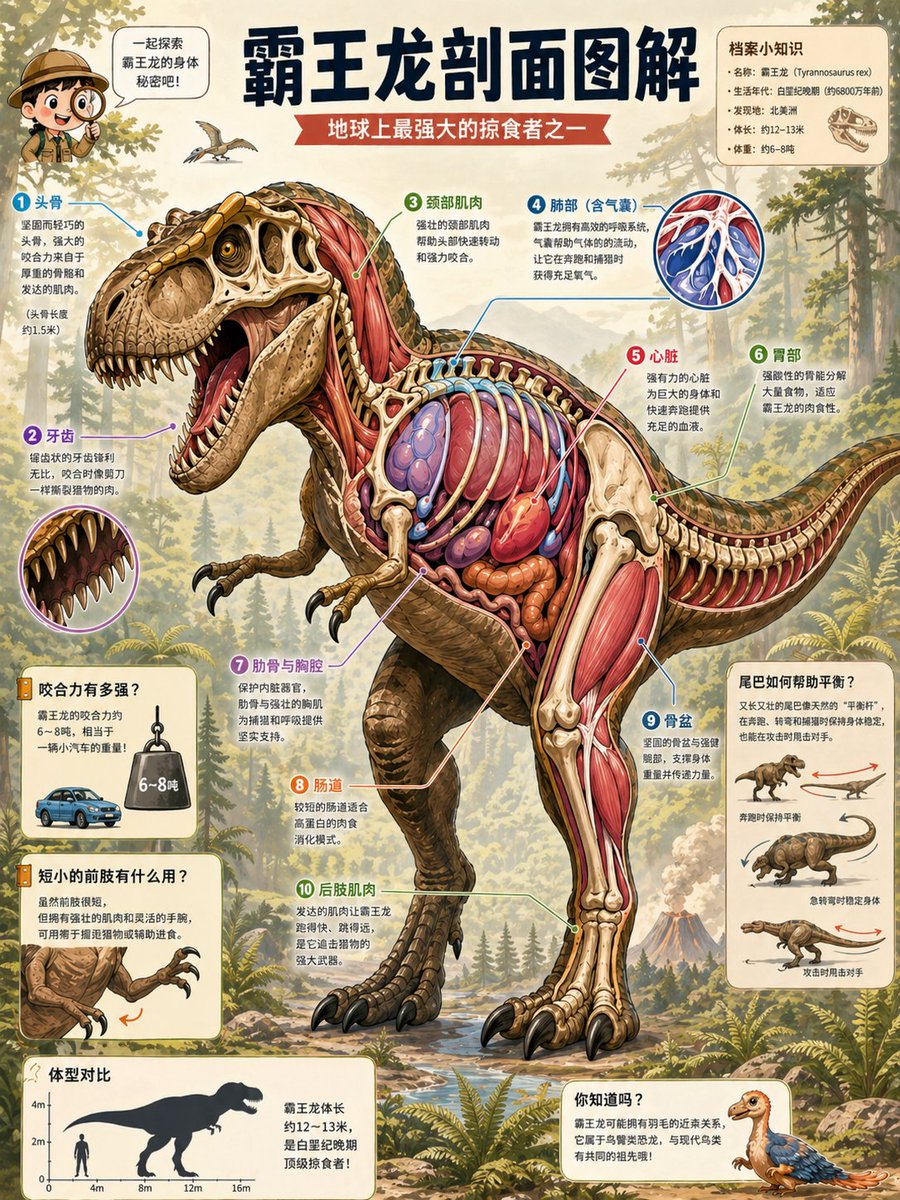
T-Rex Anatomical Cutaway Poster — Science Prompt
プロンプト · EN
type
出版级教育科学百科剖面海报
language
简体中文标签与说明文字
main_title
{argument name="headline text" default="霸王龙剖面图解"}
subtitle
{argument name="subtitle text" default="地球上最强大的掠食者之一"}
subject
species
{argument name="dinosaur species" default="霸王龙 (Tyrannosaurus rex)"}
pose
大型咆哮侧面恐龙,从左向右行走,张开大嘴,尾巴伸展以保持平衡,一只后腿向前,微小的前肢抬起
style
高度精细的半写实科学插画,复古自然历史百科全书风格,丰富的渲染水彩与水粉质感,清晰的墨线勾勒,温暖的羊皮纸背景
cutaway
左半部分展示外部鳞片皮肤和头骨;右侧及身体中心进行解剖处理,露出骨骼、红色肌肉、肋骨、肺部、心脏、肠道、胃部、肌腱以及具有空间连贯性的横截面腿部肌肉层
skin_color
{argument name="skin color" default="橄榄棕色与赭石色鳞片,带有深色条纹"}
anatomy_colors
象牙色骨骼,深红与粉色肌肉,蓝紫色肺部,亮红色心脏,橙棕色消化器官
layout
composition
纵向海报布局,恐龙居中,编号标注箭头围绕身体辐射,圆角奶油色卡片内嵌小型图解,背景为森林与火山景观
background
中生代森林,包含针叶树、蕨类植物、岩石溪流、朦胧山脉、远方火山、小型飞行翼龙,温暖阳光,教育博物馆海报氛围
top_left_mascot
小型探险家儿童角色,配有对话气泡:"一起来探索霸王龙的身体秘密吧!"
top_right_fact_card
title
档案小知识
count
4
items
item 1
名称:霸王龙(Tyrannosaurus rex)
item 2
生活年代:白垩纪晚期(约 6800 万年前)
item 3
发现地:北美洲
item 4
体长:约 12–13 米
item 5
体重:约 6–8 吨
note
在事实旁边绘制一个小型的霸王龙头骨图标
main_numbered_anatomy_callouts
count
10
items
item 1
number
1
label
头骨
description
巨大的头骨、强有力的下颚、厚实的骨骼和强壮的咬合肌
item 2
number
2
label
牙齿
description
大型圆锥形锯齿状牙齿,配有张开大嘴的圆形特写插图
item 3
number
3
label
颈部肌肉
description
连接头骨与躯干的厚实颈部肌肉
item 4
number
4
label
肺部(含气囊)
description
蓝色呼吸系统,配有展示分支气囊和血管的圆形插图
item 5
number
5
label
心脏
description
肋骨架内的大型红色心脏
item 6
number
6
label
胃部
description
肋骨后方的胃部及消化腔
item 7
number
7
label
肋骨与胸腔
description
环绕肺部和器官的拱形象牙色肋骨
item 8
number
8
label
肠道
description
腹部盘绕的橙色肠道
item 9
number
9
label
骨盆
description
支撑后肢和尾部的大型髋骨
item 10
number
10
label
后肢肌肉
description
附着在长腿骨上的强壮红色大腿和小腿肌肉
side_information_cards
count
5
cards
item 1
position
lower left upper
title
咬合力有多强?
visuals
小型蓝色汽车旁悬挂着标注 6~8 吨的重物
purpose
解释咬合力对比
item 2
position
lower left middle
title
短小的前肢有什么用?
visuals
带有爪子和橙色运动箭头的小型前肢特写
purpose
解释短小前肢的可能功能
item 3
position
lower left bottom
title
体型对比
visuals
人类与霸王龙的剪影对比图,垂直刻度达 4 米,水平刻度达 16 米
purpose
展示体型对比及约 12–13 米的体长
item 4
position
right middle
title
尾巴如何帮助平衡?
count
3
visuals
item 1
带有红色水平平衡箭头的小型恐龙
item 2
带有蓝色箭头的尾部负重行走图解
item 3
带有红色箭头的奔跑姿态图解
purpose
解释尾部平衡作用及奔跑稳定性
item 5
position
lower right
title
你知道吗?
visuals
小型带羽毛幼年恐龙插画
purpose
关于羽毛和近亲的趣味知识卡片
typography
顶部加粗深海军蓝中文标题,红色丝带副标题,清晰的印刷体中文正文,彩色编号圆圈,纤细的彩色引导线,带有细微投影的圆角奶油色注释卡片
rendering_requirements
确保解剖结构清晰且分层,包含准确的内部结构,保持色彩一致与标签清晰,高分辨率可打印海报,无照片级写实,无 3D 渲染,无现代 UI 界面元素

このプロンプトについて

Create a detailed, publication-quality educational poster of a Tyrannosaurus Rex with labeled internal anatomy, scientific facts, and a vintage natural history style. Use it as a コンセプトアート starting point for GPT Image 2: keep the visual structure and style constraints intact, then swap in your own subject, brand, or scene.

This prompt is organized as structured JSON with fields such as type, language, main title, subtitle, subject, and layout. Keeping that hierarchy helps the model separate the subject, layout, interface elements, and detail constraints.

Start with small changes to subject, scene, camera, and color, then generate a few variations to compare composition and detail without turning the page copy into keyword stuffing.

このプロンプトの使い方

  1. Copy the full prompt text into your AI image generator.
  2. Select a model known for high-detail illustration, like Sora 2 or Midjourney.
  3. Customize variables like headline text or skin color to change the title and appearance.
  4. Adjust the dinosaur species variable to feature a different prehistoric creature.
  5. Generate the image, which will be a complete infographic poster with annotations.

FAQ

ハカセ アイ(Ai-Hakase)🐾最新トレンドAIのためのX 🐾

@ai_hakase_→

公開日
2026年5月15日
元の言語
EN
モデル
GPT Image 2
カテゴリ
コンセプトアート
GPT Image 2コンセプトアートgpt-image-2twitter
閲覧
1.1K
コピー
145
いいね
27

共有

GPT Image 2 のその他

すべて見る
Anime Schoolgirls Sharing Transparent Umbrella — Sora 2 Prompt

Anime Schoolgirls Sharing Transparent Umbrella — Sora 2 Prompt

@yB7CqdfoDmrbhgD
Indonesian Bird Contest Meme — Low-Quality Phone Photo

Indonesian Bird Contest Meme — Low-Quality Phone Photo

@NyaiiBubu
Luxury Tennis Fashion Poster — Bold Studio Shoot Sora Prompt

Luxury Tennis Fashion Poster — Bold Studio Shoot Sora Prompt

@blueski68251660

Sora2Hubプロンプトで制作を速く。

検索できるプロンプトページから始め、適切なモデル文脈のまま生成へ進めます。

プロンプトを探す

