
Sora2 Hub
Sora2 Hub
  • プロンプトライブラリ
  • 料金
  • ショーケース
Sora2 Hub
Sora2 Hub
Sora2 Hub

Sora2 Hub

Sora 2、Veo 3.1、Nano Banana Proを搭載したプロフェッショナルAI制作プラットフォーム。高度な制御、HD画質、透かしなしで、魅力的な動画とスタジオ品質の画像を作成できます。

Email:support@sora2hub.org

AI動画生成

  • テキストから動画
  • 画像から動画
  • Veo 3.1
  • Sora 2
  • Kling 3.0
  • Kling 2.6
  • Kling 2.5
  • Runway
  • Wan 2.6
  • Seedance 2.0
  • Hailuo 2.3
  • Grok Imagine
  • HappyHorse-1.0

AI画像生成

  • テキストから画像
  • 画像から画像
  • Nano Banana Pro
  • Nano Banana
  • 4o Image
  • Flux Kontext
  • Z Image
  • Seedream 4.5
  • Seedream 5.0 Lite
  • Nano Banana 2
  • GPT Image 2
  • AI画像アップスケーラー

AIエフェクト

  • AI年齢フィルター
  • AI性別変換
  • AIキス
  • AIハグ
  • ジブリ画像
  • AI人魚フィルター
  • AIボディシェイク
  • スマイルフィルター
  • AI太る
  • アクションフィギュア

製品

  • 機能
  • ショーケース
  • 価格

会社情報

  • 会社概要
  • お問い合わせ

© 2025 • Sora2 Hub ORG All rights reserved.

  • プライバシーポリシー
  • 利用規約
  • 返金ポリシー
  1. ホーム
  2. /
  3. プロンプト
  4. /
  5. GPT Image 2
  6. /
  7. Camera Exploded View Infographic — Sora 2 Prompt
GPT Image 2AIプロンプト

Camera Exploded View Infographic — Sora 2 Prompt

Generates a detailed multi-panel technical infographic with a 3D exploded view of a camera, explaining the entire imaging process from light to file.
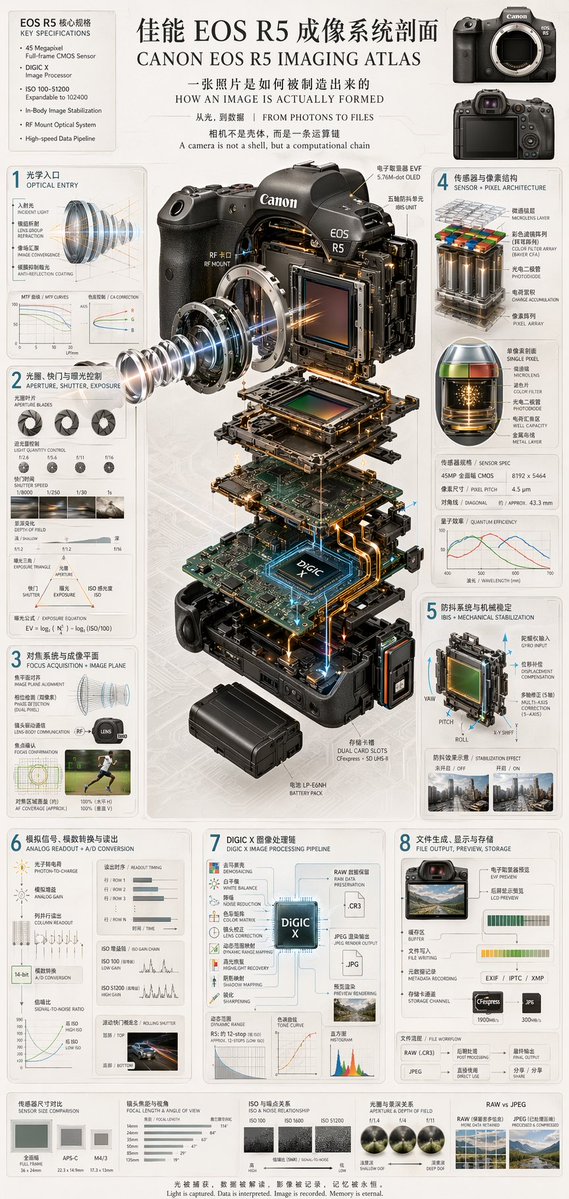
Camera Exploded View Infographic — Sora 2 Prompt
プロンプト · EN
type
技术信息图与爆炸视图
header
title
{argument name="main title" default="佳能 EOS R5 成像系统剖面 CANON EOS R5 IMAGING ATLAS"}
subtitles
item 1
一张照片是如何被制造出来的 HOW AN IMAGE IS ACTUALLY FORMED
item 2
从光,到数据 | FROM PHOTONS TO FILES
item 3
相机不是壳体,而是一条运算链 A camera is not a shell, but a computational chain
top_left_box
title
EOS R5 核心规格 KEY SPECIFICATIONS
bullet_points_count
6
top_right_images
count
2
description
相机机身的前视图和后视图
centerpiece
description
高度详细的 {argument name="camera model" default="Canon EOS R5"} 相机 3D 爆炸视图,展示垂直分离的内部组件
components_visible
item 1
镜头卡口
item 2
带有发光蓝色光线的镜头元件
item 3
图像传感器
item 4
带有发光 {argument name="processor name" default="DIGIC X"} 芯片的主板
item 5
电池组
item 6
双卡槽
item 7
电子取景器 (EVF)
layout
numbered_sections
item 1
number
1
title
光学入口 OPTICAL ENTRY
elements
item 1
带有光线的镜头横截面
item 2
2 张折线图
item 2
number
2
title
光圈、快门与曝光控制 APERTURE, SHUTTER, EXPOSURE
elements
item 1
3 张光圈叶片图
item 2
4 张快门速度示例照片
item 3
景深示意图
item 4
曝光三角示意图
item 3
number
3
title
对焦系统与成像平面 FOCUS ACQUISITION + IMAGE PLANE
elements
item 1
镜头对准示意图
item 2
跑步者的自动对焦覆盖范围照片
item 4
number
4
title
传感器与像素结构 SENSOR + PIXEL ARCHITECTURE
elements
item 1
3D 像素阵列图
item 2
单像素横截面图
item 3
传感器规格表
item 4
量子效率图
item 5
number
5
title
防抖系统与机械稳定 IBIS + MECHANICAL STABILIZATION
elements
item 1
带有偏航/俯仰/滚动轴的传感器位移机制图
item 2
2 张防抖效果对比照片
item 6
number
6
title
模拟信号、模数转换与读出 ANALOG READOUT + A/D CONVERSION
elements
item 1
信号流程图
item 2
3 张读出时序图
item 3
信噪比图
item 4
汽车的果冻效应示例照片
item 7
number
7
title
DIGIC X 图像处理链 DIGIC X IMAGE PROCESSING PIPELINE
elements
item 1
以中央芯片为核心的处理流程图
item 2
动态范围图
item 3
色调曲线图
item 4
直方图
item 8
number
8
title
文件生成、显示与存储 FILE OUTPUT, PREVIEW, STORAGE
elements
item 1
文件输出流程图
item 2
2 个存储卡图标
item 3
文件工作流图
bottom_comparisons
count
5
labels
item 1
传感器尺寸对比 SENSOR SIZE COMPARISON
item 2
镜头焦距与视角 FOCAL LENGTH & ANGLE OF VIEW
item 3
ISO 与噪点关系 ISO & NOISE RELATIONSHIP
item 4
光圈与景深关系 APERTURE & DEPTH OF FIELD
item 5
RAW vs JPEG
footer
{argument name="footer quote" default="光被捕获,数据被解读,影像被记录,记忆被永恒。 Light is captured. Data is interpreted. Image is recorded. Memory is eternal."}
style
简洁、技术感、高度详细、照片级真实感的组件、蓝图风格标注、浅灰色背景、精确的排版

このプロンプトについて

Generates a detailed multi-panel technical infographic with a 3D exploded view of a camera, explaining the entire imaging process from light to file. Use it as a コンセプトアート starting point for GPT Image 2: keep the visual structure and style constraints intact, then swap in your own subject, brand, or scene.

This prompt is organized as structured JSON with fields such as type, header, centerpiece, layout, and style. Keeping that hierarchy helps the model separate the subject, layout, interface elements, and detail constraints.

Start with small changes to subject, scene, camera, and color, then generate a few variations to compare composition and detail without turning the page copy into keyword stuffing.

このプロンプトの使い方

  1. Copy the Prompt: Copy the full prompt text above.
  2. Choose Your Model: Paste into Sora 2 or a similar AI image generator.
  3. Tweak Variables: Change variables like {main title}, {camera model}, or {processor name} for your specific device.
  4. Generate: Submit the prompt and review the multi-panel technical diagram.

FAQ

虎小象

@hx831126→

公開日
2026年4月25日
元の言語
EN
モデル
GPT Image 2
カテゴリ
コンセプトアート
GPT Image 2コンセプトアートgpt-image-2twitter
閲覧
275
コピー
37
いいね
14

共有

GPT Image 2 のその他

すべて見る
Minimalist Skincare Brand Manual — Sora 2 Prompt

Minimalist Skincare Brand Manual — Sora 2 Prompt

@FranromeGraph
Dark Anime Devil Girl Mario Kart Poster — Sora 2 Prompt

Dark Anime Devil Girl Mario Kart Poster — Sora 2 Prompt

@opener_ai
Guangzhou 2026 Poster: Silk Ribbon Cityscape — Sora 2 Prompt

Guangzhou 2026 Poster: Silk Ribbon Cityscape — Sora 2 Prompt

@alanlovelq

Sora2Hubプロンプトで制作を速く。

検索できるプロンプトページから始め、適切なモデル文脈のまま生成へ進めます。

プロンプトを探す

