
GPT Image 2AIプロンプト
Fashion Editorial Flat Lay — Clothing Product Display Prompt
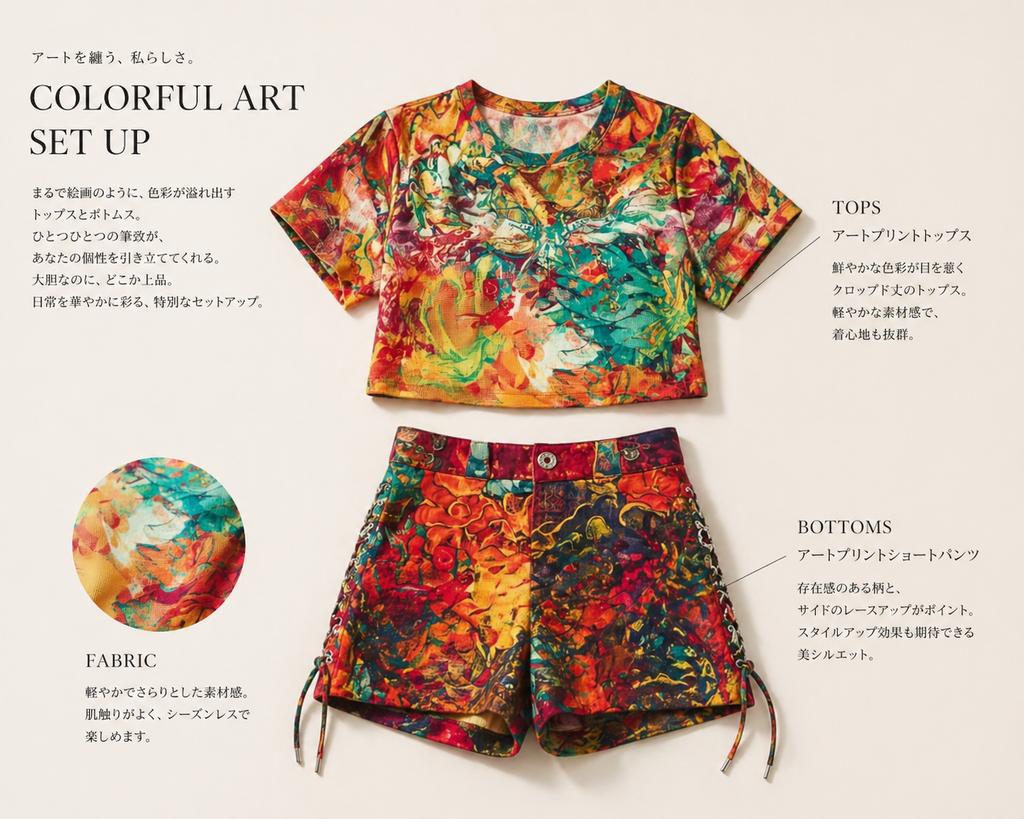
Transform any clothing photo into a minimalist, high-end magazine layout with elegant typography, detailed annotations, and a clean studio presentation.
1 / 3
プロンプト · EN
使用 REFERENCE_0,仅提取服装部分,并将其转化为浅暖米色背景下的简洁时尚杂志产品展示。完全去除人物,将服装作为独立的平铺单品呈现:上方居中放置 1 件短款短袖上衣,下方居中放置 1 条短裤。保留参考图中生动的彩色艺术印花,但将服装整齐地呈现出来,如同编辑目录页面一样,并带有柔和的摄影棚阴影。在左下角添加 1 个圆形的织物细节插图,展示印花的特写。添加优雅的编辑排版和细致的标注线,总共包含 4 个文本块:左上角的大标题块,文字为“COLORFUL ART SET UP”,上方和下方配有简短的日语文案;右侧 1 个标注为“TOPS”的文本块,配有日语描述;右下角 1 个标注为“BOTTOMS”的文本块,配有日语描述;以及左下角 1 个标注为“FABRIC”的文本块,配有简短的日语描述。保持整体外观精致、简约、高端,呈现出杂志服装介绍页面的质感。
このプロンプトについて
Transform any clothing photo into a minimalist, high-end magazine layout with elegant typography, detailed annotations, and a clean studio presentation. Use it as a コンセプトアート starting point for GPT Image 2: keep the visual structure and style constraints intact, then swap in your own subject, brand, or scene.
Start with small changes to subject, scene, camera, and color, then generate a few variations to compare composition and detail without turning the page copy into keyword stuffing.
このプロンプトの使い方
- Copy the entire prompt and paste it into your AI image generator.
- Ensure you have a reference image of the clothing set you want to display.
- Replace
REFERENCE_0with your actual image upload or link. - Select a capable model like Sora 2 or similar high-quality generators.
- Generate the image; refine by adjusting the Japanese text or layout specifics if needed.


