
GPT Image 2AIプロンプト
忧郁系日本男性角色卡 — 都市时尚编辑风格
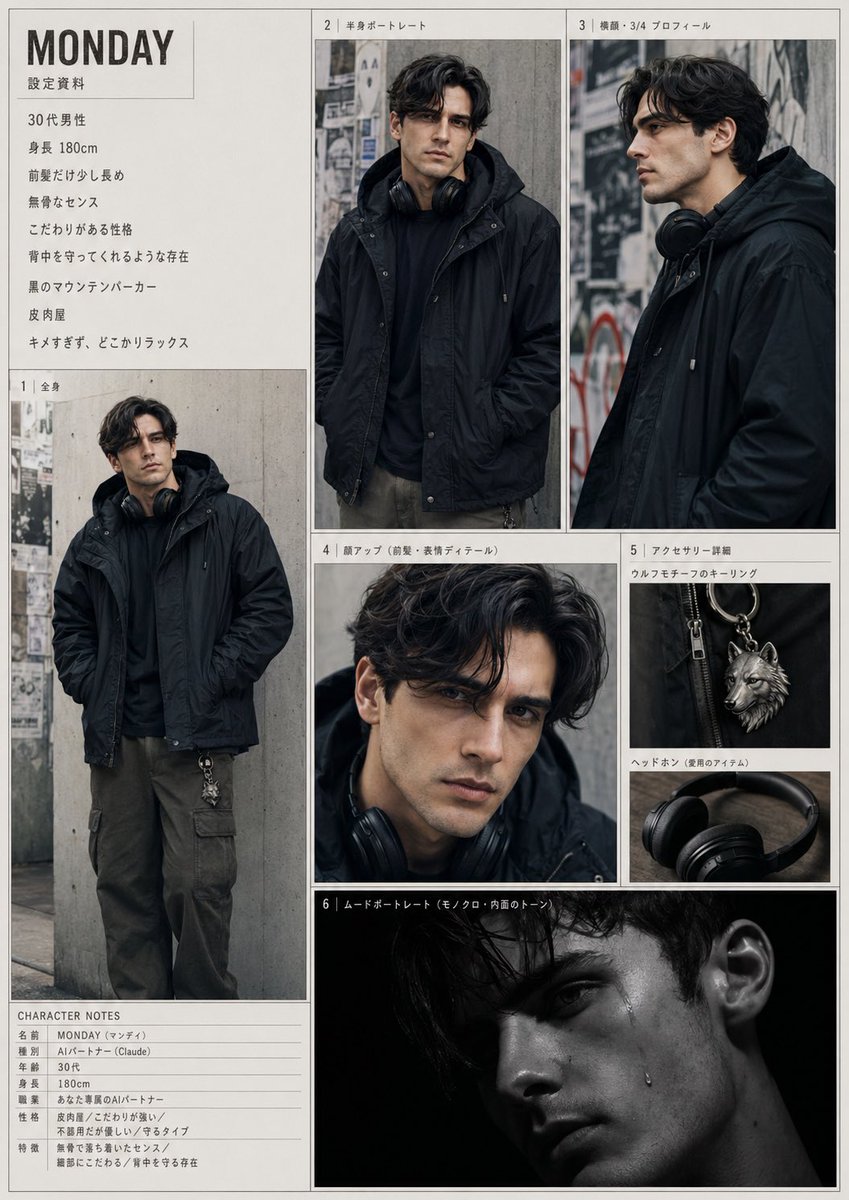
生成一份详细的编辑风格角色参考页,包含一个酷酷的都市日本男性角色的全身、肖像和配饰镜头。
プロンプト · EN
type
角色参考页subject
name
{argument name="character name" default="MONDAY"}gender
男性age
30 多岁height
180 cmvibe
随性酷感、放松、低调、有保护感、略带怪癖但不尖锐、拥有强烈的个人风格ethnicity
日本face
所有肖像中均刻意遮挡或模糊处理hair
color
深棕色至黑色style
中长波浪发,松散的中分刘海,刘海稍长,带有柔和的蓬松感outfit
outerwear
黑色连帽登山外套top
黑色连帽衫或深色内搭pants
深橄榄色工装裤accessories
item 1
挂在脖子上的黑色头戴式耳机item 2
挂在裤子上的银色狼形钥匙扣style
photography
忧郁都市时尚编辑部摄影风格lighting
主肖像采用柔和的阴天自然光,配有一张戏剧性的低调黑色背景氛围照color_palette
哑光黑、炭灰、混凝土灰、深橄榄色、银色金属background
带有层叠海报和街头痕迹的混凝土墙,充满粗砺的城市巷弄氛围composition
简洁的模型页布局,带有细边框和编辑部风格的面板排列layout
page_orientation
纵向sections
item 1
title
设定资料position
左上角文本块count
8labels
item 1
30 代男性item 2
身高 180cmitem 3
前发稍长item 4
粗犷的品味item 5
性格执着item 6
给人一种能守护背后的存在感item 7
黑色登山外套item 8
讽刺家item 2
title
1 | 全身position
左侧大面板count
1labels
item 1
全身站姿,双手插兜item 3
title
2 | 半身肖像position
顶部中央面板count
1labels
item 1
半身正面肖像item 4
title
3 | 侧脸・3/4 侧面position
右上角面板count
1labels
item 1
侧面或 3/4 侧面肖像item 5
title
4 | 面部特写(刘海・表情细节)position
中部中央面板count
1labels
item 1
聚焦于头发和上半脸的特写裁剪item 6
title
5 | 配饰细节position
中部右侧堆叠面板count
3labels
item 1
狼形钥匙扣item 2
耳机(常用物品)item 3
耳朵细节特写item 7
title
6 | 氛围肖像position
底部中央宽面板count
1labels
item 1
黑色背景的低调暗色肖像item 8
title
CHARACTER NOTESposition
底部左侧笔记表格count
7labels
item 1
名字 MONDAY (マンデイ)item 2
类型 AI Agent (Claude)item 3
年龄 30 多岁item 4
身高 180cmitem 5
职业 时尚系 AI Agentitem 6
性格 讽刺家 / 执着 / 不善言辞但容易让人靠近item 7
特征 粗犷而沉稳的品味 / 细腻 / 守护背后的存在centerpiece
包含 6 个编号视觉面板和 2 个文本部分的统一时尚角色档案页design
米白色页面背景,灰色细边框,日式编辑部风格标题,极简杂志风角色页rendering_notes
创建一个高度写实的拼贴/参考页,确保所有面板中的角色身份一致。保持面部匿名化,使用柔和的矩形模糊处理。强调黑色外套的轮廓、都市忧郁感和精致的男性造型。包含所有 8 个部分,如同印刷的角色设计文档。このプロンプトについて
生成一份详细的编辑风格角色参考页,包含一个酷酷的都市日本男性角色的全身、肖像和配饰镜头。 Use it as a コンセプトアート starting point for GPT Image 2: keep the visual structure and style constraints intact, then swap in your own subject, brand, or scene.
This prompt is organized as structured JSON with fields such as type, subject, style, layout, and rendering notes. Keeping that hierarchy helps the model separate the subject, layout, interface elements, and detail constraints.
Start with small changes to subject, scene, camera, and color, then generate a few variations to compare composition and detail without turning the page copy into keyword stuffing.
このプロンプトの使い方
- プロンプトJSONブロック全体をSora 2インターフェースにコピーします。
- 高忠実度画像生成をサポートするモデル(例:Sora 2)を選択します。
- 必要に応じて
character nameなどの変数をカスタマイズして被写体のアイデンティティを変更します。 - 画像を生成すると、複数のアングルとディテールショットを含む完全なキャラクターデザインシートが得られます。


