
GPT Image 2AIプロンプト
Chinese General Lü Bu — Cinematic Infographic Poster Prompt
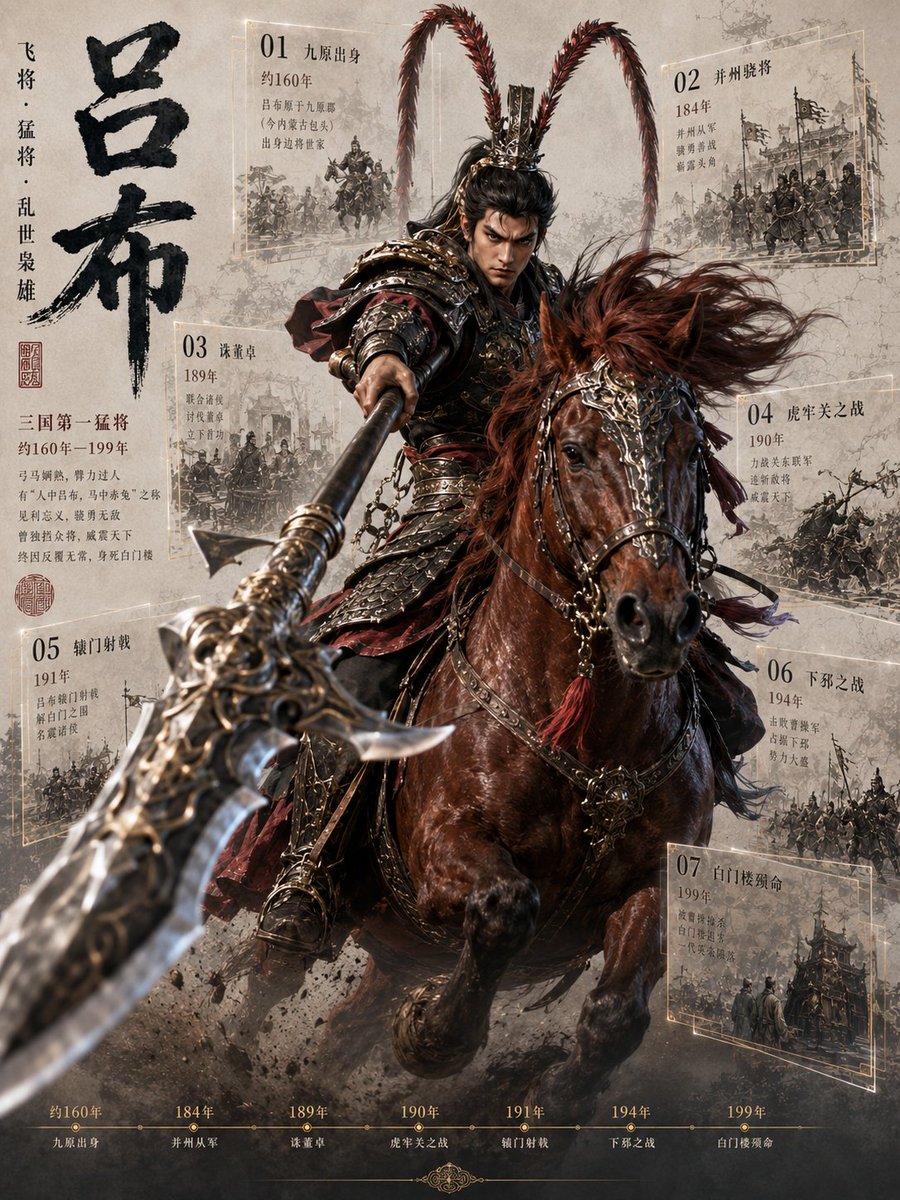
Generate a dramatic, film-quality portrait of the legendary Three Kingdoms warrior Lü Bu on horseback, complete with biographical event cards and a timeline.
プロンプト · EN
目标:创作一张关于 argcharacter name: 吕布(三国传奇名将)的戏剧性竖版历史武将信息图海报,将电影级奇幻写实风格与古风手稿设计相结合。 画布:竖版 3:4 海报,羊皮纸灰纹理背景,带有水墨污渍、尘土、烟雾、战场沙砾及隐约的裂纹。采用高对比度的电影构图,主体人物从中心向外爆发式冲锋。 主体:一位威武的中国古代重装骑兵将军骑着深栗色战马,正向观众直冲而来。骑手身着华丽的深青铜色与黑色扎甲,配有红色布饰、锁链、金属肩甲,以及一顶带有两根极长红色雉鸡翎、向上高耸并向外弯曲的精致头盔。他的面部被刻意用柔和的矩形模糊/遮罩处理,而图像其余部分保持清晰。他将一把巨大的华丽方天画戟刺向镜头,营造出极端的近景透视:武器刃部巨大,因景深效果而模糊,从左下方延伸至骑手手中。战马鬃毛随风飘动,配有装饰性的缰绳、金属饰品、流苏,前腿抬起,扬起泥土与烟雾。 左侧排版:左侧垂直排列巨大的黑色书法标题 argmain title: 吕布,笔触粗犷。旁边放置较小的垂直短语 argvertical subtitle: 飞将 · 猛将 · 乱世枭雄。标题下方添加红色印章及一段中文简介,包括“三国第一猛将”、“约160年–199年”以及几行小型衬线中文文本。 信息图面板:在中央骑手周围放置 7 个半透明的羊皮纸事件卡片,每张卡片带有细淡金色矩形边框、大号两位数字、中文事件标题、年份、简短中文描述及单色素描风格的战斗插图。7 张可见卡片为:01 “九原出身”及“约160年”(左上);02 “并州骁将”及“184年”(右上);03 “诛董卓”及“189年”(中左);04 “虎牢关之战”及“190年”(中右);05 “辕门射戟”及“191年”(左下);06 “下邳之战”及“194年”(右下);07 “白门楼殒命”及“199年”(右下)。面板需保持透视倾斜,仿佛悬浮在武将身后,并被烟雾和马匹部分遮挡。 底部时间轴:在底部边缘添加 7 个柔和金色的时间轴里程碑,与卡片对应:“约160年 九原出身”、“184年 并州从军”、“189年 诛董卓”、“190年 虎牢关之战”、“191年 辕门射戟”、“194年 下邳之战”、“199年 白门楼殒命”。使用小圆点连接细水平线,中心下方配有微妙的装饰性花纹。 视觉风格:超精细电影级中国历史奇幻风格,写实的盔甲与马匹解剖结构,动态感,浅景深,烟雾缭绕的战场氛围,以深褐色羊皮纸为基调,辅以水墨黑、深青铜色、牛血红及淡金色高光。背景面板呈现出印在旧纸张上的档案素描质感。 约束:使用中文作为可见图形元素,严格保持 7 个事件卡片和 7 个时间轴里程碑的数量,无现代物品,无 Logo 或水印,前景无额外角色,并保持海报式的编辑信息图布局。
このプロンプトについて
Generate a dramatic, film-quality portrait of the legendary Three Kingdoms warrior Lü Bu on horseback, complete with biographical event cards and a timeline. Use it as a コンセプトアート starting point for GPT Image 2: keep the visual structure and style constraints intact, then swap in your own subject, brand, or scene.
Start by replacing character name, main title, and vertical subtitle, then keep the camera, composition, and material cues in the same order. This makes the output easier to compare across variations.
このプロンプトの使い方
- Copy the entire prompt text from the page.
- Choose a compatible AI image generator (e.g., Sora 2, Midjourney v6, DALL-E 3, Stable Diffusion XL).
- Replace the default names and titles in the
{argument name="..."}tags with your desired character or customize the text (e.g., change "吕布" to "关羽"). - Paste the modified prompt into your chosen model's interface and generate.
- Iterate on the prompt by adjusting style keywords (e.g., change 'cinematic' to 'ink wash') or the aspect ratio for different looks.


