
GPT Image 2AIプロンプト
Double Exposure Character Poster Prompt — Ink & Silhouette
Craft 9:16 character posters using dual-layer composition: a giant silhouette top, full body bottom, enriched with double exposure and ink-wash aesthetics.
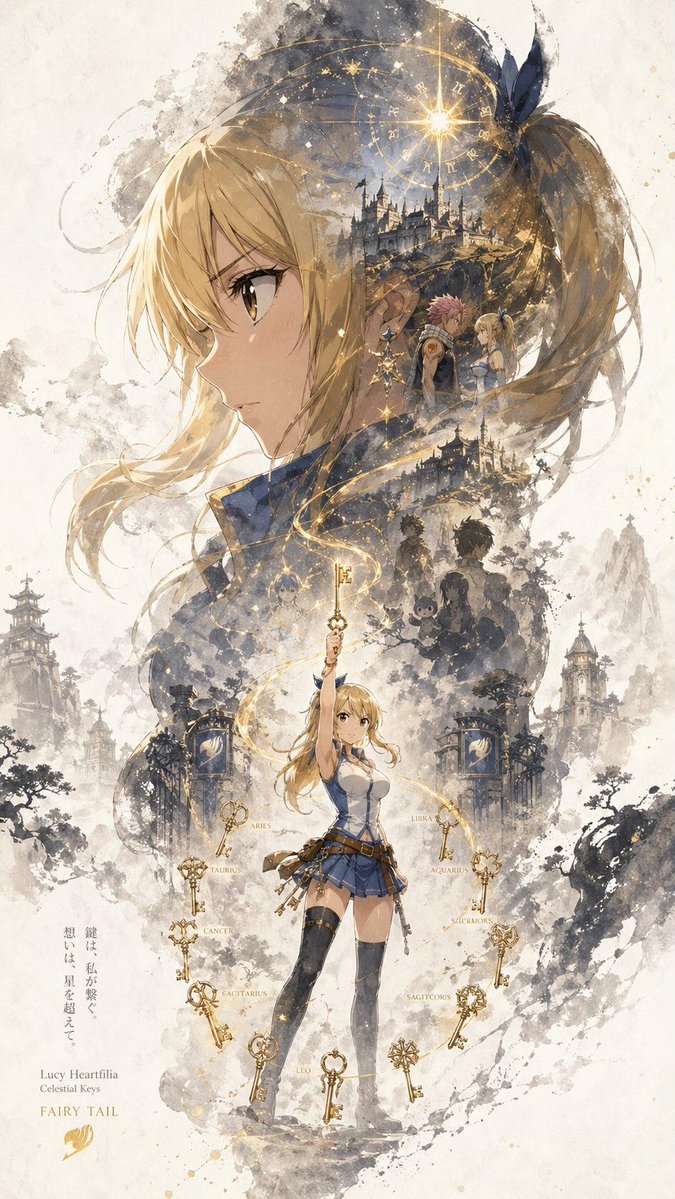
1 / 2
プロンプト · EN
一张名为“argposter title: INPUT NAME”的角色宣传海报,采用统一的竖版主视觉构图(9:16)。每张海报均遵循“上大下小”的层级结构:上半部分以角色最具辨识度的元素(头部、面部轮廓、面具或上半身剪影)作为主导的超大视觉焦点,形成极具辨识度的剪影;中下部呈现角色全身作为次要主体,采用稳定的站姿或轻微的动态,确立构图的视觉核心。在大剪影内部及角色周围,运用双重曝光和拼贴式的叙事构图。将多个场景、象征性意象、小型角色互动、辅助元素及环境细节进行分层,并融入烟雾、水墨及留白之中。左右两侧加入互补的次要元素,以营造叙事张力与空间变化。一条连续的流动视觉线贯穿上下,将主角色、内部拼贴及上方大剪影连接起来,增强连贯性并引导观众视线。整体构图保留大面积留白。边缘采用水墨晕染、柔和模糊及碎片化过渡处理,在东方美学的启发下实现“有”与“无”的平衡。整体风格统一、精致且克制,强调深度、叙事感、强烈的视觉冲击力以及连贯的系列海报语言。
このプロンプトについて
Craft 9:16 character posters using dual-layer composition: a giant silhouette top, full body bottom, enriched with double exposure and ink-wash aesthetics. Use it as a コンセプトアート starting point for GPT Image 2: keep the visual structure and style constraints intact, then swap in your own subject, brand, or scene.
Start by replacing poster title, then keep the camera, composition, and material cues in the same order. This makes the output easier to compare across variations.
このプロンプトの使い方
- Copy the prompt template.
- Paste it into an AI image generator like Sora or Midjourney.
- Replace
{argument name="poster title" default="INPUT NAME"}with your character's name. - Optionally tweak colors, symbols, or add personal elements.
- Generate and run multiple iterations to refine the result.


