
Sora2 Hub
Sora2 Hub
  • プロンプトライブラリ
  • 料金
  • ショーケース
Sora2 Hub
Sora2 Hub
Sora2 Hub

Sora2 Hub

Sora 2、Veo 3.1、Nano Banana Proを搭載したプロフェッショナルAI制作プラットフォーム。高度な制御、HD画質、透かしなしで、魅力的な動画とスタジオ品質の画像を作成できます。

Email:support@sora2hub.org

AI動画生成

  • テキストから動画
  • 画像から動画
  • Veo 3.1
  • Sora 2
  • Kling 3.0
  • Kling 2.6
  • Kling 2.5
  • Runway
  • Wan 2.6
  • Seedance 2.0
  • Hailuo 2.3
  • Grok Imagine
  • HappyHorse-1.0

AI画像生成

  • テキストから画像
  • 画像から画像
  • Nano Banana Pro
  • Nano Banana
  • 4o Image
  • Flux Kontext
  • Z Image
  • Seedream 4.5
  • Seedream 5.0 Lite
  • Nano Banana 2
  • GPT Image 2
  • AI画像アップスケーラー

AIエフェクト

  • AI年齢フィルター
  • AI性別変換
  • AIキス
  • AIハグ
  • ジブリ画像
  • AI人魚フィルター
  • AIボディシェイク
  • スマイルフィルター
  • AI太る
  • アクションフィギュア

製品

  • 機能
  • ショーケース
  • 価格

会社情報

  • 会社概要
  • お問い合わせ

© 2025 • Sora2 Hub ORG All rights reserved.

  • プライバシーポリシー
  • 利用規約
  • 返金ポリシー
  1. ホーム
  2. /
  3. プロンプト
  4. /
  5. GPT Image 2
  6. /
  7. Alpine Landscape Souvenir Pin — Sora 2 Prompt
GPT Image 2AIプロンプト

Alpine Landscape Souvenir Pin — Sora 2 Prompt

Generate a split image comparing a detailed enamel pin souvenir with its source alpine meadow landscape, perfect for travel memory concepts.
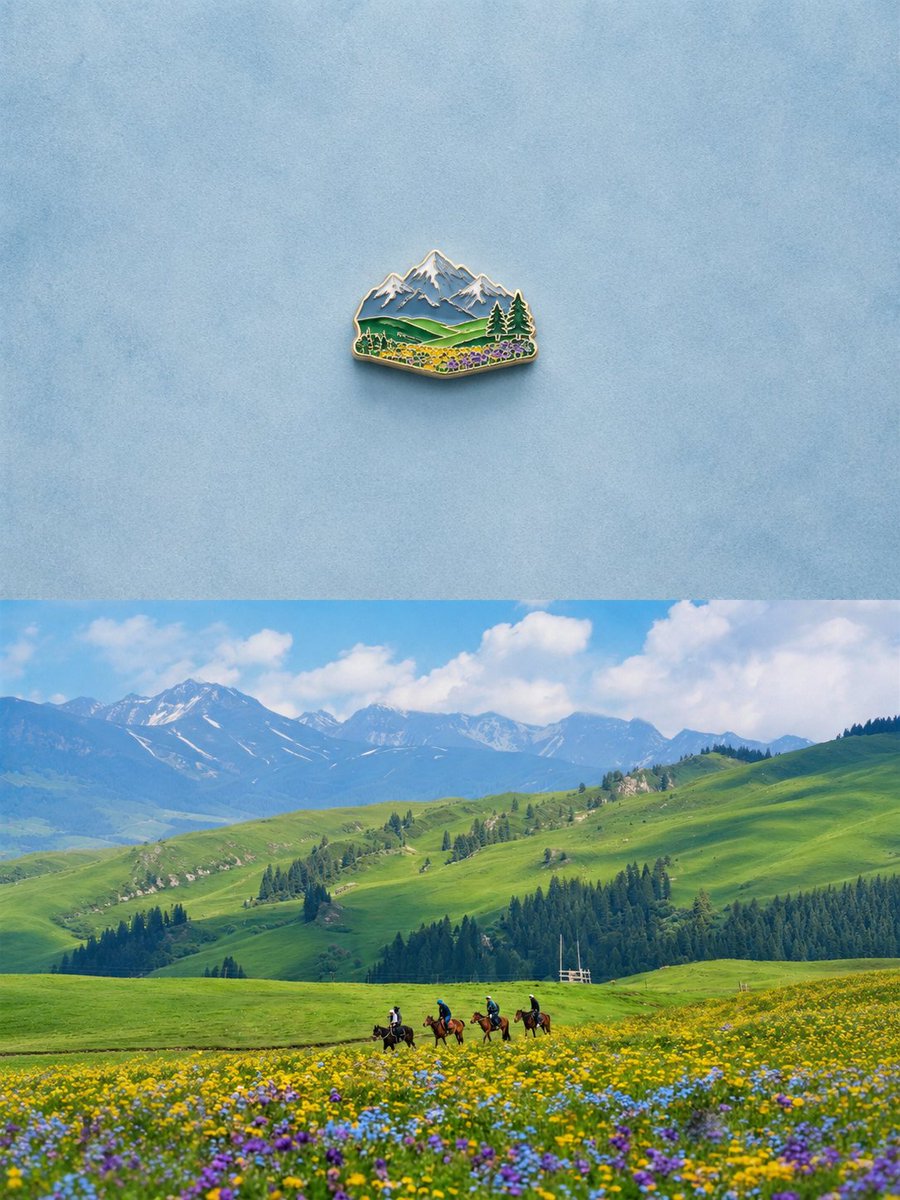
Alpine Landscape Souvenir Pin — Sora 2 Prompt
プロンプト · EN
创建一张垂直堆叠的对比图,包含 2 个水平部分:顶部是 1 个小型珐琅冰箱贴的极简主义摄影棚产品照,置于浅蓝色纹理背景中央,留有大量负空间;磁贴呈微型高山风景纪念品形状,带有闪亮的金色金属轮廓、凸起的珐琅细节、积雪的蓝灰色山峰、起伏的绿色丘陵、深色的常青树,以及前景中一簇簇细小的黄色、紫色和蓝色野花,投射出柔和逼真的阴影。底部是 arglocation: 高山草甸山谷 在蓝天白云下的明亮逼真风景照:广阔起伏的绿色丘陵、远处带有积雪的山脉、深色的松树林,以及前景中开满黄色、紫色和蓝色花朵的野花草甸。在靠近下方中心的位置,加入 4 名骑马者穿过草甸,在广阔的风景中显得比例较小。使顶部的磁贴呈现出下方风景的精简纪念品版本,并保留相同的关键视觉元素:山脉、绿色丘陵、针叶树、野花和开阔的天空。采用简洁的编辑构图、逼真的光影、清晰的细节、柔和的阴影以及宁静的旅行记忆美学。无可见文字,无标签,无水印。

このプロンプトについて

Generate a split image comparing a detailed enamel pin souvenir with its source alpine meadow landscape, perfect for travel memory concepts. Use it as a コンセプトアート starting point for GPT Image 2: keep the visual structure and style constraints intact, then swap in your own subject, brand, or scene.

Start by replacing location, then keep the camera, composition, and material cues in the same order. This makes the output easier to compare across variations.

このプロンプトの使い方

  1. Copy the full prompt text from the page.
  2. Choose a compatible AI image model (e.g., Sora 2, DALL-E 3, or Midjourney).
  3. Paste the prompt into the model's interface, replacing the {location} variable with your desired landscape if needed.
  4. Adjust the aspect ratio to a vertical (portrait) format for optimal split composition.
  5. Generate the image and review the detail preservation between the souvenir and the landscape.

FAQ

两斤

@0x00_Krypt→

公開日
2026年5月15日
元の言語
EN
モデル
GPT Image 2
カテゴリ
コンセプトアート
GPT Image 2コンセプトアートgpt-image-2twitter
閲覧
904
コピー
131
いいね
57

共有

GPT Image 2 のその他

すべて見る
Cyberpunk AI Launch Banner — Cinematic Neon Poster Prompt

Cyberpunk AI Launch Banner — Cinematic Neon Poster Prompt

@ObieriI
Minimalist Skincare Brand Manual — Sora 2 Prompt

Minimalist Skincare Brand Manual — Sora 2 Prompt

@FranromeGraph
Cubist Minimalist Fashion Portrait — Sora 2 Prompt

Cubist Minimalist Fashion Portrait — Sora 2 Prompt

@ChillaiKalan__

Sora2Hubプロンプトで制作を速く。

検索できるプロンプトページから始め、適切なモデル文脈のまま生成へ進めます。

プロンプトを探す

