
GPT Image 2AIプロンプト
Japanese Temple Path — Ghibli-Style Sora 2 Prompt
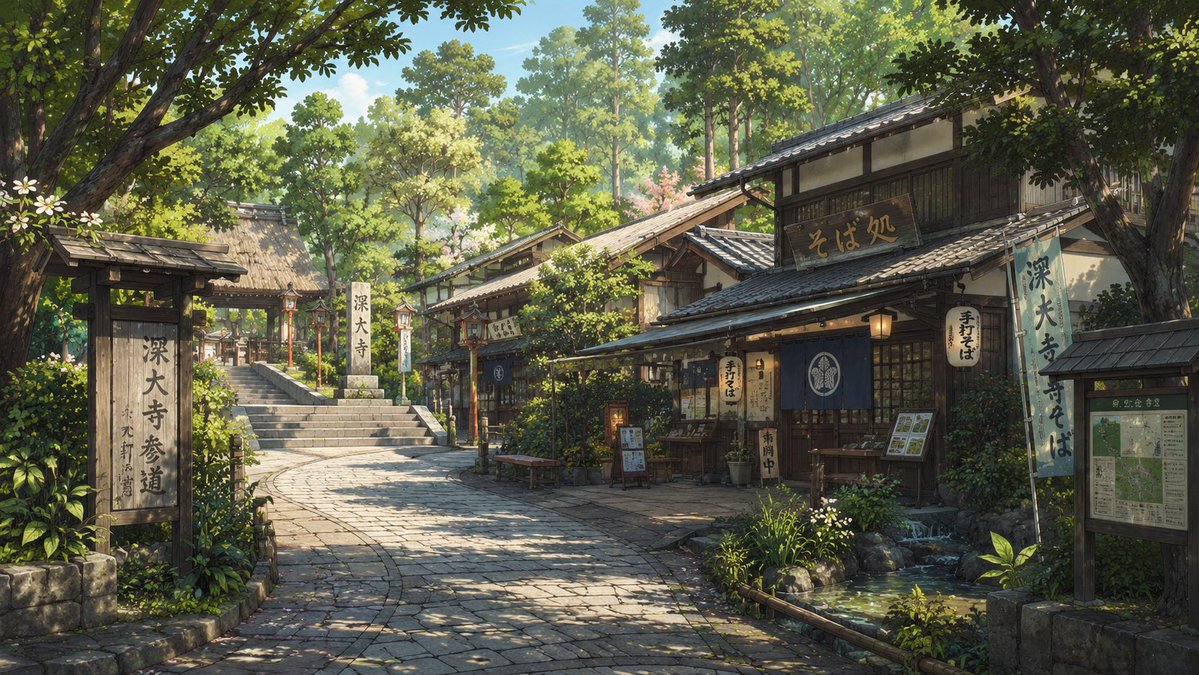
Create a serene, hyper-detailed animated temple path with traditional soba shops, mossy stones, dappled sunlight, and lush foliage in Studio Ghibli aesthetic.
プロンプト · EN
创作一张高度精细的动画风格背景插画,描绘 arglocation: 东京调布市深大寺参道 附近一条宁静的日本寺庙参道,时间设定在晴朗的春季或初夏早晨。画面中,一条微微弯曲的石板路从前景延伸至左侧的寺庙台阶和茅草屋顶门楼,右侧排列着传统的木质店铺。主店是一家荞麦面馆,拥有深色木梁、瓦片屋顶、温暖的纸灯笼、蓝色暖帘、菜单项目,以及清晰可见的日文招牌,包括 argshop sign text: そば処 和 argtemple sign text: 深大寺参道。画面中需包含 3 个醒目的垂直招牌:左侧前景处一个大型木质参道指示牌,右侧店铺上一个淡蓝色悬挂横幅,以及最右侧的一个地图/信息项目。在餐厅门面周围添加 4 个可见的店铺灯笼。街道四周环绕着茂密的绿树、灌木、盆栽、小白花、长满青苔的石头,右下角设有一个清澈的浅水池或溪流,倒映着阳光。运用透过树冠洒下的柔和斑驳光影,采用写实的透视效果,呈现层次丰富的植被、精细的瓦片和木纹质感,营造出宁静怀旧的氛围。画面中无人物,采用宽幅电影构图,16:9 比例,呈现出吉卜力工作室风格的绘画感与清晰度兼备的日本背景艺术。
このプロンプトについて
Create a serene, hyper-detailed animated temple path with traditional soba shops, mossy stones, dappled sunlight, and lush foliage in Studio Ghibli aesthetic. Use it as a コンセプトアート starting point for GPT Image 2: keep the visual structure and style constraints intact, then swap in your own subject, brand, or scene.
Start by replacing location, shop sign text, and temple sign text, then keep the camera, composition, and material cues in the same order. This makes the output easier to compare across variations.
このプロンプトの使い方
- Copy the full prompt text below.
- Open your preferred AI image generator (Sora 2, Midjourney, DALL·E, etc.).
- Paste the prompt, then customize the
location,shop sign text, andtemple sign textvariables to match your desired scene. - Set the output to 16:9 wide aspect ratio for cinematic framing.
- Generate the image and iterate by adjusting lighting or foliage density keywords if needed.


