Sora2 Hub
Sora2 Hub
  • プロンプトライブラリ
  • 料金
  • ショーケース
Sora2 Hub
Sora2 Hub
Sora2 Hub

Sora2 Hub

Sora 2、Veo 3.1、Nano Banana Proを搭載したプロフェッショナルAI制作プラットフォーム。高度な制御、HD画質、透かしなしで、魅力的な動画とスタジオ品質の画像を作成できます。

Email:support@sora2hub.org

AI動画生成

  • テキストから動画
  • 画像から動画
  • Veo 3.1
  • Sora 2
  • Kling 3.0
  • Kling 2.6
  • Kling 2.5
  • Runway
  • Wan 2.6
  • Seedance 2.0
  • Hailuo 2.3
  • Grok Imagine
  • HappyHorse-1.0
  • HappyHorse 1.1
  • Kling 3.0 Turbo
  • Volcengine Video-to-Video Lip Sync
  • OmniHuman 1.5
  • Grok Imagine Video 1.5
  • Gemini Omni
  • Wan 2.7 Video
  • Seedance 2.0 Mini

AI画像生成

  • テキストから画像
  • 画像から画像
  • Nano Banana Pro
  • Nano Banana
  • 4o Image
  • Flux Kontext
  • Z Image
  • Seedream 4.5
  • Seedream 5.0 Lite
  • Nano Banana 2
  • GPT Image 2
  • AI画像アップスケーラー
  • Seedream 5.0 Pro
  • Nano Banana 2 Lite
  • Qwen Image 2.0

AIエフェクト

  • AI年齢フィルター
  • AI性別変換
  • AIキス
  • AIハグ
  • ジブリ画像
  • AI人魚フィルター
  • AIボディシェイク
  • スマイルフィルター
  • AI太る
  • アクションフィギュア

製品

  • 機能
  • ショーケース
  • 価格

会社情報

  • 会社概要
  • お問い合わせ

© 2025 • Sora2 Hub ORG All rights reserved.

  • プライバシーポリシー
  • 利用規約
  • 返金ポリシー
  1. ホーム
  2. /
  3. プロンプト
  4. /
  5. GPT Image 2
  6. /
  7. Bold Red Triptych: Build the Future Toy Poster — Sora 2 Prompt
GPT Image 2AIプロンプト

Bold Red Triptych: Build the Future Toy Poster — Sora 2 Prompt

Generate a high-contrast, three-panel toy brand campaign poster with a child portrait, brick-building action, and bold typography, perfect for ad mockups and editorial designs.
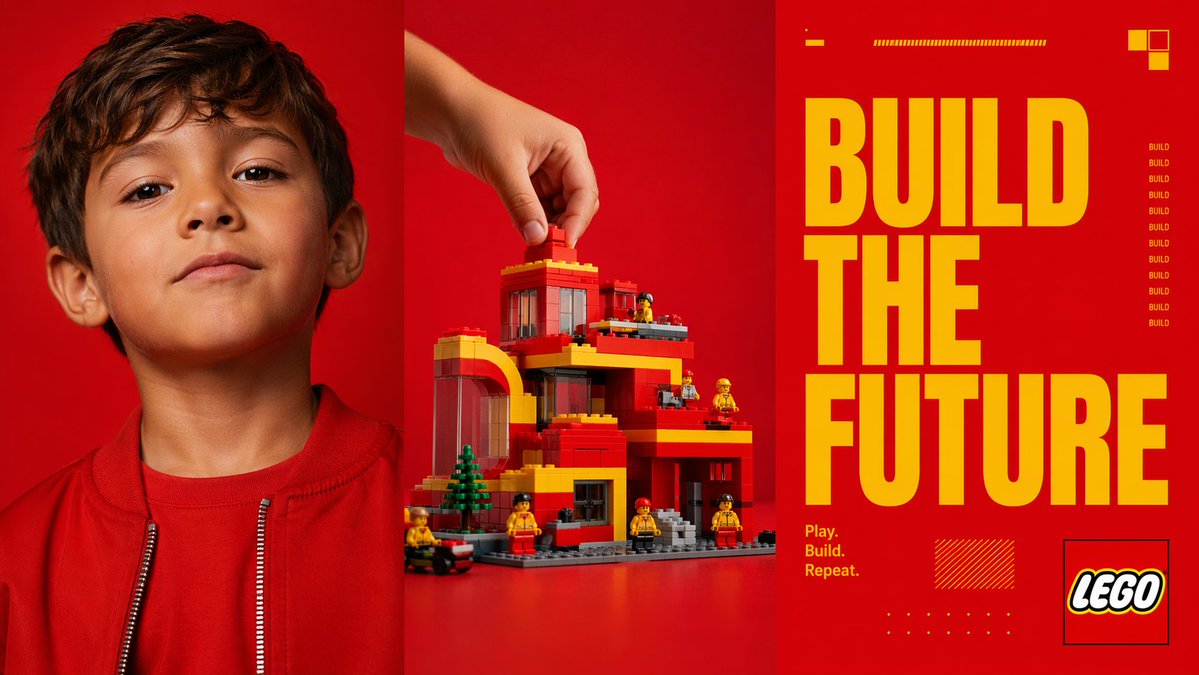
Bold Red Triptych: Build the Future Toy Poster — Sora 2 Prompt
プロンプト · EN
type
三联画广告海报
style
大胆现代的玩具品牌活动风格,高对比度摄影棚摄影与图形编辑设计相结合
format
三个等宽垂直面板并排
color_palette
dominant_background
鲜艳饱和的红色
accent
亮黄色
secondary
橙红色、黑色、白色、灰色
subject
theme
创意构建与想象力
brand_style
积木玩具美学
headline
{argument name="headline text" default="BUILD THE FUTURE"}
tagline
{argument name="tagline" default="Play. Build. Repeat."}
layout
sections
item 1
title
左侧肖像面板
position
左侧三分之一
count
1
labels
item 1
儿童肖像
item 2
title
中央构建面板
position
中间三分之一
count
1
labels
item 1
手部放置积木到玩具建筑上
item 3
title
右侧排版面板
position
右侧三分之一
count
1
labels
item 1
标题与品牌图形
panel_dividers
三个面板之间有细长的深色垂直分隔线
left_panel
subject
儿童胸部以上的近景肖像
counted_elements
people
1
garments
2
visible_facial_features
2
appearance
age
幼童
hair
短深棕色头发
clothing
item 1
红色圆领衫
item 2
带有银色拉链齿的红色拉链夹克
visible_features
item 1
可见左耳
item 2
可见颈部和下半脸
framing
头顶略微裁剪,位于面板中心
background
纯色鲜艳红色无缝摄影棚背景
center_panel
subject
正在组装的玩具建筑场景
counted_elements
hands
1
main_building
1
mini_figures
6
trees
1
vehicles
1
loose_bricks_being_placed
1
action
一只人手从左上方伸入,将一块红色积木放在屋顶上
building
style
积木搭建的现代多层住宅或市政建筑
colors
item 1
红色
item 2
黄色
item 3
灰色
item 4
透明深色窗板
features
item 1
左侧拱形结构
item 2
平屋顶层
item 3
多个阳台或露台
item 4
大窗户
item 5
灰色底板
item 6
前台阶
surroundings
mini_figures
6 个小型建筑工人造型的玩具人偶,分布在结构周围,身穿黄红色衣服
trees
1 棵靠近左前方的绿色小型针叶树
vehicle
1 辆位于左下边缘的小型黑红色轮式车辆
background
纯色鲜艳红色无缝摄影棚背景
surface
与背景相连的红色桌面
right_panel
subject
图形海报排版
counted_elements
headline_words
3
small_repeated_word_instances
9
decorative_blocks_top_right
3
small_horizontal_bar_groups_top
2
tagline_lines
3
logo_boxes
1
decorative_hatched_boxes
1
decorative_dot_grids
1
typography
main_text
{argument name="headline text" default="BUILD THE FUTURE"}
arrangement
三行堆叠,每行一个单词,非常大的黄色压缩粗体无衬线字体,占据面板大部分高度
tagline
{argument name="tagline" default="Play. Build. Repeat."}
tagline_position
右侧面板左下方,以 3 行黄色小字显示
repeated_side_text
单词 BUILD 在右侧中部垂直重复 9 次,以黄色小字显示
graphics
top_details
item 1
左上方 1 个短黄色短横线
item 2
顶部中心 1 个长细黄色条纹杆
top_right
item 1
3 个黄色和橙色的小方块组合
bottom_details
item 1
左下中心 1 个黄色阴影矩形
item 2
底部中心 1 个黄色小点阵
logo
{argument name="brand name" default="LEGO"} 标志位于右下角一个细黑色轮廓方框内
background
纯色鲜艳红色
lighting
干净的商业摄影棚灯光,清晰且饱和,阴影极少,呈现精致的广告活动质感
composition
引人注目的三联画构图,左侧为摄影肖像,中间为产品构建动作,右侧为超大排版标语面板

このプロンプトについて

Generate a high-contrast, three-panel toy brand campaign poster with a child portrait, brick-building action, and bold typography, perfect for ad mockups and editorial designs. Use it as a コンセプトアート starting point for GPT Image 2: keep the visual structure and style constraints intact, then swap in your own subject, brand, or scene.

This prompt is organized as structured JSON with fields such as type, style, format, color palette, subject, layout, and left panel. Keeping that hierarchy helps the model separate the subject, layout, interface elements, and detail constraints.

Start with small changes to subject, scene, camera, and color, then generate a few variations to compare composition and detail without turning the page copy into keyword stuffing.

このプロンプトの使い方

  1. Copy the prompt above.
  2. Paste it into an AI image generator like Sora, DALL·E 3, or MidJourney.
  3. Customize the headline text and tagline arguments with your own copy.
  4. Generate the image and review the triptych layout.
  5. Iterate by tweaking colors, panel content, or text for your campaign needs.
FAQ

Drew Brucker

@dcbruck→

公開日
2026年4月25日
元の言語
EN
モデル
GPT Image 2
カテゴリ
コンセプトアート
GPT Image 2コンセプトアートgpt-image-2twitter
閲覧
2.2K
コピー
248
いいね
109

共有

GPT Image 2 のその他

すべて見る
Dark Anime Devil Girl Mario Kart Poster — Sora 2 Prompt

Dark Anime Devil Girl Mario Kart Poster — Sora 2 Prompt

@opener_ai
Anime Reaction Thumbnail Prompt — Neon Edgy VTuber

Anime Reaction Thumbnail Prompt — Neon Edgy VTuber

@abdiisan
Japanese Cinematic Poster Prompt — 4-Panel Agency Ad

Japanese Cinematic Poster Prompt — 4-Panel Agency Ad

@kantamizutamari

Sora2Hubプロンプトで制作を速く。

検索できるプロンプトページから始め、適切なモデル文脈のまま生成へ進めます。

プロンプトを探す