Sora2 Hub
Sora2 Hub
  • プロンプトライブラリ
  • 料金
  • ショーケース
Sora2 Hub
Sora2 Hub
Sora2 Hub

Sora2 Hub

Sora 2、Veo 3.1、Nano Banana Proを搭載したプロフェッショナルAI制作プラットフォーム。高度な制御、HD画質、透かしなしで、魅力的な動画とスタジオ品質の画像を作成できます。

Email:support@sora2hub.org

AI動画生成

  • テキストから動画
  • 画像から動画
  • Veo 3.1
  • Sora 2
  • Kling 3.0
  • Kling 2.6
  • Kling 2.5
  • Runway
  • Wan 2.6
  • Seedance 2.0
  • Hailuo 2.3
  • Grok Imagine
  • HappyHorse-1.0

AI画像生成

  • テキストから画像
  • 画像から画像
  • Nano Banana Pro
  • Nano Banana
  • 4o Image
  • Flux Kontext
  • Z Image
  • Seedream 4.5
  • Seedream 5.0 Lite
  • Nano Banana 2
  • GPT Image 2
  • AI画像アップスケーラー

AIエフェクト

  • AI年齢フィルター
  • AI性別変換
  • AIキス
  • AIハグ
  • ジブリ画像
  • AI人魚フィルター
  • AIボディシェイク
  • スマイルフィルター
  • AI太る
  • アクションフィギュア

製品

  • 機能
  • ショーケース
  • 価格

会社情報

  • 会社概要
  • お問い合わせ

© 2025 • Sora2 Hub ORG All rights reserved.

  • プライバシーポリシー
  • 利用規約
  • 返金ポリシー
  1. ホーム
  2. /
  3. プロンプト
  4. /
  5. GPT Image 2
  6. /
  7. Cute to Crazy Expression Grid — Consistent Character Faces
GPT Image 2AIプロンプト

Cute to Crazy Expression Grid — Consistent Character Faces

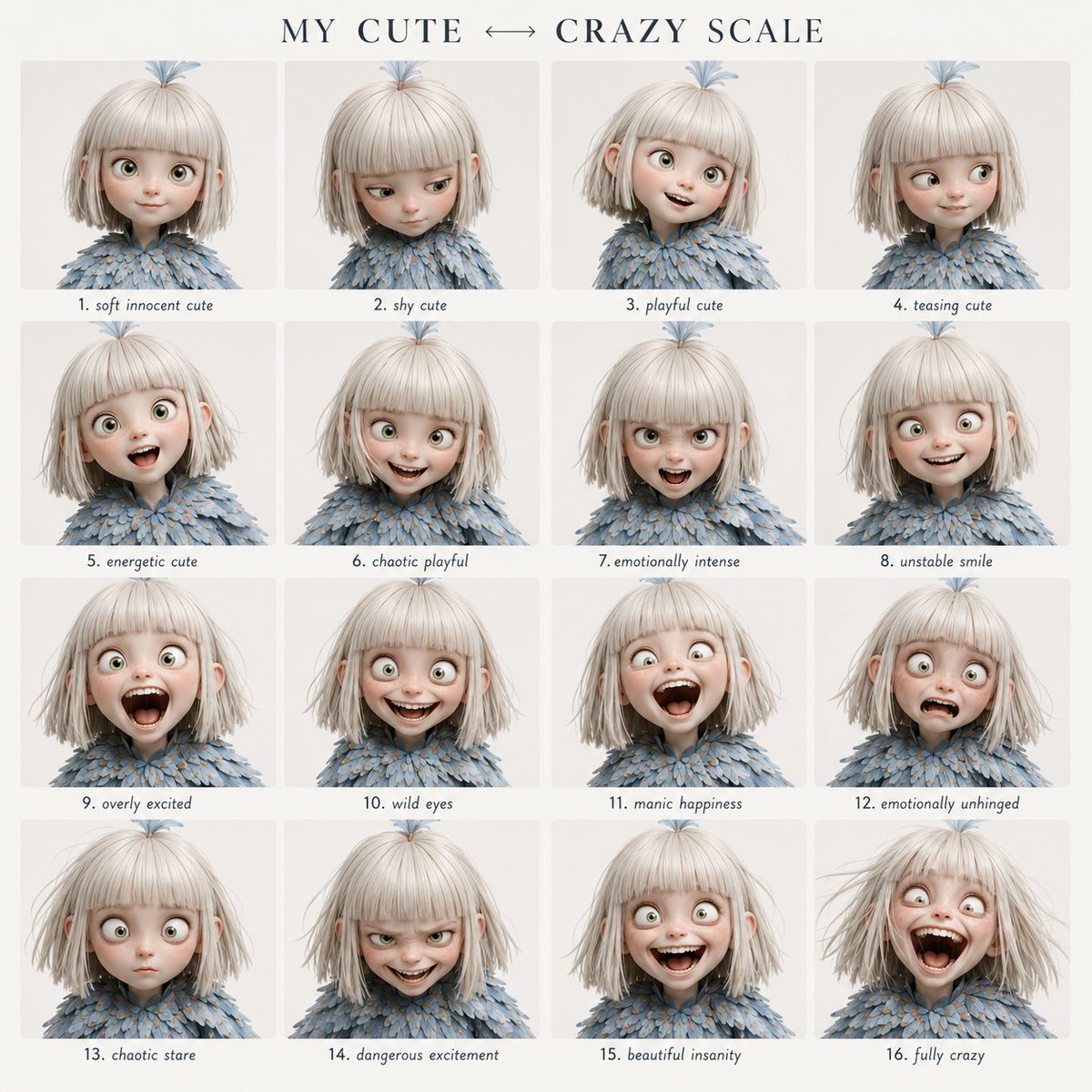
Generate a perfectly consistent 4x4 character expression grid, smoothly transitioning from cute innocence to full madness with cinematic portrait styling.
Cute to Crazy Expression Grid — Consistent Character Faces
プロンプト · EN
使用提供的角色作为固定身份参考,创建一个清晰的 4x4 情绪表现网格。 视觉风格:
简洁的现代平面设计布局。顶部配有优雅的衬线字体标题,柔和的米白色背景,间距均匀,每个面板下方居中显示易于阅读的小号手写风格标签。 标题文本:
“arggrid title: 我的可爱 ↔ 疯狂量表” 在所有 16 个面板中严格保持面部特征的一致性。 遵循从左上角到右下角的精确情绪演变顺序。
请勿随机化表情或强度。 网格顺序: 第 1 行:
1. 温柔无辜的可爱
2. 害羞的可爱
3. 俏皮的可爱
4. 戏谑的可爱 第 2 行:
5. 充满活力的可爱
6. 混乱的俏皮
7. 情绪强烈
8. 不稳定的微笑 第 3 行:
9. 过度兴奋
10. 狂野的眼神
11. 狂躁的快乐
12. 情绪失控 第 4 行:
13. 混乱的凝视
14. 危险的兴奋
15. 美丽的疯狂
16. 完全疯狂 格式:
4x4 网格,argstyle: 电影肖像摄影 风格,中性背景,紧凑的特写构图,浅景深,无水印。

このプロンプトについて

Generate a perfectly consistent 4x4 character expression grid, smoothly transitioning from cute innocence to full madness with cinematic portrait styling. Use it as a コンセプトアート starting point for GPT Image 2: keep the visual structure and style constraints intact, then swap in your own subject, brand, or scene.

Start by replacing grid title and style, then keep the camera, composition, and material cues in the same order. This makes the output easier to compare across variations.

このプロンプトの使い方

  1. Copy the full prompt and paste it into your chosen AI image generator (e.g., Sora, Midjourney).
  2. Edit the {grid title} argument to set your custom grid heading.
  3. Adjust the {style} argument to change the visual style (e.g., anime, watercolor).
  4. Provide a clear character reference image if supported for best facial consistency.
  5. Generate the output and refine by tweaking the prompt if expressions are inconsistent.
FAQ

Kōda

@aimikoda→

公開日
2026年5月15日
元の言語
EN
モデル
GPT Image 2
カテゴリ
コンセプトアート
GPT Image 2コンセプトアートgpt-image-2twitter
閲覧
3.5K
コピー
234
いいね
74

共有

GPT Image 2 のその他

すべて見る
Futuristic Google Search Ad — AI Prompt

Futuristic Google Search Ad — AI Prompt

@AiWithTariq
Gothic Anime Girl with Hidden Face — Sora 2 Prompt

Gothic Anime Girl with Hidden Face — Sora 2 Prompt

@hoshi122221
Anime Idol Profile Page — Lavender Art Style Prompt

Anime Idol Profile Page — Lavender Art Style Prompt

@uzuyanurp

Sora2Hubプロンプトで制作を速く。

検索できるプロンプトページから始め、適切なモデル文脈のまま生成へ進めます。

プロンプトを探す