
Sora2 Hub
Sora2 Hub
  • プロンプトライブラリ
  • 料金
  • ショーケース
Sora2 Hub
Sora2 Hub
Sora2 Hub

Sora2 Hub

Sora 2、Veo 3.1、Nano Banana Proを搭載したプロフェッショナルAI制作プラットフォーム。高度な制御、HD画質、透かしなしで、魅力的な動画とスタジオ品質の画像を作成できます。

Email:support@sora2hub.org

AI動画生成

  • テキストから動画
  • 画像から動画
  • Veo 3.1
  • Sora 2
  • Kling 3.0
  • Kling 2.6
  • Kling 2.5
  • Runway
  • Wan 2.6
  • Seedance 2.0
  • Hailuo 2.3
  • Grok Imagine
  • HappyHorse-1.0

AI画像生成

  • テキストから画像
  • 画像から画像
  • Nano Banana Pro
  • Nano Banana
  • 4o Image
  • Flux Kontext
  • Z Image
  • Seedream 4.5
  • Seedream 5.0 Lite
  • Nano Banana 2
  • GPT Image 2
  • AI画像アップスケーラー

AIエフェクト

  • AI年齢フィルター
  • AI性別変換
  • AIキス
  • AIハグ
  • ジブリ画像
  • AI人魚フィルター
  • AIボディシェイク
  • スマイルフィルター
  • AI太る
  • アクションフィギュア

製品

  • 機能
  • ショーケース
  • 価格

会社情報

  • 会社概要
  • お問い合わせ

© 2025 • Sora2 Hub ORG All rights reserved.

  • プライバシーポリシー
  • 利用規約
  • 返金ポリシー
  1. ホーム
  2. /
  3. プロンプト
  4. /
  5. GPT Image 2
  6. /
  7. Japanese School Classroom Group Photo — Wide-Angle Candid Prompt
GPT Image 2AIプロンプト

Japanese School Classroom Group Photo — Wide-Angle Candid Prompt

Generate a polished, candid-style classroom photo of four friends in coordinated outfits, shot with a playful smartphone flash aesthetic.
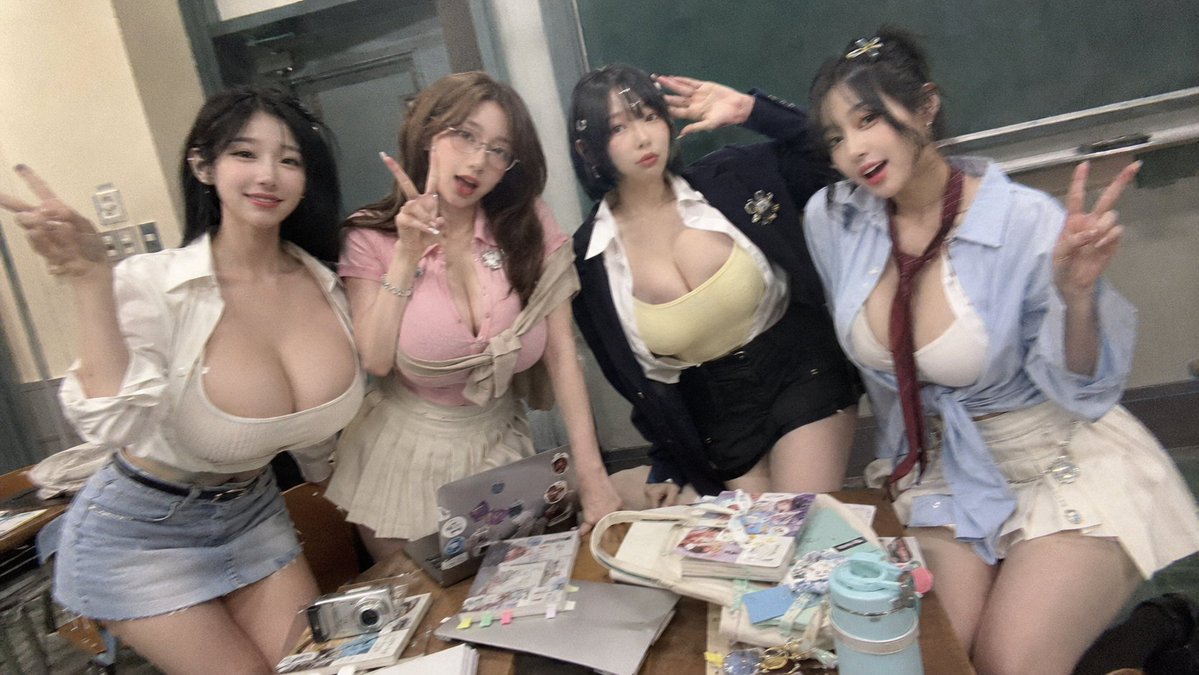
Japanese School Classroom Group Photo — Wide-Angle Candid Prompt
プロンプト · EN
以 REFERENCE_2 作为人物、服装和课堂道具的参考,重新生成一张更整洁、最终版的课堂抓拍合影。画面中仍为那四位女性和经过调整的协调服装,但将她们的姿势改为站在课桌后方,而非坐着。保留随意的“剪刀手”活力和日本学校教室的场景,同时将背景调整为右侧有一块大型深色黑板,左侧为门口/柜子区域。摄像机角度需略微倾斜、近景、广角,呈现出闪光灯拍摄的效果,带有轻微的运动模糊和真实的智能手机/一次性相机质感。保持面部匿名/模糊处理,与参考图一致。画面中必须包含 4 位女性:左侧女性身穿白色开衫内搭米色上衣,下着浅色牛仔短裙;第二位女性身穿粉色上衣,搭配米色百褶裙,腰间系着毛衣;第三位女性身穿深色西装外套,内搭黄色上衣,下着黑色短裙;右侧女性身穿蓝色衬衫,系红色领带,搭配米色百褶裙。前景课桌需摆放杂乱的学习和个人用品,包括贴满贴纸的笔记本电脑、银色笔记本电脑、杂志/书籍、小型数码相机、米色托特包、小型化妆品/文具以及蓝色水杯。最终效果应呈现为经过体型和服装优化后的精修图,同时保留参考图中俏皮的合影氛围。

このプロンプトについて

Generate a polished, candid-style classroom photo of four friends in coordinated outfits, shot with a playful smartphone flash aesthetic. Use it as a コンセプトアート starting point for GPT Image 2: keep the visual structure and style constraints intact, then swap in your own subject, brand, or scene.

Start with small changes to subject, scene, camera, and color, then generate a few variations to compare composition and detail without turning the page copy into keyword stuffing.

このプロンプトの使い方

  1. Copy the entire prompt text from the page.
  2. Open your preferred AI image generator (e.g., Sora 2, Midjourney, DALL·E).
  3. Paste the prompt into the input field, replacing any placeholder (like REFERENCE_2) with your own reference image or description.
  4. Tweak variables such as outfit colors, background details, or camera angle to match your vision.
  5. Generate and review the image, adjusting the prompt if needed for better composition or lighting.


FAQ

AI Girl's Photo Studio

@AI_GIRL_DESIGN→

公開日
2026年5月15日
元の言語
EN
モデル
GPT Image 2
カテゴリ
コンセプトアート
GPT Image 2コンセプトアートgpt-image-2twitter
閲覧
177
コピー
23
いいね
5

共有

GPT Image 2 のその他

すべて見る
Minimalist Skincare Brand Manual — Sora 2 Prompt

Minimalist Skincare Brand Manual — Sora 2 Prompt

@FranromeGraph
Dynamic Nike Ad Poster — Sora 2 Prompt with Sydney Sweeney

Dynamic Nike Ad Poster — Sora 2 Prompt with Sydney Sweeney

@im_shahid7
Celebrity Crossover — Sora 2 Prompt

Celebrity Crossover — Sora 2 Prompt

@Conor_D_Dart

Sora2Hubプロンプトで制作を速く。

検索できるプロンプトページから始め、適切なモデル文脈のまま生成へ進めます。

プロンプトを探す
