Sora2 Hub
Sora2 Hub
  • プロンプトライブラリ
  • 料金
  • ショーケース
Sora2 Hub
Sora2 Hub
Sora2 Hub

Sora2 Hub

Sora 2、Veo 3.1、Nano Banana Proを搭載したプロフェッショナルAI制作プラットフォーム。高度な制御、HD画質、透かしなしで、魅力的な動画とスタジオ品質の画像を作成できます。

Email:support@sora2hub.org

AI動画生成

  • テキストから動画
  • 画像から動画
  • Veo 3.1
  • Sora 2
  • Kling 3.0
  • Kling 2.6
  • Kling 2.5
  • Runway
  • Wan 2.6
  • Seedance 2.0
  • Hailuo 2.3
  • Grok Imagine
  • HappyHorse-1.0
  • HappyHorse 1.1
  • Kling 3.0 Turbo
  • Volcengine Video-to-Video Lip Sync
  • OmniHuman 1.5
  • Grok Imagine Video 1.5
  • Gemini Omni
  • Wan 2.7 Video
  • Seedance 2.0 Mini

AI画像生成

  • テキストから画像
  • 画像から画像
  • Nano Banana Pro
  • Nano Banana
  • 4o Image
  • Flux Kontext
  • Z Image
  • Seedream 4.5
  • Seedream 5.0 Lite
  • Nano Banana 2
  • GPT Image 2
  • AI画像アップスケーラー
  • Seedream 5.0 Pro
  • Nano Banana 2 Lite
  • Qwen Image 2.0

AIエフェクト

  • AI年齢フィルター
  • AI性別変換
  • AIキス
  • AIハグ
  • ジブリ画像
  • AI人魚フィルター
  • AIボディシェイク
  • スマイルフィルター
  • AI太る
  • アクションフィギュア

製品

  • 機能
  • ショーケース
  • 価格

会社情報

  • 会社概要
  • お問い合わせ

© 2025 • Sora2 Hub ORG All rights reserved.

  • プライバシーポリシー
  • 利用規約
  • 返金ポリシー
  1. ホーム
  2. /
  3. プロンプト
  4. /
  5. GPT Image 2
  6. /
  7. Dramatic Sunlit Digital Painting — Sora 2 Prompt
GPT Image 2AIプロンプト

Dramatic Sunlit Digital Painting — Sora 2 Prompt

Transform any illustration into a high-definition digital painting with explosive sunlight, bold dappled shadows, and gemstone eye reflections for a sacred, cinematic atmosphere.
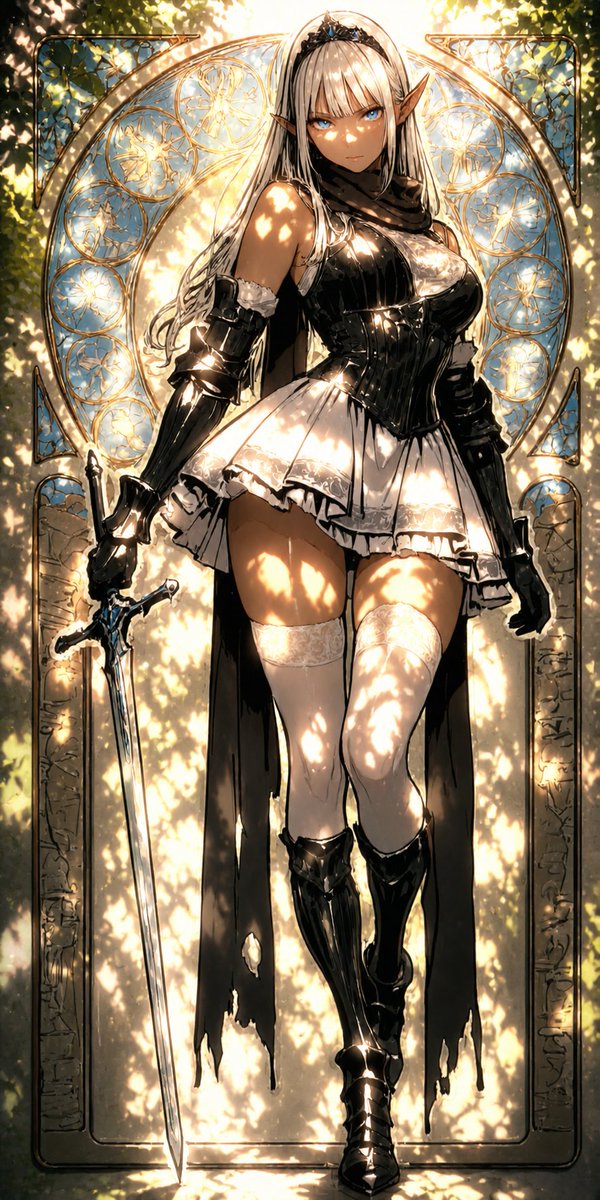
Dramatic Sunlit Digital Painting — Sora 2 Prompt
1 / 4
プロンプト · EN
将此插画转换为 argstyle: 高清数字绘画风格,强调透过树木过滤的强烈阳光。强烈的斑驳光影有力地照亮了整个角色,面部、头发和衣物上大胆地呈现出非常明亮的高光和清晰的光影图案。增加对比度以强调爆发性光芒与深邃阴影之间的对比。如宝石般的眼睛反射出强烈的光芒,营造出一种神秘、神圣且富有戏剧性的氛围。完整保留原始构图和角色。

このプロンプトについて

Transform any illustration into a high-definition digital painting with explosive sunlight, bold dappled shadows, and gemstone eye reflections for a sacred, cinematic atmosphere. Use it as a コンセプトアート starting point for GPT Image 2: keep the visual structure and style constraints intact, then swap in your own subject, brand, or scene.

Start by replacing style, then keep the camera, composition, and material cues in the same order. This makes the output easier to compare across variations.

このプロンプトの使い方

  1. Copy the prompt above into your preferred AI image generator.
  2. Select your model — this works best with Sora 2, Midjourney, or Stable Diffusion for painterly styles.
  3. Customize the style variable by changing {style} to your preferred look, e.g., 'watercolor style' or 'oil painting style'.
  4. Upload your source illustration as the reference image if the platform supports image-to-image transformation.
  5. Generate and refine — adjust contrast or lighting intensity keywords if the output needs more dramatic effect.

FAQ

のとろ

@notoro_ai→

公開日
2026年5月15日
元の言語
EN
モデル
GPT Image 2
カテゴリ
コンセプトアート
GPT Image 2コンセプトアートgpt-image-2twitter
閲覧
121
コピー
14
いいね
4

共有

GPT Image 2 のその他

すべて見る
Cyberpunk Catgirl Soda Splash — Sora 2 Prompt

Cyberpunk Catgirl Soda Splash — Sora 2 Prompt

@kuso_seisakusyo
AI-Generated Japanese Travel Ad Grid — Sora Prompt

AI-Generated Japanese Travel Ad Grid — Sora Prompt

@jblogpham
Anime Schoolgirls Sharing Transparent Umbrella — Sora 2 Prompt

Anime Schoolgirls Sharing Transparent Umbrella — Sora 2 Prompt

@yB7CqdfoDmrbhgD

Sora2Hubプロンプトで制作を速く。

検索できるプロンプトページから始め、適切なモデル文脈のまま生成へ進めます。

プロンプトを探す