
Sora2 Hub
Sora2 Hub
  • プロンプトライブラリ
  • 料金
  • ショーケース
Sora2 Hub
Sora2 Hub
Sora2 Hub

Sora2 Hub

Sora 2、Veo 3.1、Nano Banana Proを搭載したプロフェッショナルAI制作プラットフォーム。高度な制御、HD画質、透かしなしで、魅力的な動画とスタジオ品質の画像を作成できます。

Email:support@sora2hub.org

AI動画生成

  • テキストから動画
  • 画像から動画
  • Veo 3.1
  • Sora 2
  • Kling 3.0
  • Kling 2.6
  • Kling 2.5
  • Runway
  • Wan 2.6
  • Seedance 2.0
  • Hailuo 2.3
  • Grok Imagine
  • HappyHorse-1.0

AI画像生成

  • テキストから画像
  • 画像から画像
  • Nano Banana Pro
  • Nano Banana
  • 4o Image
  • Flux Kontext
  • Z Image
  • Seedream 4.5
  • Seedream 5.0 Lite
  • Nano Banana 2
  • GPT Image 2
  • AI画像アップスケーラー

AIエフェクト

  • AI年齢フィルター
  • AI性別変換
  • AIキス
  • AIハグ
  • ジブリ画像
  • AI人魚フィルター
  • AIボディシェイク
  • スマイルフィルター
  • AI太る
  • アクションフィギュア

製品

  • 機能
  • ショーケース
  • 価格

会社情報

  • 会社概要
  • お問い合わせ

© 2025 • Sora2 Hub ORG All rights reserved.

  • プライバシーポリシー
  • 利用規約
  • 返金ポリシー
  1. ホーム
  2. /
  3. プロンプト
  4. /
  5. GPT Image 2
  6. /
  7. Dreamy Eastern Portrait — Sora 2 Photorealistic Prompt
GPT Image 2AIプロンプト

Dreamy Eastern Portrait — Sora 2 Photorealistic Prompt

Generate a stunning, high-resolution female portrait with perfect skin texture, elegant accessories, and cinematic warm lighting for commercial use.
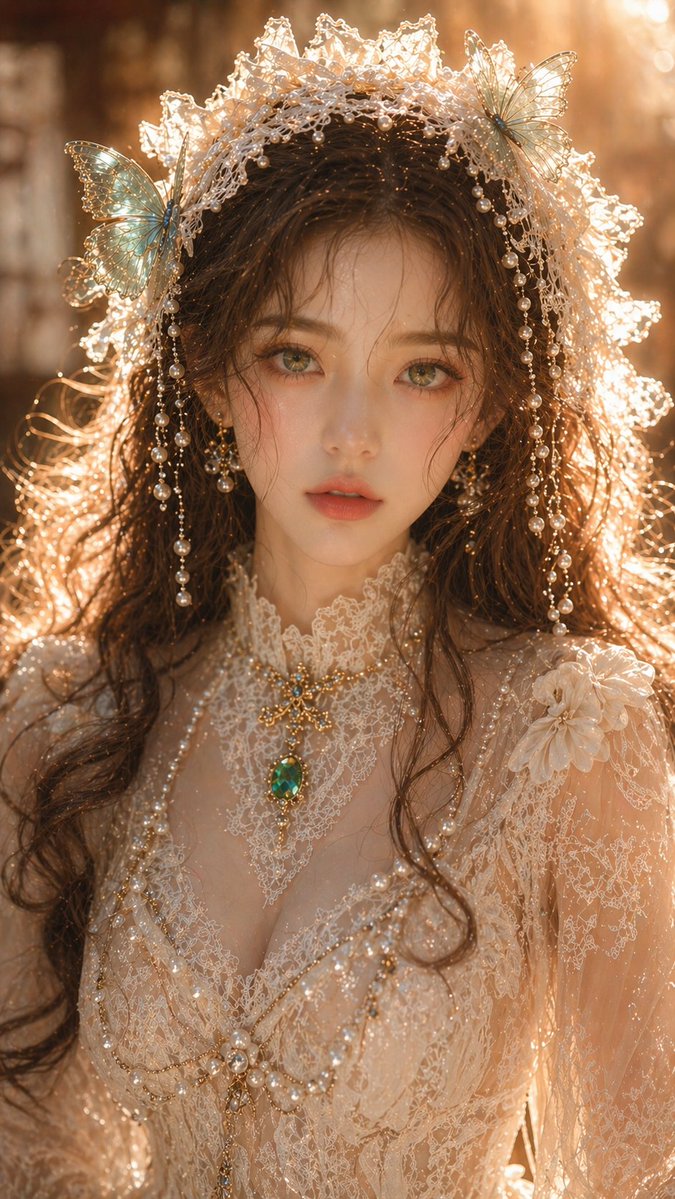
Dreamy Eastern Portrait — Sora 2 Photorealistic Prompt
プロンプト · EN
argsubject: 梦幻东方女性肖像, 成年女性,特写肖像,精致的五官,白皙透亮的皮肤,细腻而干净的皮肤纹理,翡翠绿色的双眼,柔和迷人的目光,棕色波浪卷发自然垂落;argaccessories: 米白色蕾丝头饰,点缀着绿松石蝴蝶和珍珠装饰;身着精致的蕾丝礼服,结构清晰,纹理简洁而不繁复,搭配翡翠首饰;光影采用柔和的暖金色侧逆光,轮廓光清晰但不曝光过度,皮肤带有微弱高光但无过度反光,整体光感通透干净,背景柔焦虚化,浅景深效果;高端肖像摄影品质,细节清晰且内敛,无颗粒感,无噪点,真实物理光影,8K,商业级画质。长宽比:9:16

このプロンプトについて

Generate a stunning, high-resolution female portrait with perfect skin texture, elegant accessories, and cinematic warm lighting for commercial use. Use it as a コンセプトアート starting point for GPT Image 2: keep the visual structure and style constraints intact, then swap in your own subject, brand, or scene.

Start by replacing subject and accessories, then keep the camera, composition, and material cues in the same order. This makes the output easier to compare across variations.

このプロンプトの使い方

  1. Copy the prompt from sora2hub.com and paste it into your AI image generator (like Sora 2 or Midjourney).
  2. Select a model capable of photorealistic output. Sora 2 is recommended for the best 8K results.
  3. Customize the variables in the curly brackets, such as {subject} and {accessories}, to change the portrait style.
  4. Adjust the aspect ratio in your model's settings to 9:16 for vertical portrait orientation.
  5. Generate the image and review the output. Refine the prompt by specifying more detailed lighting or jewelry if needed.


FAQ

李岳

@liyue_ai→

公開日
2026年4月30日
元の言語
EN
モデル
GPT Image 2
カテゴリ
コンセプトアート
GPT Image 2コンセプトアートgpt-image-2twitter
閲覧
346
コピー
42
いいね
15

共有

GPT Image 2 のその他

すべて見る
Anime Idol Profile Page — Lavender Art Style Prompt

Anime Idol Profile Page — Lavender Art Style Prompt

@uzuyanurp
AI-Generated Crossover Fighter Screenshot — Sora 2 Prompt

AI-Generated Crossover Fighter Screenshot — Sora 2 Prompt

@momoringo_sub
Anime Mahjong Win Scene with Yakuza Score UI — Sora 2 Prompt

Anime Mahjong Win Scene with Yakuza Score UI — Sora 2 Prompt

@AI_Ossan

Sora2Hubプロンプトで制作を速く。

検索できるプロンプトページから始め、適切なモデル文脈のまま生成へ進めます。

プロンプトを探す
