Sora2 Hub
Sora2 Hub
  • プロンプトライブラリ
  • 料金
  • ショーケース
Sora2 Hub
Sora2 Hub
Sora2 Hub

Sora2 Hub

Sora 2、Veo 3.1、Nano Banana Proを搭載したプロフェッショナルAI制作プラットフォーム。高度な制御、HD画質、透かしなしで、魅力的な動画とスタジオ品質の画像を作成できます。

Email:support@sora2hub.org

AI動画生成

  • テキストから動画
  • 画像から動画
  • Veo 3.1
  • Sora 2
  • Kling 3.0
  • Kling 2.6
  • Kling 2.5
  • Runway
  • Wan 2.6
  • Seedance 2.0
  • Hailuo 2.3
  • Grok Imagine
  • HappyHorse-1.0

AI画像生成

  • テキストから画像
  • 画像から画像
  • Nano Banana Pro
  • Nano Banana
  • 4o Image
  • Flux Kontext
  • Z Image
  • Seedream 4.5
  • Seedream 5.0 Lite
  • Nano Banana 2
  • GPT Image 2
  • AI画像アップスケーラー

AIエフェクト

  • AI年齢フィルター
  • AI性別変換
  • AIキス
  • AIハグ
  • ジブリ画像
  • AI人魚フィルター
  • AIボディシェイク
  • スマイルフィルター
  • AI太る
  • アクションフィギュア

製品

  • 機能
  • ショーケース
  • 価格

会社情報

  • 会社概要
  • お問い合わせ

© 2025 • Sora2 Hub ORG All rights reserved.

  • プライバシーポリシー
  • 利用規約
  • 返金ポリシー
  1. ホーム
  2. /
  3. プロンプト
  4. /
  5. GPT Image 2
  6. /
  7. Vertical Slice Double Exposure Portrait — Sora 2 Prompt
GPT Image 2AIプロンプト

Vertical Slice Double Exposure Portrait — Sora 2 Prompt

Create a moody, cinematic double exposure portrait where a contemplative figure is sliced into vertical panels, each revealing a rain-soaked cityscape within.
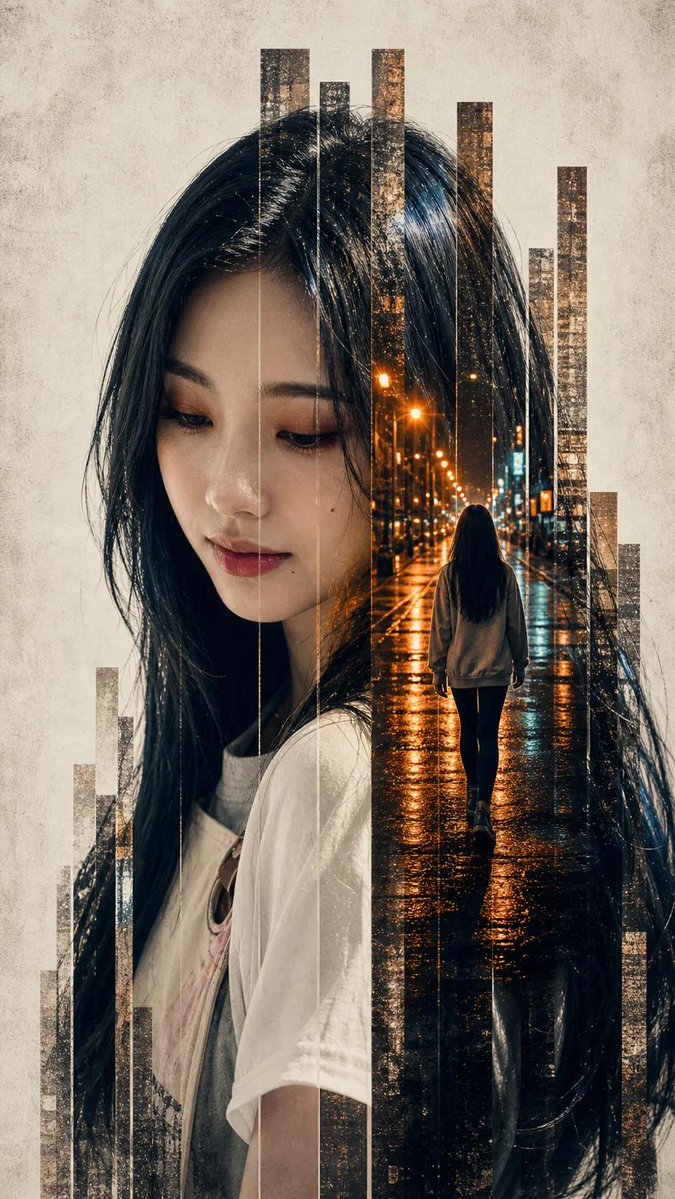
Vertical Slice Double Exposure Portrait — Sora 2 Prompt
1 / 2
プロンプト · EN
一张高对比度的双重曝光编辑风格肖像,画面中的 argsubject: 美丽的女性 正低头沉思。图像被创意性地分割成不同高度的垂直切片,背景为质感丰富的米白色羊皮纸。叠加效果:在女性面部的垂直切片内,可见另一幅场景:同一位女性身穿 argclothing: 卫衣,走在 argscene: 雨后的夜间街道 上。 街景中,路灯散发出温暖的橙色光斑,倒映在湿润的路面上,与肖像的冷色调形成鲜明对比。风格元素:光影:明暗对照法,女性的白色衬衫和深色夹克上有着深邃的阴影与明亮的强光。 质感:细腻的颗粒感和陈旧的纸张纹理覆盖整个画布,赋予画面艺术感与原始气息。色彩搭配:肖像采用去饱和的单色调,点缀着雨中城市景观带来的琥珀色、金色和青绿色。氛围:忧郁、内省,带有现代黑色电影的韵味;面部细节与皮肤纹理渲染极其细腻。 技术规格:使用 85mm 镜头拍摄,f/1.8 光圈,电影级布光,眼镜处焦点清晰,8K 分辨率,图形海报风格。纵横比 9:16。

このプロンプトについて

Create a moody, cinematic double exposure portrait where a contemplative figure is sliced into vertical panels, each revealing a rain-soaked cityscape within. Use it as a コンセプトアート starting point for GPT Image 2: keep the visual structure and style constraints intact, then swap in your own subject, brand, or scene.

Start by replacing subject, clothing, and scene, then keep the camera, composition, and material cues in the same order. This makes the output easier to compare across variations.

このプロンプトの使い方

  1. Copy the entire prompt body.
  2. Select your preferred AI model (like Sora 2 or a similar image generator).
  3. Adjust the variables in curly braces {} to customize the subject, clothing, and scene to your liking.
  4. Generate the image and experiment with slight tweaks for unique results.
FAQ

Aaliya

@AIwithAliya→

公開日
2026年5月15日
元の言語
EN
モデル
GPT Image 2
カテゴリ
コンセプトアート
GPT Image 2コンセプトアートgpt-image-2twitter
閲覧
506
コピー
46
いいね
29

共有

GPT Image 2 のその他

すべて見る
Cozy Anime Cat Holiday Bedroom — Sora 2 Prompt

Cozy Anime Cat Holiday Bedroom — Sora 2 Prompt

@miya_space
Japanese Cinematic Poster Prompt — 4-Panel Agency Ad

Japanese Cinematic Poster Prompt — 4-Panel Agency Ad

@kantamizutamari
Anime Mahjong Win Scene with Yakuza Score UI — Sora 2 Prompt

Anime Mahjong Win Scene with Yakuza Score UI — Sora 2 Prompt

@AI_Ossan

Sora2Hubプロンプトで制作を速く。

検索できるプロンプトページから始め、適切なモデル文脈のまま生成へ進めます。

プロンプトを探す