
GPT Image 2AIプロンプト
AI-Generated QR Code Dice Tweet Screenshot — Sora 2 Prompt
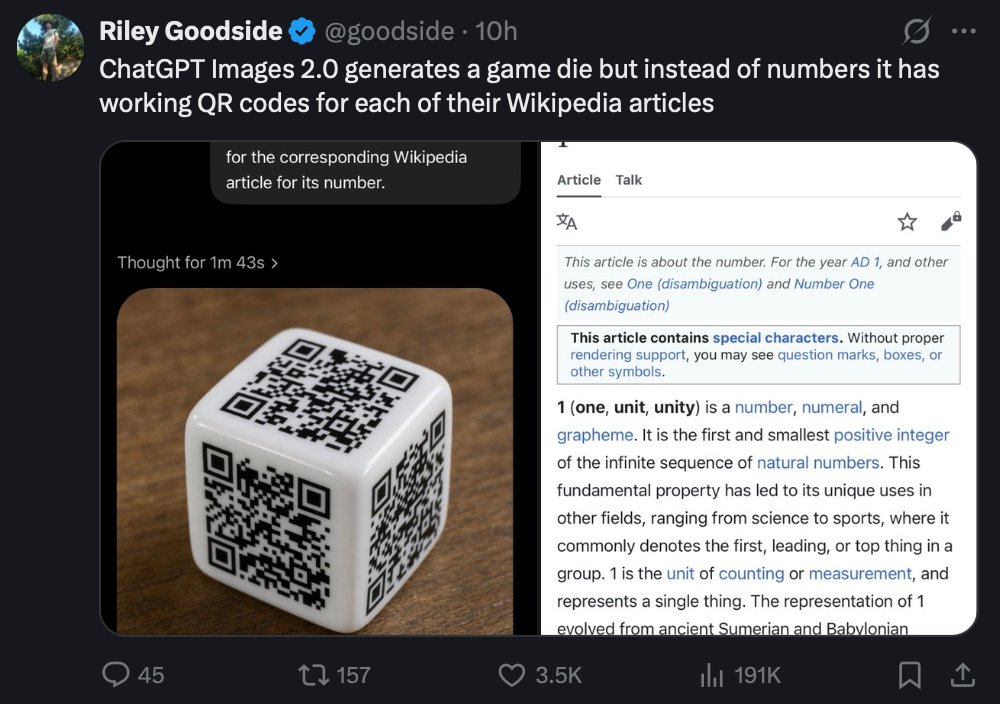
Generate a hyper-realistic dark-mode X/Twitter screenshot depicting an AI-created die with QR codes for Wikipedia articles, perfect for tech demo recreations and UI concepts.
プロンプト · EN
一张在桌面界面上查看的逼真深色模式社交媒体推文截图。左上角是一个圆形头像,显示名称为 Riley Goodside,带有蓝色认证徽章,后跟账号 @goodside 和时间戳 10h。推文内容为:“ChatGPT Images 2.0 生成了一个游戏骰子,但它上面没有数字,而是为每个数字对应的维基百科文章提供了可用的 QR 码”。推文下方是一张巨大的嵌入式图片,圆角矩形内包含两个并排的面板。左侧面板显示一个光泽的白色六面骰子,放置在温暖的棕色木制桌面上,以微小角度拍摄,可见 3 个面,每个可见面上都有一个不同的黑色 QR 码代替点数;光线柔和逼真,骰子圆角处有细微的反射。骰子图像上方是一个深色 UI 标题区域,有一行小字写着“思考了 1 分 43 秒”,顶部附近有一个裁剪过的类似对话气泡的覆盖层,写着“用于其数字对应的维基百科文章”。右侧面板是数字 1 的移动端风格维基百科页面截图,背景为白色,带有细灰色边框,顶部显示“条目”和“讨论”标签、小型界面图标,以及以“本条目介绍的是数字。关于公元 1 年及其他用途,请见 One (消歧义) 和 Number One (消歧义)”开头的文章正文,随后是一个关于特殊字符的方框通知,以及加粗的开篇行“1(一,单位,统一)是一个数字、数值和字素。”嵌入式图片周围的社交媒体界面使用近乎黑色的背景,底部带有标准的回复、转发、点赞、分析、书签和分享图标,并显示 45 条回复、157 次转发、3.5K 次点赞和 191K 次浏览。清晰的 UI 排版,真实的桌面版 X/Twitter 布局,逼真的截图风格,高可读性,带有细微的压缩感和屏幕截图外观。
このプロンプトについて
Generate a hyper-realistic dark-mode X/Twitter screenshot depicting an AI-created die with QR codes for Wikipedia articles, perfect for tech demo recreations and UI concepts. Use it as a コンセプトアート starting point for GPT Image 2: keep the visual structure and style constraints intact, then swap in your own subject, brand, or scene.
Start with small changes to subject, scene, camera, and color, then generate a few variations to compare composition and detail without turning the page copy into keyword stuffing.
このプロンプトの使い方
- Copy the prompt text from this page.
- Paste into a high-fidelity AI image generator like DALL·E 3 or Midjourney.
- Customize elements such as the username, tweet text, or analytics numbers if desired.
- Generate the image and iterate to ensure readable QR codes and text.
- Use the final output for mockups, demonstrations, or social media concepts.


