Sora2 Hub
Sora2 Hub
  • プロンプトライブラリ
  • 料金
  • ショーケース
Sora2 Hub
Sora2 Hub
Sora2 Hub

Sora2 Hub

Sora 2、Veo 3.1、Nano Banana Proを搭載したプロフェッショナルAI制作プラットフォーム。高度な制御、HD画質、透かしなしで、魅力的な動画とスタジオ品質の画像を作成できます。

Email:support@sora2hub.org

AI動画生成

  • テキストから動画
  • 画像から動画
  • Veo 3.1
  • Sora 2
  • Kling 3.0
  • Kling 2.6
  • Kling 2.5
  • Runway
  • Wan 2.6
  • Seedance 2.0
  • Hailuo 2.3
  • Grok Imagine
  • HappyHorse-1.0
  • HappyHorse 1.1
  • Kling 3.0 Turbo
  • Volcengine Video-to-Video Lip Sync
  • OmniHuman 1.5
  • Grok Imagine Video 1.5
  • Gemini Omni
  • Wan 2.7 Video
  • Seedance 2.0 Mini

AI画像生成

  • テキストから画像
  • 画像から画像
  • Nano Banana Pro
  • Nano Banana
  • 4o Image
  • Flux Kontext
  • Z Image
  • Seedream 4.5
  • Seedream 5.0 Lite
  • Nano Banana 2
  • GPT Image 2
  • AI画像アップスケーラー
  • Seedream 5.0 Pro
  • Nano Banana 2 Lite
  • Qwen Image 2.0

AIエフェクト

  • AI年齢フィルター
  • AI性別変換
  • AIキス
  • AIハグ
  • ジブリ画像
  • AI人魚フィルター
  • AIボディシェイク
  • スマイルフィルター
  • AI太る
  • アクションフィギュア

製品

  • 機能
  • ショーケース
  • 価格

会社情報

  • 会社概要
  • お問い合わせ

© 2025 • Sora2 Hub ORG All rights reserved.

  • プライバシーポリシー
  • 利用規約
  • 返金ポリシー
  1. ホーム
  2. /
  3. プロンプト
  4. /
  5. GPT Image 2
  6. /
  7. Sci-Fi Anime Character Reference Sheet — Sora 2 Prompt
GPT Image 2AIプロンプト

Sci-Fi Anime Character Reference Sheet — Sora 2 Prompt

Generate a detailed multi-panel character design sheet with turnarounds, emotion states, and accessory close-ups for consistent world-building.
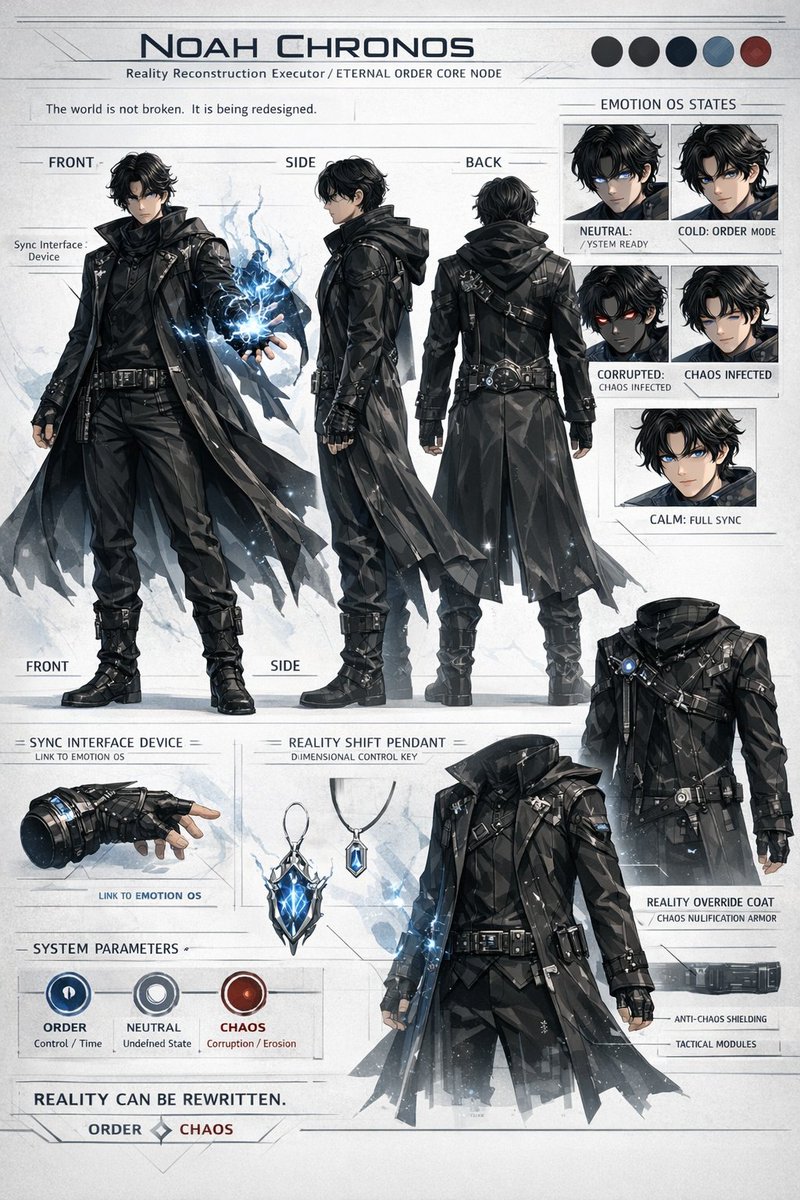
Sci-Fi Anime Character Reference Sheet — Sora 2 Prompt
プロンプト · EN
type
sci-fi anime character reference sheet
header
title
{argument name="character name" default="NOAH CHRONOS"}
subtitle
{argument name="subtitle" default="Reality Reconstruction Executor / ETERNAL ORDER CORE NODE"}
quote
The world is not broken. It is being redesigned.
color_palette
count
5
colors
item 1
black
item 2
dark grey
item 3
navy
item 4
grey-blue
item 5
dark red
character_design
appearance
young male, messy black hair, glowing blue eyes
outfit
{argument name="coat style" default="black tactical trench coat with geometric polygonal textures"}, high boots, belts, straps
action
holding {argument name="energy type" default="glowing blue lightning energy"} in left hand
layout
sections
item 1
title
Main Turnarounds
position
left and center
count
3
labels
item 1
FRONT
item 2
SIDE
item 3
BACK
description
full body poses showing the character from different angles
item 2
title
EMOTION OS STATES
position
top right
count
5
labels
item 1
NEUTRAL: / YSTEM READY
item 2
COLD: ORDER MODE
item 3
CORRUPTED: CHAOS INFECTED
item 4
CHAOS INFECTED
item 5
CALM: FULL SYNC
description
headshot portraits with varying expressions and eye colors
item 3
title
Accessories
position
bottom left
count
2
labels
item 1
SYNC INTERFACE DEVICE = LINK TO EMOTION OS
item 2
REALITY SHIFT PENDANT = DIMENSIONAL CONTROL KEY
description
detailed close-ups of a tactical glove and a glowing crystal pendant
item 4
title
SYSTEM PARAMETERS
position
bottom left
count
3
labels
item 1
ORDER Control / Time
item 2
NEUTRAL Undefined State
item 3
CHAOS Corruption / Erosion
description
circular UI icons in blue, grey, and red
item 5
title
REALITY OVERRIDE COAT / CHAOS NULIFICATION ARMOR
position
bottom right
count
1
labels
item 1
ANTI-CHAOS SHIELDING
item 2
TACTICAL MODULES
description
headless display of the coat with pointing lines
footer
quote
{argument name="footer quote" default="REALITY CAN BE REWRITTEN."}
alignment
ORDER [diamond] CHAOS

このプロンプトについて

Generate a detailed multi-panel character design sheet with turnarounds, emotion states, and accessory close-ups for consistent world-building. Use it as a コンセプトアート starting point for GPT Image 2: keep the visual structure and style constraints intact, then swap in your own subject, brand, or scene.

This prompt is organized as structured JSON with fields such as type, header, character design, layout, and footer. Keeping that hierarchy helps the model separate the subject, layout, interface elements, and detail constraints.

Start with small changes to subject, scene, camera, and color, then generate a few variations to compare composition and detail without turning the page copy into keyword stuffing.

このプロンプトの使い方

  1. Copy the full prompt JSON from the page.
  2. Select a capable AI image generator like Sora 2.
  3. Customize the arguments such as "character name" and "energy type" to define your hero.
  4. Paste the code into the model and generate to view the complete sheet.
FAQ

てつ

@prompts→

公開日
2026年4月30日
元の言語
EN
モデル
GPT Image 2
カテゴリ
コンセプトアート
GPT Image 2コンセプトアートgpt-image-2gptimage2api promptsgptimage2apien
閲覧
333
コピー
38
いいね
8

共有

GPT Image 2 のその他

すべて見る
AI-Generated Crossover Fighter Screenshot — Sora 2 Prompt

AI-Generated Crossover Fighter Screenshot — Sora 2 Prompt

@momoringo_sub
Sacred Dragon Dome Ceiling Mural — Sora 2 Prompt

Sacred Dragon Dome Ceiling Mural — Sora 2 Prompt

@KanaWorks_AI
Futuristic Google Search Ad — AI Prompt

Futuristic Google Search Ad — AI Prompt

@AiWithTariq

Sora2Hubプロンプトで制作を速く。

検索できるプロンプトページから始め、適切なモデル文脈のまま生成へ進めます。

プロンプトを探す