
Sora2 Hub
Sora2 Hub
  • プロンプトライブラリ
  • 料金
  • ショーケース
Sora2 Hub
Sora2 Hub
Sora2 Hub

Sora2 Hub

Sora 2、Veo 3.1、Nano Banana Proを搭載したプロフェッショナルAI制作プラットフォーム。高度な制御、HD画質、透かしなしで、魅力的な動画とスタジオ品質の画像を作成できます。

Email:support@sora2hub.org

AI動画生成

  • テキストから動画
  • 画像から動画
  • Veo 3.1
  • Sora 2
  • Kling 3.0
  • Kling 2.6
  • Kling 2.5
  • Runway
  • Wan 2.6
  • Seedance 2.0
  • Hailuo 2.3
  • Grok Imagine
  • HappyHorse-1.0

AI画像生成

  • テキストから画像
  • 画像から画像
  • Nano Banana Pro
  • Nano Banana
  • 4o Image
  • Flux Kontext
  • Z Image
  • Seedream 4.5
  • Seedream 5.0 Lite
  • Nano Banana 2
  • GPT Image 2
  • AI画像アップスケーラー

AIエフェクト

  • AI年齢フィルター
  • AI性別変換
  • AIキス
  • AIハグ
  • ジブリ画像
  • AI人魚フィルター
  • AIボディシェイク
  • スマイルフィルター
  • AI太る
  • アクションフィギュア

製品

  • 機能
  • ショーケース
  • 価格

会社情報

  • 会社概要
  • お問い合わせ

© 2025 • Sora2 Hub ORG All rights reserved.

  • プライバシーポリシー
  • 利用規約
  • 返金ポリシー
  1. ホーム
  2. /
  3. プロンプト
  4. /
  5. GPT Image 2
  6. /
  7. Tesla Model 3 Supplier Infographic — Sora 2 Prompt
GPT Image 2AIプロンプト

Tesla Model 3 Supplier Infographic — Sora 2 Prompt

Creates a professional Chinese automotive infographic poster showing a 9-layer Tesla Model 3 teardown with supplier details for industry articles or presentations.
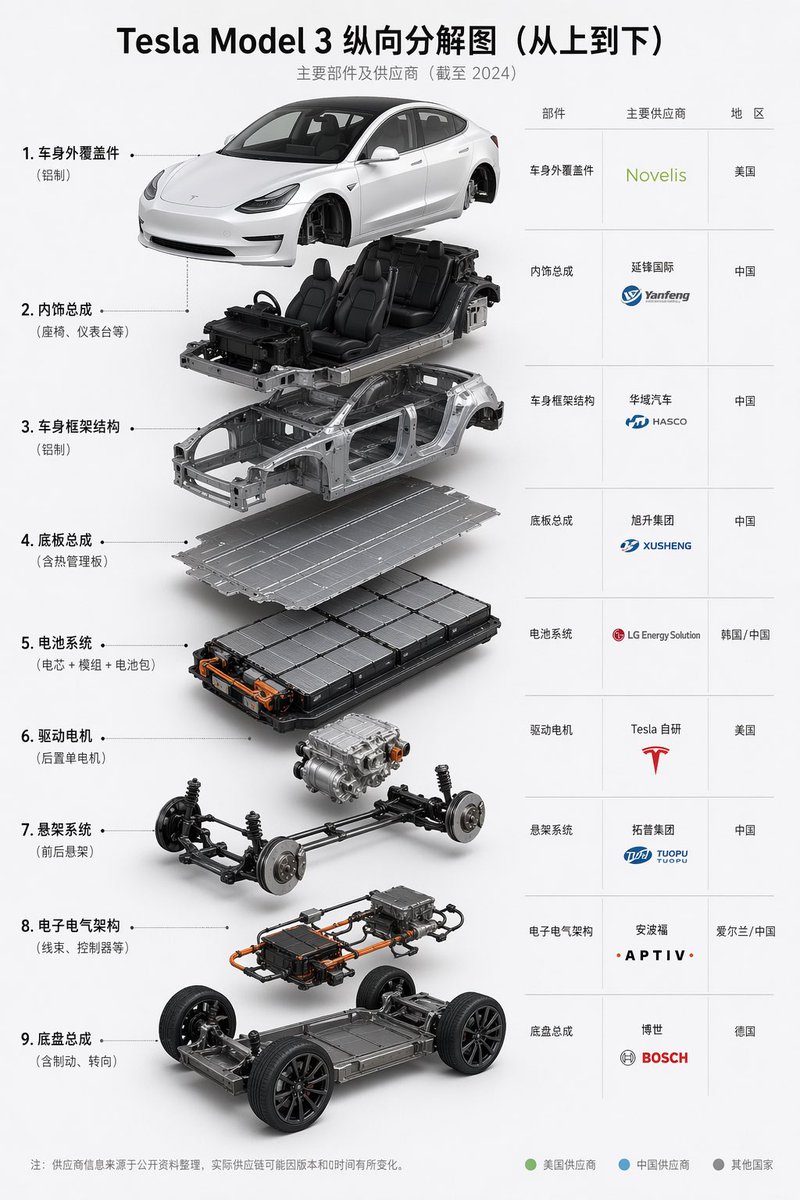
Tesla Model 3 Supplier Infographic — Sora 2 Prompt
プロンプト · EN
type
汽车拆解供应商信息图海报
topic
Tesla Model 3 纵向分解图(从上到下)
language
中文
style
简洁专业的工业信息图,白色背景,高端企业演示风格,精确的 3D 产品渲染,柔和的摄影棚阴影,极简布局,清晰的排版
title
main
{argument name="headline text" default="Tesla Model 3 纵向分解图(从上到下)"}
subtitle
主要部件及供应商(截至 2024 年)
subject
vehicle
{argument name="vehicle model" default="Tesla Model 3"}
view
前侧 45 度视角
composition
纵向堆叠的拆解装配图,各组件从上到下对齐悬浮
layout
left_panel
position
左侧三分之二
count
9
items
item 1
index
1
label
车身外覆盖件
note
铝制
visual
喷漆白色外车身,含车门、引擎盖、后备箱、车灯,不含车轮
item 2
index
2
label
内饰总成
note
座椅、仪表台等
visual
内饰座舱总成,含四个黑色座椅、仪表盘、方向盘、中控台,安装在部分底盘上
item 3
index
3
label
车身框架结构
note
铝制
visual
裸露的银色白车身结构框架
item 4
index
4
label
底板总成
note
含热管理板
visual
扁平金属底板
item 5
index
5
label
电池系统
note
电芯 + 模组 + 电池包
visual
大型矩形电池包,可见模组布局及橙色高压连接器
item 6
index
6
label
驱动电机
note
后置单电机
visual
后置单电机驱动单元悬浮
item 7
index
7
label
悬架系统
note
前后悬架
visual
前后悬架副车架总成,含制动器和弹簧
item 8
index
8
label
电子电气架构
note
线束、控制器等
visual
电子模块总成,含橙色线缆、控制器、线束及接线盒
item 9
index
9
label
底盘总成
note
含制动、转向
visual
滚动滑板式底盘,含车轮、电池底板、转向及制动系统
right_panel
position
右侧三分之一
type
供应商表格
columns
item 1
部件
item 2
主要供应商
item 3
地区
count
9
rows
item 1
part
车身外覆盖件
supplier
Novelis
region
美国
item 2
part
内饰总成
supplier
延锋国际
region
中国
item 3
part
车身框架结构
supplier
华域汽车 / HASCO
region
中国
item 4
part
底板总成
supplier
旭升集团 / XUSHENG
region
中国
item 5
part
电池系统
supplier
LG Energy Solution
region
韩国 / 中国
item 6
part
驱动电机
supplier
Tesla 自研
region
美国
item 7
part
悬架系统
supplier
拓普集团 / TUOPU
region
中国
item 8
part
电子电气架构
supplier
安波福 / APTIV
region
爱尔兰 / 中国
item 9
part
底盘总成
supplier
博世 / BOSCH
region
德国
connectors
从左侧各编号标签到对应拆解组件的虚线引导线
footer
note
注:供应商信息来源于公开资料整理,实际供应商可能因版本和时间有所变化。
legend_count
3
legend
item 1
label
美国供应商
color
green
item 2
label
中国供应商
color
blue
item 3
label
其他国家
color
gray
rendering
materials
喷漆白色车身,拉丝铝结构,黑色真皮座椅,深色橡胶轮胎,金属机械零件,橙色高压线缆
lighting
来自左前方的自然摄影棚灯光,柔和的环境光遮蔽,各悬浮层下方有柔和的投影
camera
略微仰视的前方视角,居中纵向堆叠
background
纯白或极浅灰色
constraints
item 1
保留所有 9 层,按从上到下的精确顺序排列
item 2
在表格中显示供应商 Logo 或品牌风格文字
item 3
整张信息图均使用中文标签
item 4
保持简洁的间距和专业的视觉设计
item 5
确保 3D 组件真实且在技术上合理

このプロンプトについて

Creates a professional Chinese automotive infographic poster showing a 9-layer Tesla Model 3 teardown with supplier details for industry articles or presentations. Use it as a コンセプトアート starting point for GPT Image 2: keep the visual structure and style constraints intact, then swap in your own subject, brand, or scene.

This prompt is organized as structured JSON with fields such as type, topic, language, style, title, subject, and layout. Keeping that hierarchy helps the model separate the subject, layout, interface elements, and detail constraints.

Start with small changes to subject, scene, camera, and color, then generate a few variations to compare composition and detail without turning the page copy into keyword stuffing.

このプロンプトの使い方

  1. Copy the entire prompt from the box above.
  2. Open Sora or your preferred AI image generation tool.
  3. Paste the prompt and make any desired tweaks (e.g., change vehicle model or language).
  4. Generate the image; you may re-run for best layout alignment.
  5. Download and use the infographic in your project.

FAQ

MURPH

@MurphChenOnX→

公開日
2026年4月25日
元の言語
EN
モデル
GPT Image 2
カテゴリ
コンセプトアート
GPT Image 2コンセプトアートgpt-image-2twitter
閲覧
1.8K
コピー
175
いいね
40

共有

GPT Image 2 のその他

すべて見る
Futuristic Google Search Ad — AI Prompt

Futuristic Google Search Ad — AI Prompt

@AiWithTariq
Sacred Dragon Dome Ceiling Mural — Sora 2 Prompt

Sacred Dragon Dome Ceiling Mural — Sora 2 Prompt

@KanaWorks_AI
Anime Schoolgirls Sharing Transparent Umbrella — Sora 2 Prompt

Anime Schoolgirls Sharing Transparent Umbrella — Sora 2 Prompt

@yB7CqdfoDmrbhgD

Sora2Hubプロンプトで制作を速く。

検索できるプロンプトページから始め、適切なモデル文脈のまま生成へ進めます。

プロンプトを探す

