
Sora2 Hub
Sora2 Hub
  • プロンプトライブラリ
  • 料金
  • ショーケース
Sora2 Hub
Sora2 Hub
Sora2 Hub

Sora2 Hub

Sora 2、Veo 3.1、Nano Banana Proを搭載したプロフェッショナルAI制作プラットフォーム。高度な制御、HD画質、透かしなしで、魅力的な動画とスタジオ品質の画像を作成できます。

Email:support@sora2hub.org

AI動画生成

  • テキストから動画
  • 画像から動画
  • Veo 3.1
  • Sora 2
  • Kling 3.0
  • Kling 2.6
  • Kling 2.5
  • Runway
  • Wan 2.6
  • Seedance 2.0
  • Hailuo 2.3
  • Grok Imagine
  • HappyHorse-1.0

AI画像生成

  • テキストから画像
  • 画像から画像
  • Nano Banana Pro
  • Nano Banana
  • 4o Image
  • Flux Kontext
  • Z Image
  • Seedream 4.5
  • Seedream 5.0 Lite
  • Nano Banana 2
  • GPT Image 2
  • AI画像アップスケーラー

AIエフェクト

  • AI年齢フィルター
  • AI性別変換
  • AIキス
  • AIハグ
  • ジブリ画像
  • AI人魚フィルター
  • AIボディシェイク
  • スマイルフィルター
  • AI太る
  • アクションフィギュア

製品

  • 機能
  • ショーケース
  • 価格

会社情報

  • 会社概要
  • お問い合わせ

© 2025 • Sora2 Hub ORG All rights reserved.

  • プライバシーポリシー
  • 利用規約
  • 返金ポリシー
  1. ホーム
  2. /
  3. プロンプト
  4. /
  5. GPT Image 2
  6. /
  7. Yang Guifei Historical Realistic Portrait — Sora 2 Prompt
GPT Image 2AIプロンプト

Yang Guifei Historical Realistic Portrait — Sora 2 Prompt

Create a historically accurate, realistic portrait of Tang Dynasty consort Yang Guifei with iPhone 15 Pro camera quality and luxurious court details.
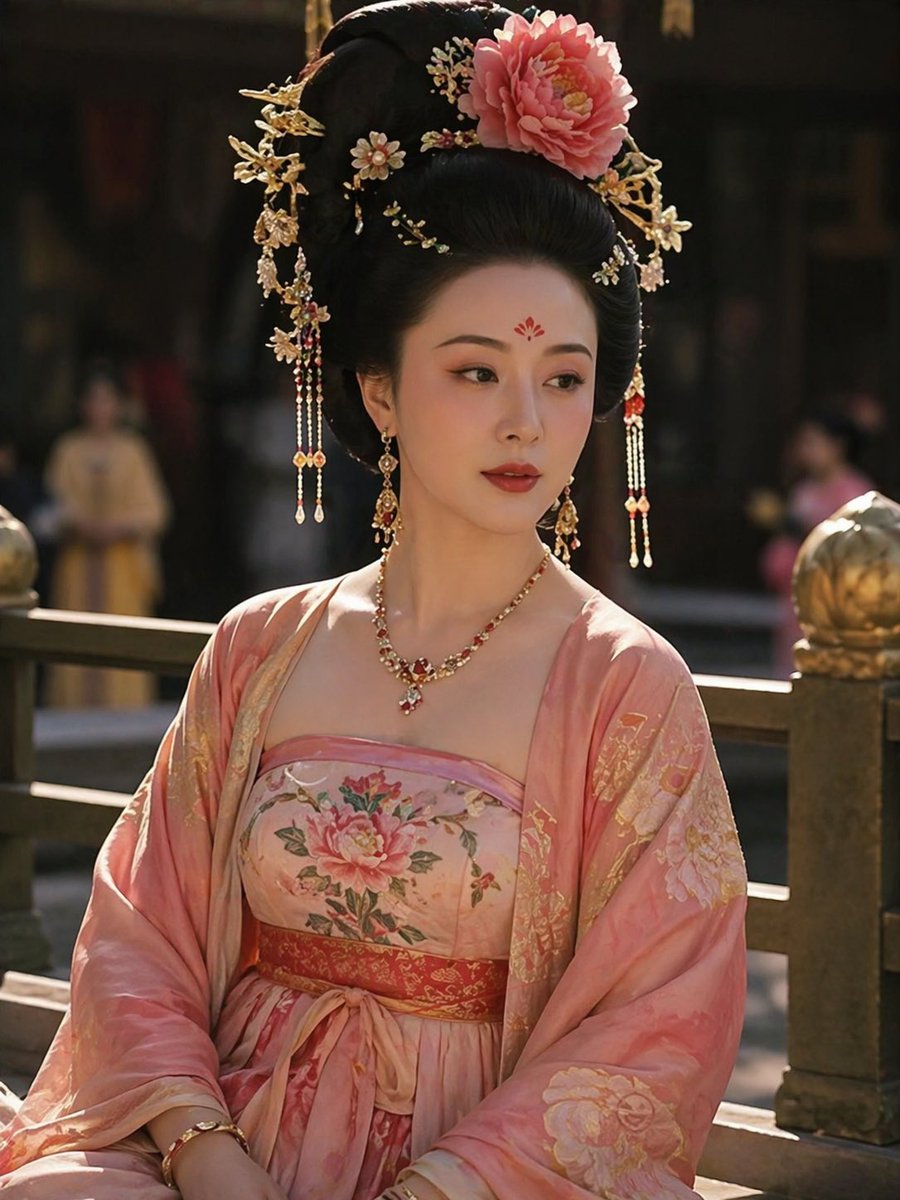
Yang Guifei Historical Realistic Portrait — Sora 2 Prompt
プロンプト · EN
Based on authentic historical descriptions of Yang Yuhuan (Yang Guifei), generate a realistic photograph of the Tang Dynasty imperial consort. Render with iPhone 15 Pro camera quality. Capture her historically described features 鈥?a fuller, rounded figure considered the beauty ideal of the Tang Dynasty, elegant features, warm expression, elaborate hair ornaments and jewelry, luxurious Tang Dynasty court garments with flowing silk layers, and the refined grace that made her one of the Four Great Beauties of ancient China.

このプロンプトについて

Create a historically accurate, realistic portrait of Tang Dynasty consort Yang Guifei with iPhone 15 Pro camera quality and luxurious court details. Use it as a コンセプトアート starting point for GPT Image 2: keep the visual structure and style constraints intact, then swap in your own subject, brand, or scene.

Common directions include community showcase, intermediate, portrait, and chinese history. Treat these tags as creative cues; the prompt structure and preview image are the more useful guide.

Start with small changes to subject, scene, camera, and color, then generate a few variations to compare composition and detail without turning the page copy into keyword stuffing.

このプロンプトの使い方

  1. Copy the prompt text.
  2. Open an AI image generator like Sora 2, Midjourney, or DALL·E.
  3. Paste the prompt into the input field.
  4. Optionally customize details such as lighting, expression, or background.
  5. Generate and download your realistic Yang Guifei portrait.

FAQ

Zhaoge01

@Zhaoge01

公開日
2026年4月25日
元の言語
EN
モデル
GPT Image 2
カテゴリ
コンセプトアート
GPT Image 2コンセプトアートgpt-image-2community showcaseintermediateportraitchinese history
閲覧
1.5K
コピー
126
いいね
90

共有

GPT Image 2 のその他

すべて見る
Shenzhen Golden Hour City Prompt: Futuristic Heritage Poster

Shenzhen Golden Hour City Prompt: Futuristic Heritage Poster

@ivanalog_com
Minimalist Japanese Electric Nail Clipper Product Landing Page — Sora 2 Prompt

Minimalist Japanese Electric Nail Clipper Product Landing Page — Sora 2 Prompt

@eisho_m
Cyberpunk AI Launch Banner — Cinematic Neon Poster Prompt

Cyberpunk AI Launch Banner — Cinematic Neon Poster Prompt

@ObieriI

Sora2Hubプロンプトで制作を速く。

検索できるプロンプトページから始め、適切なモデル文脈のまま生成へ進めます。

プロンプトを探す

