
Sora2 Hub
Sora2 Hub
  • Prompt Library
  • Pricing
  • Showcase
  • Blog
Sora2 Hub
Sora2 Hub
Sora2 Hub

Sora2 Hub

Professional AI creation platform powered by Sora 2, Veo 3.1, and Nano Banana Pro. Create stunning videos and studio-grade images with advanced control, HD quality, and no watermarks.

Email:support@sora2hub.org

AI Video Generator

  • Text to Video
  • Image to Video
  • Veo 3.1
  • Sora 2
  • Kling 3.0
  • Kling 2.6
  • Kling 2.5
  • Runway
  • Wan 2.6
  • Seedance 2.0
  • Hailuo 2.3
  • Grok Imagine
  • HappyHorse-1.0

AI Image Generator

  • Text to Image
  • Image to Image
  • Nano Banana Pro
  • Nano Banana
  • 4o Image
  • Flux Kontext
  • Z Image
  • Seedream 4.5
  • Seedream 5.0 Lite
  • Nano Banana 2
  • GPT Image 2
  • AI Image Upscaler

AI Effects

  • AI Age Filter
  • AI Gender Swap
  • AI Kiss
  • AI Hug
  • Ghibli Image
  • AI Mermaid Filter
  • AI Bodyshake
  • Smiling Filter
  • AI Fat
  • Action Figure

Product

  • Features
  • Showcases
  • Pricing

Company

  • About
  • Contact

© 2025 • Sora2 Hub ORG All rights reserved.

  • Privacy Policy
  • Terms of Service
  • Refund Policy
  1. Home
  2. /
  3. Prompts
  4. /
  5. GPT Image 2
  6. /
  7. 16-Panel Yoga Storyboard Grid — Sora 2 Prompt
GPT Image 2AI Prompt

16-Panel Yoga Storyboard Grid — Sora 2 Prompt

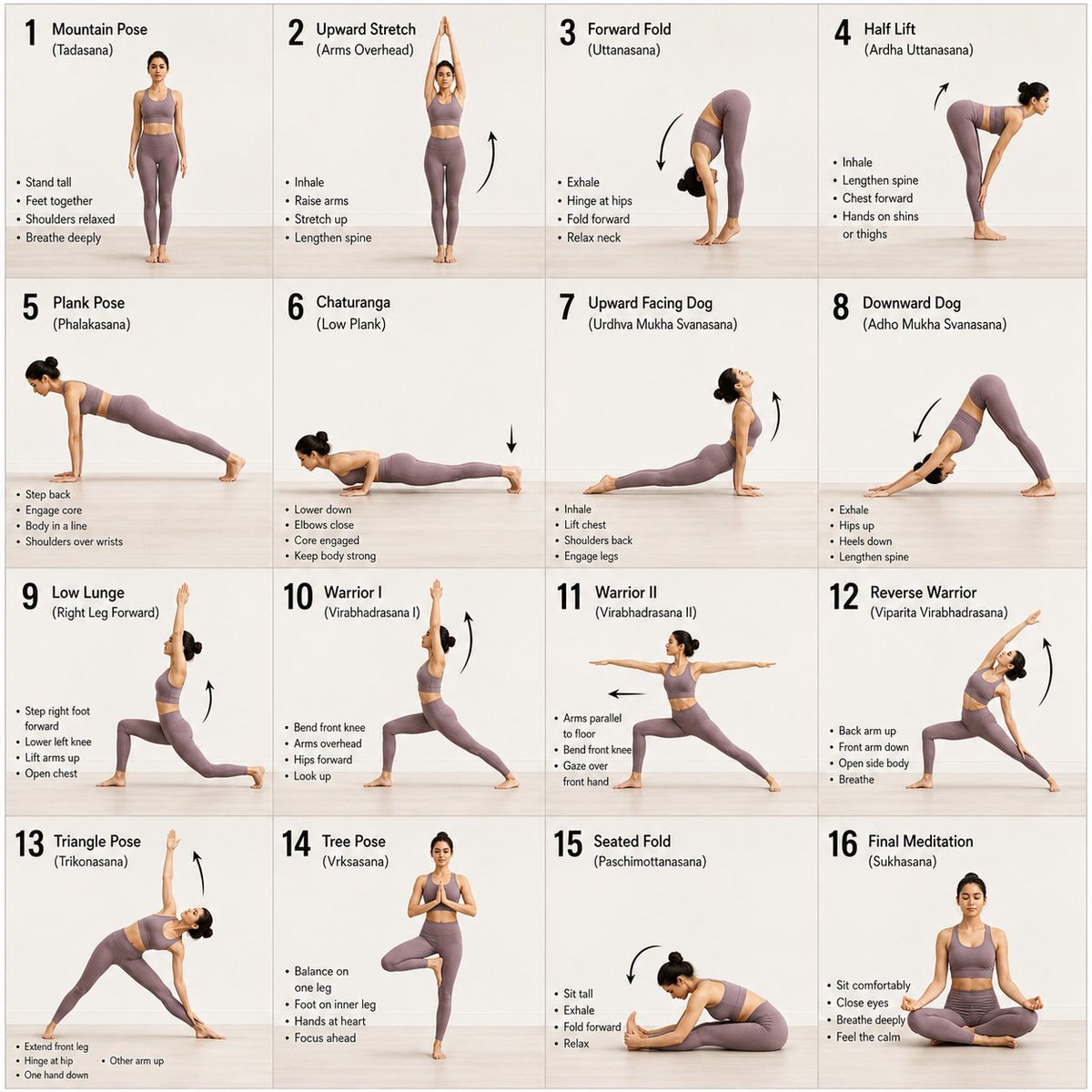
Generate a clean, minimal 16-panel yoga instructional storyboard with consistent framing, labeled poses, and smooth progression flow.
16-Panel Yoga Storyboard Grid — Sora 2 Prompt
PROMPT · EN
A 16-panel instructional storyboard grid featuring a argsubject: calm, athletic young woman performing a sequence of argactivity: yoga poses in the same spot. Clean minimal studio background with soft natural lighting, consistent full-body framing across all panels. The woman wears a argoutfit: fitted neutral-toned yoga outfit (leggings + sports top), barefoot, hair tied back. Each panel shows a different pose in a smooth progression: Mountain Pose (Tadasana), Upward Stretch (Arms Overhead), Forward Fold (Uttanasana), Half Lift, Plank Pose, Chaturanga (Low Plank), Upward Facing Dog, Downward Dog, Low Lunge (Right Leg Forward), Warrior I, Warrior II, Reverse Warrior, Triangle Pose, Tree Pose (Balance), Seated Fold, Final Meditation Pose (Eyes Closed, Calm Expression). Style: modern instructional design, evenly spaced grid layout, each frame labeled with step number and pose name, subtle arrows indicating movement flow, soft shadows, neutral background, high detail, realistic proportions, elegant and calming aesthetic.

About this prompt

Generate a clean, minimal 16-panel yoga instructional storyboard with consistent framing, labeled poses, and smooth progression flow. Use it as a Concept Art starting point for GPT Image 2: keep the visual structure and style constraints intact, then swap in your own subject, brand, or scene.

Start by replacing subject, activity, and outfit, then keep the camera, composition, and material cues in the same order. This makes the output easier to compare across variations.

How to use this prompt

  1. Copy the full prompt text from the page.
  2. Paste it into your preferred AI model (e.g., Sora 2, Runway, Kling).
  3. Customize variables like subject, activity, or outfit to match your vision.
  4. Generate and review the output grid for layout and pose accuracy.
  5. Refine prompt details if needed for better consistency or style.

FAQ

Synthia

@AIwithSynthia→

Published
May 15, 2026
Language
EN
Model
GPT Image 2
Category
Concept Art
GPT Image 2Concept Artgpt-image-2twitter
Views
276
Copies
31
Likes
15

Share

More from GPT Image 2

Browse all
Gothic Anime Girl Bites Playground Rail — Sora 2 Prompt

Gothic Anime Girl Bites Playground Rail — Sora 2 Prompt

@hoshi122221
Anime Idol Profile Page — Lavender Art Style Prompt

Anime Idol Profile Page — Lavender Art Style Prompt

@uzuyanurp
Anime Schoolgirls Sharing Transparent Umbrella — Sora 2 Prompt

Anime Schoolgirls Sharing Transparent Umbrella — Sora 2 Prompt

@yB7CqdfoDmrbhgD

Create faster with Sora2Hub prompts.

Use curated prompt pages as searchable entry points, then jump straight into generation with the right model context.

Explore prompts

