
Sora2 Hub
Sora2 Hub
  • Prompt Library
  • Pricing
  • Showcase
  • Blog
Sora2 Hub
Sora2 Hub
Sora2 Hub

Sora2 Hub

Professional AI creation platform powered by Sora 2, Veo 3.1, and Nano Banana Pro. Create stunning videos and studio-grade images with advanced control, HD quality, and no watermarks.

Email:support@sora2hub.org

AI Video Generator

  • Text to Video
  • Image to Video
  • Veo 3.1
  • Sora 2
  • Kling 3.0
  • Kling 2.6
  • Kling 2.5
  • Runway
  • Wan 2.6
  • Seedance 2.0
  • Hailuo 2.3
  • Grok Imagine
  • HappyHorse-1.0

AI Image Generator

  • Text to Image
  • Image to Image
  • Nano Banana Pro
  • Nano Banana
  • 4o Image
  • Flux Kontext
  • Z Image
  • Seedream 4.5
  • Seedream 5.0 Lite
  • Nano Banana 2
  • GPT Image 2
  • AI Image Upscaler

AI Effects

  • AI Age Filter
  • AI Gender Swap
  • AI Kiss
  • AI Hug
  • Ghibli Image
  • AI Mermaid Filter
  • AI Bodyshake
  • Smiling Filter
  • AI Fat
  • Action Figure

Product

  • Features
  • Showcases
  • Pricing

Company

  • About
  • Contact

© 2025 • Sora2 Hub ORG All rights reserved.

  • Privacy Policy
  • Terms of Service
  • Refund Policy
  1. Home
  2. /
  3. Prompts
  4. /
  5. GPT Image 2
  6. /
  7. Editorial Portrait 2x2 Grid — Sora 2 Prompt
GPT Image 2AI Prompt

Editorial Portrait 2x2 Grid — Sora 2 Prompt

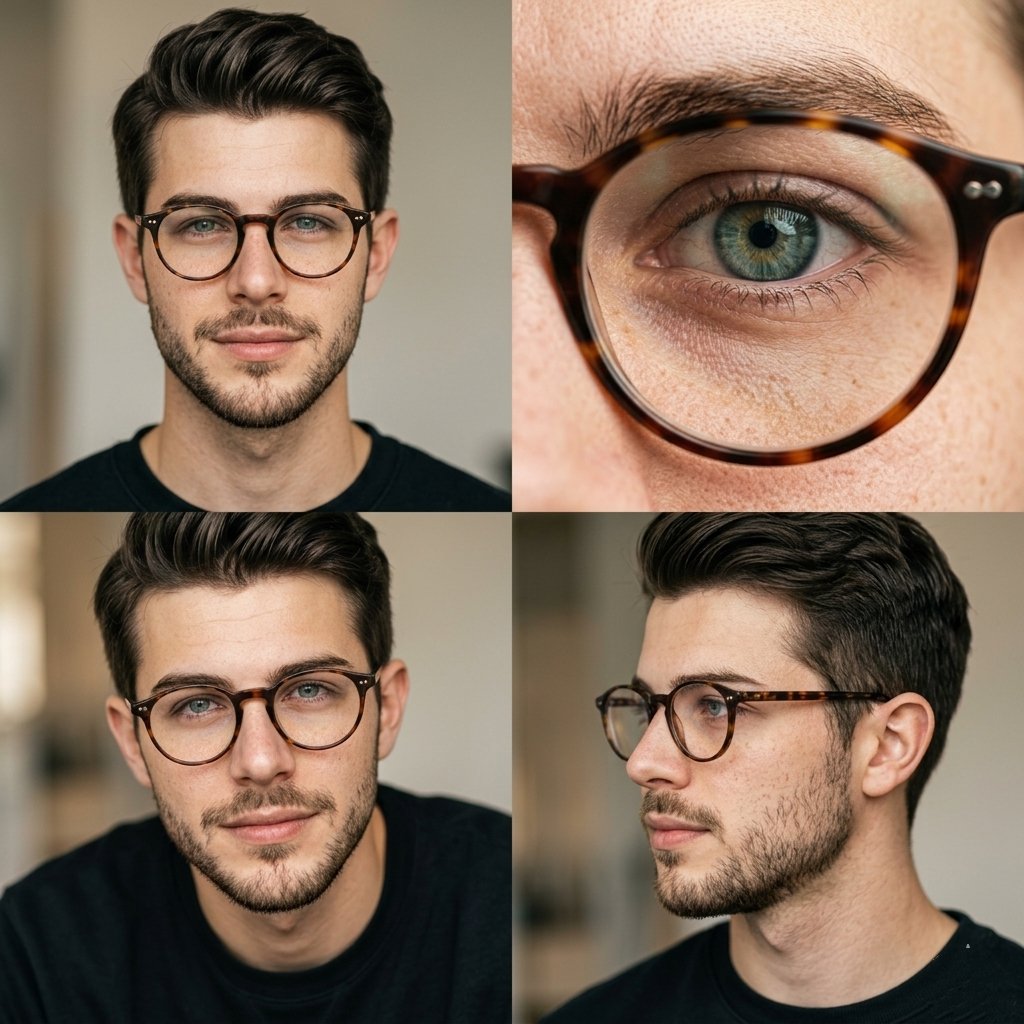
Generate a cinematic 2x2 editorial portrait grid with hyper-realistic skin textures, soft lighting, and multiple angles for professional photography results.
Editorial Portrait 2x2 Grid — Sora 2 Prompt
PROMPT · EN
编辑风肖像摄影,采用 2x2 网格布局,主角均为 argsubject: 男性,佩戴 argaccessory: 玳瑁圆框眼镜,自然妆容,留有胡茬,背景为 argbackground: 柔和的中性背景。
左上:正面肖像,直视镜头,表情平静。
右上:眼镜后方眼睛的极致微距特写,超精细的虹膜和皮肤纹理。
左下:略微低角度的肖像,表情微妙,柔和阴影。
右下:侧面轮廓肖像,自然姿态,视线看向别处。
柔和的漫射自然光,温暖的中性色调,浅景深,超写实的皮肤纹理(可见毛孔和雀斑),极简修图,85mm 镜头,高端编辑风摄影风格,构图简洁,4K

About this prompt

Generate a cinematic 2x2 editorial portrait grid with hyper-realistic skin textures, soft lighting, and multiple angles for professional photography results. Use it as a Concept Art starting point for GPT Image 2: keep the visual structure and style constraints intact, then swap in your own subject, brand, or scene.

Start by replacing subject, accessory, and background, then keep the camera, composition, and material cues in the same order. This makes the output easier to compare across variations.

How to use this prompt

  1. Copy the entire prompt below.
  2. Choose your preferred AI image generator (Sora 2, DALL-E 3, Midjourney, etc.).
  3. Customize the {subject}, {accessory}, and {background} variables to match your vision.
  4. Paste the prompt and generate the image.
  5. Refine variables and regenerate until you achieve the desired result.

FAQ

Taaruk

@Taaruk_→

Published
May 15, 2026
Language
EN
Model
GPT Image 2
Category
Concept Art
GPT Image 2Concept Artgpt-image-2twitter
Views
346
Copies
29
Likes
11

Share

More from GPT Image 2

Browse all
Anime Reaction Thumbnail Prompt — Neon Edgy VTuber

Anime Reaction Thumbnail Prompt — Neon Edgy VTuber

@abdiisan
Minimalist Skincare Brand Manual — Sora 2 Prompt

Minimalist Skincare Brand Manual — Sora 2 Prompt

@FranromeGraph
Indonesian Bird Contest Meme — Low-Quality Phone Photo

Indonesian Bird Contest Meme — Low-Quality Phone Photo

@NyaiiBubu

Create faster with Sora2Hub prompts.

Use curated prompt pages as searchable entry points, then jump straight into generation with the right model context.

Explore prompts

