
Sora2 Hub
Sora2 Hub
  • Prompt Library
  • Pricing
  • Showcase
  • Blog
Sora2 Hub
Sora2 Hub
Sora2 Hub

Sora2 Hub

Professional AI creation platform powered by Sora 2, Veo 3.1, and Nano Banana Pro. Create stunning videos and studio-grade images with advanced control, HD quality, and no watermarks.

Email:support@sora2hub.org

AI Video Generator

  • Text to Video
  • Image to Video
  • Veo 3.1
  • Sora 2
  • Kling 3.0
  • Kling 2.6
  • Kling 2.5
  • Runway
  • Wan 2.6
  • Seedance 2.0
  • Hailuo 2.3
  • Grok Imagine
  • HappyHorse-1.0

AI Image Generator

  • Text to Image
  • Image to Image
  • Nano Banana Pro
  • Nano Banana
  • 4o Image
  • Flux Kontext
  • Z Image
  • Seedream 4.5
  • Seedream 5.0 Lite
  • Nano Banana 2
  • GPT Image 2
  • AI Image Upscaler

AI Effects

  • AI Age Filter
  • AI Gender Swap
  • AI Kiss
  • AI Hug
  • Ghibli Image
  • AI Mermaid Filter
  • AI Bodyshake
  • Smiling Filter
  • AI Fat
  • Action Figure

Product

  • Features
  • Showcases
  • Pricing

Company

  • About
  • Contact

© 2025 • Sora2 Hub ORG All rights reserved.

  • Privacy Policy
  • Terms of Service
  • Refund Policy
  1. Home
  2. /
  3. Prompts
  4. /
  5. GPT Image 2
  6. /
  7. ChatGPT Image Prompt Infographic — Clean 4-Column Guide
GPT Image 2AI Prompt

ChatGPT Image Prompt Infographic — Clean 4-Column Guide

Create a professional, pastel-toned 4-column infographic that teaches effective AI image prompting techniques with icons, examples, and a workflow diagram.
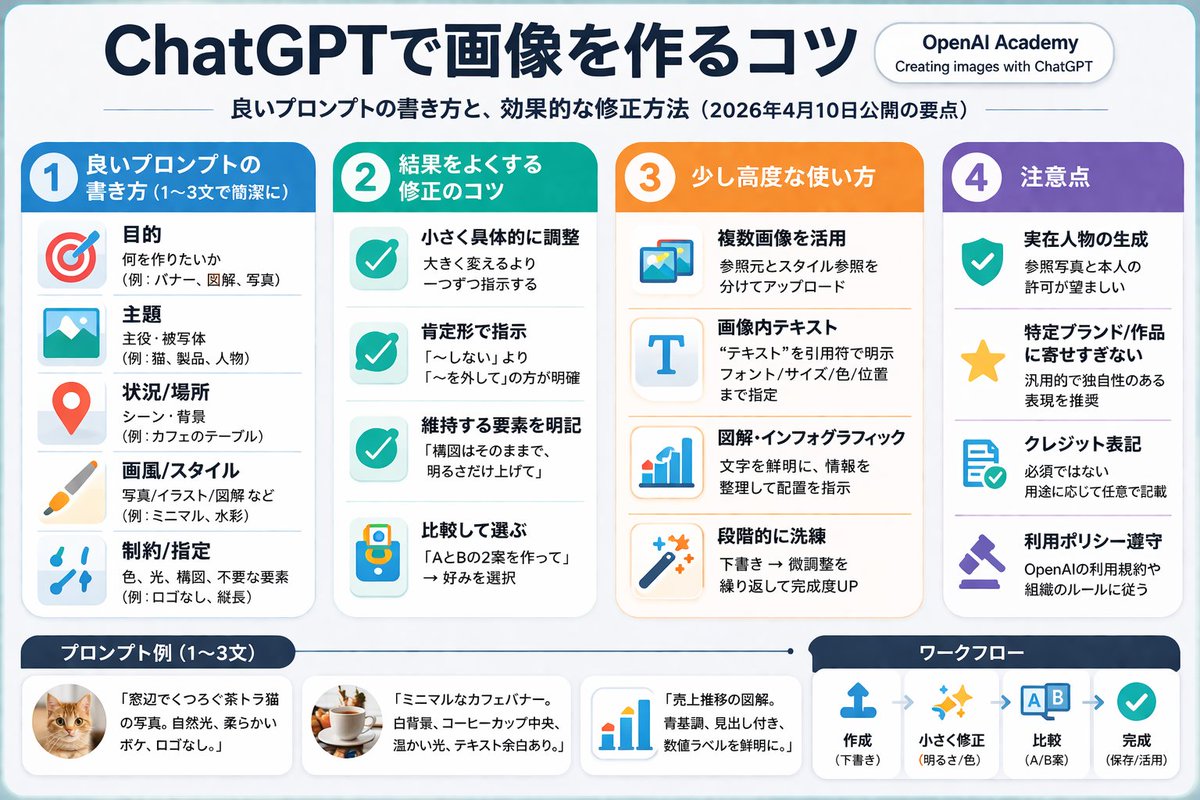
ChatGPT Image Prompt Infographic — Clean 4-Column Guide
PROMPT · EN
type
infographic
style
clean, corporate, flat design, soft pastel colors, rounded corners, white background
header
main_title
{argument name="main title" default="ChatGPTで画像を作るコツ"}
subtitle
{argument name="subtitle" default="良いプロンプトの書き方と、効果的な修正方法(2026年4月10日公開の要点)"}
top_right_badge
OpenAI Academy / Creating images with ChatGPT
layout
columns
item 1
color_theme
blue
header
{argument name="column 1 title" default="1 良いプロンプトの書き方 (1〜3文で簡潔に)"}
item_count
5
icons
item 1
target
item 2
landscape picture
item 3
map pin
item 4
paintbrush
item 5
sliders
item 2
color_theme
green
header
{argument name="column 2 title" default="2 結果をよくする修正のコツ"}
item_count
4
icons
item 1
checkmark
item 2
checkmark
item 3
checkmark
item 4
A/B comparison
item 3
color_theme
orange
header
3 少し高度な使い方
item_count
4
icons
item 1
multiple images
item 2
letter T
item 3
bar chart
item 4
magic wand
item 4
color_theme
purple
header
4 注意点
item_count
4
icons
item 1
shield with check
item 2
star
item 3
document with check
item 4
gavel
footer
left_section
title
{argument name="bottom left title" default="プロンプト例 (1〜3文)"}
item_count
3
thumbnails
item 1
orange tabby cat
item 2
coffee cup on white background
item 3
blue bar chart
right_section
title
ワークフロー
step_count
4
icons
item 1
upload arrow
item 2
sparkles
item 3
A/B boxes
item 4
checkmark
flow_style
horizontal with dashed arrows

About this prompt

Create a professional, pastel-toned 4-column infographic that teaches effective AI image prompting techniques with icons, examples, and a workflow diagram. Use it as a Concept Art starting point for GPT Image 2: keep the visual structure and style constraints intact, then swap in your own subject, brand, or scene.

This prompt is organized as structured JSON with fields such as type, style, header, and layout. Keeping that hierarchy helps the model separate the subject, layout, interface elements, and detail constraints.

Start with small changes to subject, scene, camera, and color, then generate a few variations to compare composition and detail without turning the page copy into keyword stuffing.

How to use this prompt

  1. Copy the full JSON prompt and paste it into your preferred AI image generator that supports structured layouts (Sora 2, Midjourney, or DALL·E). 2. Review the default Japanese text and swap any variable fields — such as main_title or subtitle — with your own language or topic. 3. Adjust column themes (blue, green, orange, purple), icon choices, or item counts to match your brand or content needs. 4. Generate the image and inspect each column for readability; iterate by refining the style keywords like "flat design" or "soft pastel colors." 5. Export the final infographic in your desired resolution for social media, blog posts, or presentations.


FAQ

炎鎮🔥 - ₿onochin -

@prompts→

Published
Apr 30, 2026
Language
EN
Model
GPT Image 2
Category
Concept Art
GPT Image 2Concept Artgpt-image-2gptimage2api promptsgptimage2apien
Views
520
Copies
28
Likes
35

Share

More from GPT Image 2

Browse all
8-Panel Romantic Manga: Shy Maid Robot & Master — Sora 2 Prompt

8-Panel Romantic Manga: Shy Maid Robot & Master — Sora 2 Prompt

@yume00112211
Anime Reaction Thumbnail Prompt — Neon Edgy VTuber

Anime Reaction Thumbnail Prompt — Neon Edgy VTuber

@abdiisan
Cyberpunk AI Launch Banner — Cinematic Neon Poster Prompt

Cyberpunk AI Launch Banner — Cinematic Neon Poster Prompt

@ObieriI

Create faster with Sora2Hub prompts.

Use curated prompt pages as searchable entry points, then jump straight into generation with the right model context.

Explore prompts
