Sora2 Hub
Sora2 Hub
  • Prompt Library
  • Pricing
  • Showcase
  • Blog
Sora2 Hub
Sora2 Hub
Sora2 Hub

Sora2 Hub

Professional AI creation platform powered by Sora 2, Veo 3.1, and Nano Banana Pro. Create stunning videos and studio-grade images with advanced control, HD quality, and no watermarks.

Email:support@sora2hub.org

AI Video Generator

  • Text to Video
  • Image to Video
  • Veo 3.1
  • Sora 2
  • Kling 3.0
  • Kling 2.6
  • Kling 2.5
  • Runway
  • Wan 2.6
  • Seedance 2.0
  • Hailuo 2.3
  • Grok Imagine
  • HappyHorse-1.0
  • HappyHorse 1.1
  • Kling 3.0 Turbo
  • Volcengine Video-to-Video Lip Sync
  • OmniHuman 1.5
  • Grok Imagine Video 1.5
  • Gemini Omni
  • Wan 2.7 Video
  • Seedance 2.0 Mini

AI Image Generator

  • Text to Image
  • Image to Image
  • Nano Banana Pro
  • Nano Banana
  • 4o Image
  • Flux Kontext
  • Z Image
  • Seedream 4.5
  • Seedream 5.0 Lite
  • Nano Banana 2
  • GPT Image 2
  • AI Image Upscaler
  • Seedream 5.0 Pro
  • Nano Banana 2 Lite
  • Qwen Image 2.0

AI Effects

  • AI Age Filter
  • AI Gender Swap
  • AI Kiss
  • AI Hug
  • Ghibli Image
  • AI Mermaid Filter
  • AI Bodyshake
  • Smiling Filter
  • AI Fat
  • Action Figure

Product

  • Features
  • Showcases
  • Pricing

Company

  • About
  • Contact

© 2025 • Sora2 Hub ORG All rights reserved.

  • Privacy Policy
  • Terms of Service
  • Refund Policy
  1. Home
  2. /
  3. Prompts
  4. /
  5. GPT Image 2
  6. /
  7. Japanese AI Image Evolution Infographic — Hand-drawn Style
GPT Image 2AI Prompt

Japanese AI Image Evolution Infographic — Hand-drawn Style

Generate a warm, hand-drawn Japanese infographic that visually explains AI image generation's evolution from art to design to understanding.
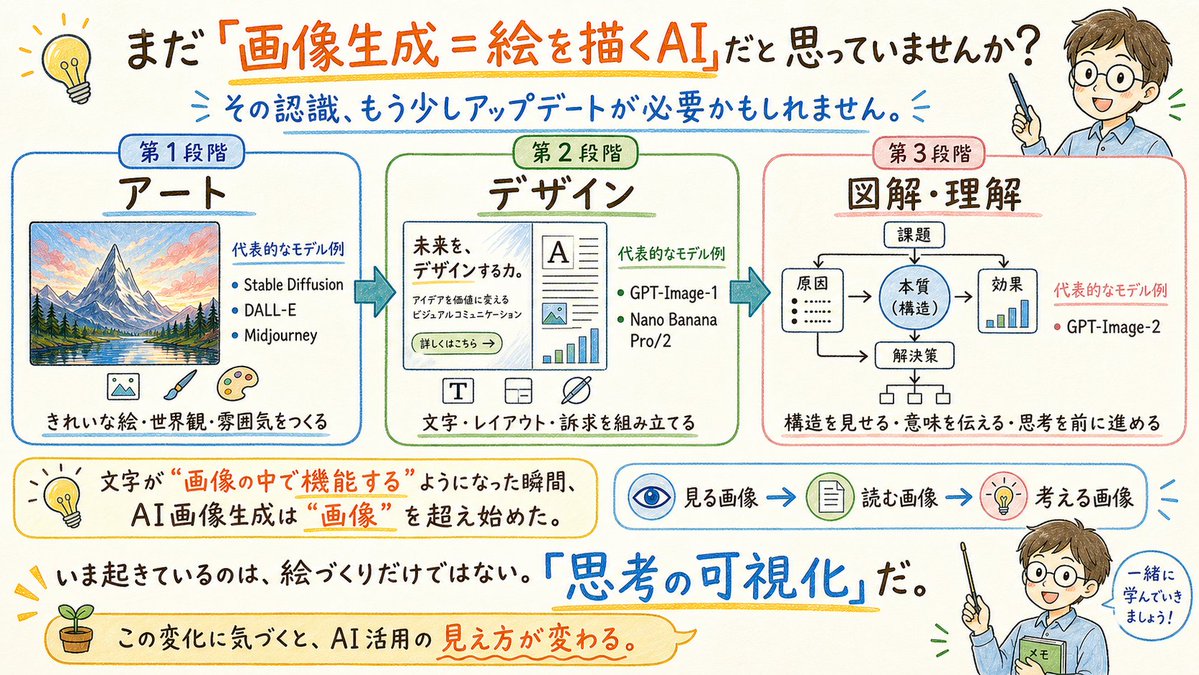
Japanese AI Image Evolution Infographic — Hand-drawn Style
PROMPT · EN
type
宽幅手绘日本教育信息图
canvas
aspectRatio
16:9 横屏
background
暖白色纸张纹理
style
友好的马克笔与水彩手绘风格,草图笔记,清晰易读的日语排版,蓝色/橙色/绿色/红色点缀,圆角框,箭头,小型涂鸦图标
headline
text
{argument name="headline text" default="你是否还认为『图像生成=AI 绘画』?"}
position
顶部居中
emphasis
橙色下划线,并对『图像生成=AI 绘画』进行橙色大号字体强调
subheadline
text
{argument name="subheadline text" default="这种认知,或许需要更新一下了。"}
position
标题下方
color
蓝色
decorations
小型放射状蓝色笔触
layout
mainSections
count
3
arrangement
中间横向排列三个大型圆角矩形面板,由粗蓝色向右箭头连接
sections
item 1
title
第一阶段
subtitle
艺术
position
左侧
borderColor
蓝色
content
带框的彩色山水风景插画;标题为 代表的なモデル例 的文本块,包含 3 个要点:Stable Diffusion, DALL-E, Midjourney;底部文字 きれいな絵・世界観・雰囲気をつくる(创作精美的画作、世界观与氛围)
icons
count
3
descriptions
item 1
小图片图标
item 2
画笔
item 3
艺术家调色板
item 2
title
第二阶段
subtitle
设计
position
中央
borderColor
绿色
content
模拟网站或海报排版,包含标题 未来を、デザインするか。(设计未来吗。),简短段落文本,按钮 詳しくはこちら →(点击了解详情),文档排版,图片占位符,以及图表元素;标题为 代表的なモデル例 的文本块,包含 2 个要点:GPT-Image-1, Nano Banana Pro/2;底部文字 文字・レイアウト・訴求を組み立てる(构建文字、排版与诉求)
icons
count
3
descriptions
item 1
T 排版图标
item 2
布局网格图标
item 3
交叉钢笔或设计工具图标
item 3
title
第三阶段
subtitle
图解・理解
position
右侧
borderColor
红色
content
简单的流程图,顶部为 課題(课题),分支指向 原因、本質(構造)、効果 以及 解決策,配有箭头和一个小型柱状图;标题为 代表的なモデル例 的文本块,包含 1 个要点:GPT-Image-2;底部文字 構造を見せる・意味を伝える・思考を前に進める(展示结构、传达意义、推动思考)
lowerExplanatoryElements
count
4
items
item 1
type
黄色圆角标注
position
左下方
text
当文字开始在“图像中发挥功能”的那一刻,AI 图像生成便已超越了“图像”本身。
icon
灯泡
item 2
type
流程条
position
中右下方
count
3
labels
item 1
观看的图像
item 2
阅读的图像
item 3
思考的图像
icons
item 1
眼睛
item 2
文档
item 3
灯泡
connectors
蓝色箭头
item 3
type
加粗陈述
position
底部中央附近
text
现在发生的不仅仅是绘画,而是『思考的可视化』。
emphasis
蓝色手写大号字体 『思考的可视化』,配黄色下划线
item 4
type
底部丝带标注
position
左下至中央
text
意识到这种变化,你对 AI 应用的看法也会随之改变。
icon
盆栽小芽
characters
count
2
description
同一位友好的教师角色在右侧出现两次,动漫风格的年轻男性,身穿浅蓝色衬衫,手持指示棒;面部区域刻意用米色矩形遮挡
instances
item 1
position
右上角
pose
手持指示棒指向标题上方
item 2
position
右下角
pose
手持指示棒和贴有 メモ(笔记) 标签的绿色笔记本,旁边有对话气泡 一緒に学んでいきましょう!(让我们一起学习吧!)
customCharacter
{argument name="teacher character" default="棕色头发的年轻男教师,身穿浅蓝色衬衫,手持指示棒,面部被米色方块遮挡"}
extraDecorations
count
4
items
item 1
左上角黄色灯泡涂鸦
item 2
重要文本周围的小太阳光芒标记
item 3
橙色、蓝色和黄色的细手绘下划线
item 4
圆角对话气泡轮廓与手绘箭头
textRequirements
所有日语文本必须清晰、易读且放置准确;保留手绘草图笔记的质感,同时保持图表简洁且具有教学意义。
theme
{argument name="main message" default="AI 图像生成已从艺术演进为设计,进而发展到图解与理解,使图像内的文字具备功能性,并实现思考的可视化。"}

About this prompt

Generate a warm, hand-drawn Japanese infographic that visually explains AI image generation's evolution from art to design to understanding. Use it as a Concept Art starting point for GPT Image 2: keep the visual structure and style constraints intact, then swap in your own subject, brand, or scene.

This prompt is organized as structured JSON with fields such as type, canvas, headline, subheadline, and layout. Keeping that hierarchy helps the model separate the subject, layout, interface elements, and detail constraints.

Start with small changes to subject, scene, camera, and color, then generate a few variations to compare composition and detail without turning the page copy into keyword stuffing.

How to use this prompt

  1. Copy the entire prompt JSON block.
  2. Choose a model that excels at Japanese text and infographic layouts (e.g., GPT-Image-1).
  3. Tweak the variables for headline text and subheadline text to customize the message.
  4. Generate the image. The output will be a 16:9 landscape infographic with a paper texture background.

FAQ

G2(じーにー)|AI日曜大工|Genspark インダストリアンバサダー

@aiclass_g2→

Published
May 15, 2026
Language
EN
Model
GPT Image 2
Category
Concept Art
GPT Image 2Concept Artgpt-image-2twitter
Views
509
Copies
67
Likes
22

Share

More from GPT Image 2

Browse all
Dynamic Nike Ad Poster — Sora 2 Prompt with Sydney Sweeney

Dynamic Nike Ad Poster — Sora 2 Prompt with Sydney Sweeney

@im_shahid7
Minimalist Japanese Electric Nail Clipper Product Landing Page — Sora 2 Prompt

Minimalist Japanese Electric Nail Clipper Product Landing Page — Sora 2 Prompt

@eisho_m
Japanese Cinematic Poster Prompt — 4-Panel Agency Ad

Japanese Cinematic Poster Prompt — 4-Panel Agency Ad

@kantamizutamari

Create faster with Sora2Hub prompts.

Use curated prompt pages as searchable entry points, then jump straight into generation with the right model context.

Explore prompts