
Sora2 Hub
Sora2 Hub
  • Prompt Library
  • Pricing
  • Showcase
  • Blog
Sora2 Hub
Sora2 Hub
Sora2 Hub

Sora2 Hub

Professional AI creation platform powered by Sora 2, Veo 3.1, and Nano Banana Pro. Create stunning videos and studio-grade images with advanced control, HD quality, and no watermarks.

Email:support@sora2hub.org

AI Video Generator

  • Text to Video
  • Image to Video
  • Veo 3.1
  • Sora 2
  • Kling 3.0
  • Kling 2.6
  • Kling 2.5
  • Runway
  • Wan 2.6
  • Seedance 2.0
  • Hailuo 2.3
  • Grok Imagine
  • HappyHorse-1.0

AI Image Generator

  • Text to Image
  • Image to Image
  • Nano Banana Pro
  • Nano Banana
  • 4o Image
  • Flux Kontext
  • Z Image
  • Seedream 4.5
  • Seedream 5.0 Lite
  • Nano Banana 2
  • GPT Image 2
  • AI Image Upscaler

AI Effects

  • AI Age Filter
  • AI Gender Swap
  • AI Kiss
  • AI Hug
  • Ghibli Image
  • AI Mermaid Filter
  • AI Bodyshake
  • Smiling Filter
  • AI Fat
  • Action Figure

Product

  • Features
  • Showcases
  • Pricing

Company

  • About
  • Contact

© 2025 • Sora2 Hub ORG All rights reserved.

  • Privacy Policy
  • Terms of Service
  • Refund Policy
  1. Home
  2. /
  3. Prompts
  4. /
  5. GPT Image 2
  6. /
  7. Japanese AI Coding Phrase Poster — Vertical Infographic Prompt
GPT Image 2AI Prompt

Japanese AI Coding Phrase Poster — Vertical Infographic Prompt

Generates a portrait Japanese anime-style infographic poster to teach practical English phrases for asking AI to explain code or specifications.
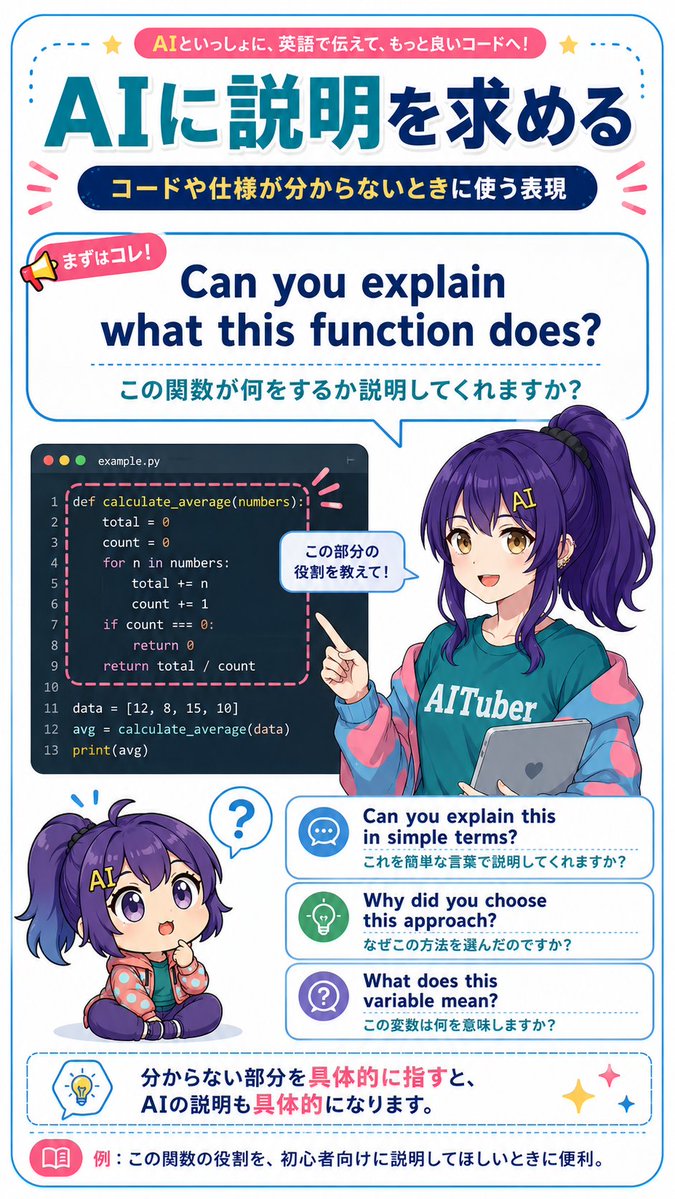
Japanese AI Coding Phrase Poster — Vertical Infographic Prompt
PROMPT · EN
type
用于学习 AI 编程助手英语的竖版日式教育信息图海报
style
明亮简洁的动漫杂志排版,gpt-image-2 风格,清晰的矢量排版与精致的动漫插画结合,白色背景,圆角蓝色边框,青色与深蓝色渐变,粉色装饰丝带,虚线分割线,可爱图标,高分辨率可打印学习资料
canvas
orientation
portrait
aspect_ratio
9:16
background
白色背景,带有细圆角青色边框以及小型装饰星星和强调符号
theme
headline_context
关于向 AI 询问代码和规范解释的虚构实用英语学习资料
main_topic
{argument name="main topic" default="向 AI 寻求解释"}
top_badge_text
{argument name="top badge text" default="与 AI 一起,用英语交流,写出更好的代码!"}
subtitle_text
{argument name="subtitle text" default="当你不理解代码或规范时使用的表达方式"}
layout
sections
item 1
title
顶部标题
position
top
count
3
elements
item 1
带有顶部徽章文字的粉色圆角横幅
item 2
巨大的青色至深蓝色渐变日文标题:AIに説明を求める
item 3
带有黄色日文文字的深蓝色胶囊状副标题
item 2
title
核心短语对话框
position
upper middle
count
3
elements
item 1
写着“首先是这个!”的小扩音器标签
item 2
大型英语短语:Can you explain what this function does?
item 3
下方的日文翻译:この関数が何をするか説明してくれますか?
panel_style
大型圆角矩形对话气泡,带有青色轮廓,指向角色方向
item 3
title
代码示例面板
position
middle left
count
1
elements
item 1
深色代码编辑器窗口,标记为 example.py,带有三个 macOS 风格的圆点,包含 Python 代码:def calculate_average(numbers):, total=0, count=0, loop through numbers, return total/count, data list, avg calculation, print(avg);函数块由粉色虚线圆角矩形高亮显示
item 4
title
动漫教师角色
position
middle right
count
1
elements
item 1
女性动漫 AI-tuber 教师,留着长长的紫色高侧马尾,穿着印有 AITuber 字样的青色 T 恤,超大号蓝粉配色夹克,手持带有心形图标的灰色平板电脑,指向代码面板
item 2
手边的小对话气泡写着:この部分の役割を教えて!
character
name
{argument name="character name" default="Nike-chan"}
hair_color
{argument name="hair color" default="深紫色"}
outfit
青色 AITuber T 恤,粉彩赛博夹克,休闲友好的教育者形象
item 5
title
Q 版反应角色
position
lower left
count
1
elements
item 1
同一个紫色头发角色的 Q 版坐姿形象,表情困惑,头顶上方有问号对话气泡
item 6
title
进阶短语卡片
position
lower middle right
count
3
labels
item 1
Can you explain this in simple terms? / 能用简单的语言解释一下吗?
item 2
Why did you choose this approach? / 你为什么选择这种方法?
item 3
What does this variable mean? / 这个变量是什么意思?
card_style
三张堆叠的圆角白色卡片,带有蓝色轮廓、虚线分隔符和圆形图标:聊天气泡、灯泡、问号
item 7
title
底部建议框
position
bottom
count
2
elements
item 1
带有灯泡图标的虚线圆角蓝色建议框,以及日文句子:分からない部分を具体的に指すと、AIの説明も具体的になります。
item 2
带有粉色书本图标和文字的底部示例条:例:这个在你想让 AI 为初学者解释该函数作用时非常有用。
composition
内容密集但易读的教育海报;排版层级非常鲜明,以居中的英语示例短语作为主要学习点;角色与代码面板及短语卡片略有重叠,营造出空间感
rendering_notes
使用准确的日文字体,简洁的无衬线字体,粗圆角轮廓,充满活力的青色/深蓝色/粉色调色板,可爱的课堂科技氛围,无照片写实感,无额外无关文字,严格保留所有列出的可见文字。

About this prompt

Generates a portrait Japanese anime-style infographic poster to teach practical English phrases for asking AI to explain code or specifications. Use it as a Concept Art starting point for GPT Image 2: keep the visual structure and style constraints intact, then swap in your own subject, brand, or scene.

This prompt is organized as structured JSON with fields such as type, style, canvas, theme, layout, and rendering notes. Keeping that hierarchy helps the model separate the subject, layout, interface elements, and detail constraints.

Start with small changes to subject, scene, camera, and color, then generate a few variations to compare composition and detail without turning the page copy into keyword stuffing.

How to use this prompt

  1. Copy the prompt's full JSON into your AI model's input field.
  2. Choose a model that supports high-resolution, illustrative outputs (e.g., GPT-image-2 or similar).
  3. Tweak the customizable arguments (e.g., main topic, character name, hair color) to fit your theme.
  4. Generate the image, selecting a portrait or 9:16 aspect ratio for the best result.

FAQ

トクツー

@TK2Works→

Published
May 15, 2026
Language
EN
Model
GPT Image 2
Category
Concept Art
GPT Image 2Concept Artgpt-image-2twitter
Views
864
Copies
68
Likes
56

Share

More from GPT Image 2

Browse all
Indonesian Bird Contest Meme — Low-Quality Phone Photo

Indonesian Bird Contest Meme — Low-Quality Phone Photo

@NyaiiBubu
Ultra-Realistic 3D Exploded View Prompt: Sony BRAVIA 8K TV

Ultra-Realistic 3D Exploded View Prompt: Sony BRAVIA 8K TV

@Ankit_patel211
Dynamic Nike Ad Poster — Sora 2 Prompt with Sydney Sweeney

Dynamic Nike Ad Poster — Sora 2 Prompt with Sydney Sweeney

@im_shahid7

Create faster with Sora2Hub prompts.

Use curated prompt pages as searchable entry points, then jump straight into generation with the right model context.

Explore prompts

