GPT Image 2AI Prompt

AI Email Prompt Carousel — Dark Glassmorphism Slides

Generate a stunning dark-themed social carousel with six ready-to-use email prompts displayed in glowing glass-effect cards.
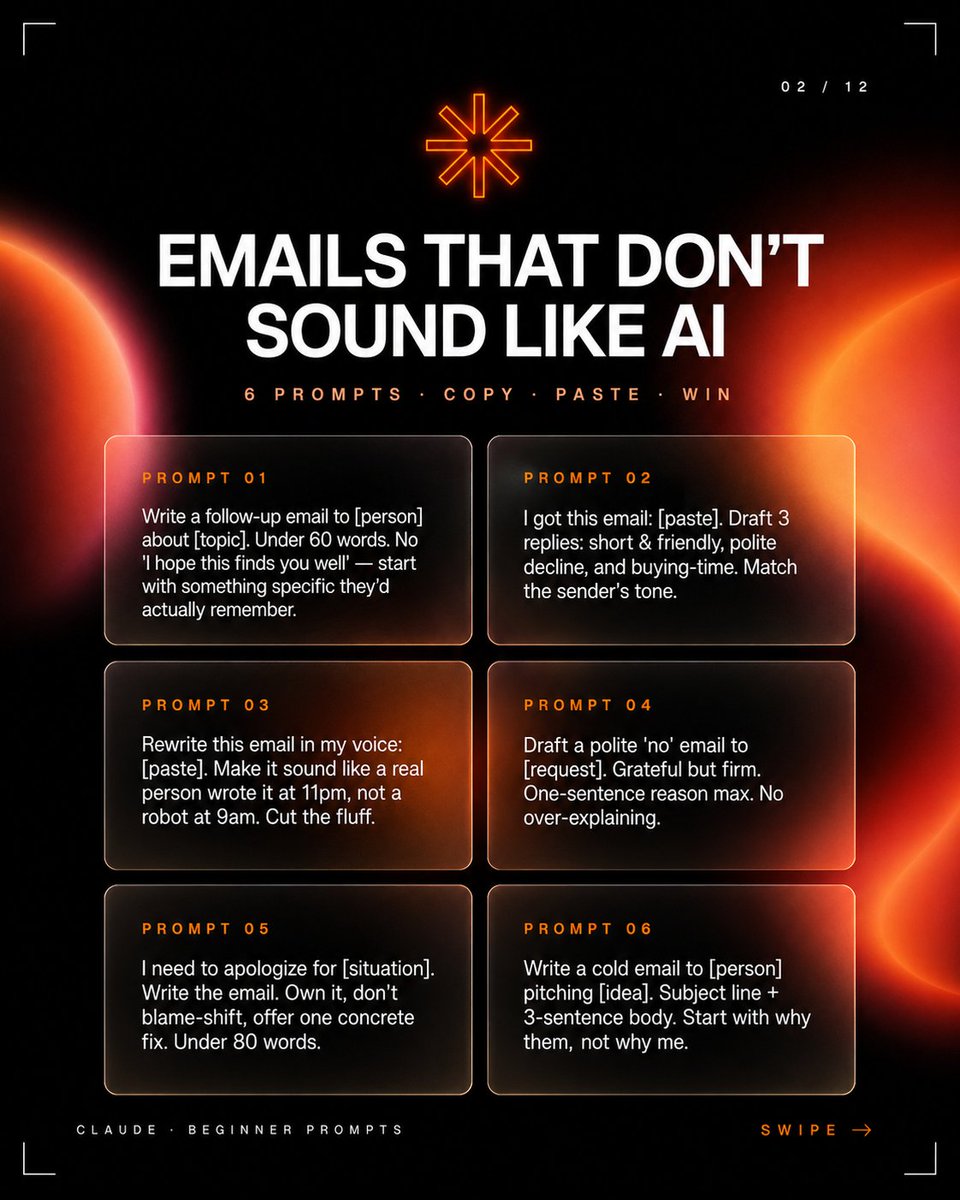
AI Email Prompt Carousel — Dark Glassmorphism Slides
PROMPT · EN
type
社交媒体轮播图缩略图
format
正方形 1:1
style
高级深色科技编辑风格,高对比度黑色背景,左右边缘带有发光的橙红色抽象行星/日食渐变,柔和的镜头光晕,细腻的噪点,带有细圆角边框的玻璃拟态卡片,未来感极简 HUD 角落裁剪标记
layout
slide_indicator
position
右上角
text
02 / 12
top_icon
position
顶部居中
description
小型发光橙色八角星符号
headline
position
上部居中
text
{argument name="headline text" default="告别 AI 味的邮件"}
typography
大号加粗大写白色无衬线字体,居中,紧凑行间距
subheadline
position
标题下方
text
{argument name="subheadline text" default="6 个提示词 · 复制 · 粘贴 · 搞定"}
typography
小号大写橙色字间距无衬线字体
prompt_cards
count
6
arrangement
两列三行,等大的半透明深色圆角卡片,带有温暖的橙色光反射和细淡边框
cards
item 1
label
提示词 01
position
第一行左
body
写一封关于 [主题] 的跟进邮件给 [人名]。字数少于 60 字。不要用“希望你一切都好”之类的客套话——从他们真正记得的具体事情写起。
item 2
label
提示词 02
position
第一行右
body
我收到了这封邮件:[粘贴内容]。起草 3 种回复:简短友好型、礼貌拒绝型和争取时间型。匹配发送者的语气。
item 3
label
提示词 03
position
第二行左
body
用我的口吻重写这封邮件:[粘贴内容]。让它听起来像是一个真实的人在晚上 11 点写的,而不是机器在早上 9 点写的。删掉废话。
item 4
label
提示词 04
position
第二行右
body
起草一封礼貌的“拒绝”邮件给 [请求]。感激但坚定。理由最多一句话。不要过度解释。
item 5
label
提示词 05
position
第三行左
body
我需要为 [情况] 道歉。写这封邮件。勇于承担,不要推卸责任,提供一个具体的解决方案。字数少于 80 字。
item 6
label
提示词 06
position
第三行右
body
写一封冷启动邮件给 [人名] 推销 [想法]。包含主题行 + 3 句正文。从“为什么是他们”而不是“为什么是我”开始。
footer
left_text
{argument name="footer label" default="CLAUDE · 初学者提示词"}
right_text
{argument name="swipe text" default="向左滑动 →"}
position
底部角落
typography
微型大写字间距字体,左侧为淡灰色,右侧为橙色
color_palette
background
近黑色
primary_text
白色
accent
霓虹橙色和红色
card_fill
透明烟黑色带琥珀色高光
composition_notes
保持所有文字清晰易读,具有强烈的层级感:巨大的标题、较小的副标题、六个清晰分隔的提示词卡片。使用电影感的橙色光球从侧面渗入,但保持中心区域足够暗以确保可读性。

About this prompt

Generate a stunning dark-themed social carousel with six ready-to-use email prompts displayed in glowing glass-effect cards. Use it as a Concept Art starting point for GPT Image 2: keep the visual structure and style constraints intact, then swap in your own subject, brand, or scene.

This prompt is organized as structured JSON with fields such as type, format, style, layout, color palette, and composition notes. Keeping that hierarchy helps the model separate the subject, layout, interface elements, and detail constraints.

Start with small changes to subject, scene, camera, and color, then generate a few variations to compare composition and detail without turning the page copy into keyword stuffing.

How to use this prompt

  1. Copy the Prompt: Copy the entire prompt JSON into your preferred AI image generator like Sora 2.
  2. Choose a Model: Select a model that excels at photorealistic or stylized graphic design outputs.
  3. Tweak Variables: Customize the headline, subheadline, and prompt_cards body text with your own email topics.
  4. Generate & Refine: Generate the image and adjust parameters like color palette or layout density if needed.
  5. Export: Download the final 1:1 square image for direct use on Instagram, LinkedIn, or other social platforms.

FAQ

More from GPT Image 2

Browse all

Create faster with Sora2Hub prompts.

Use curated prompt pages as searchable entry points, then jump straight into generation with the right model context.

Explore prompts