
GPT Image 2AI Prompt
Brainrot Projector Screen: Gaming & Math — Sora 2 Prompt
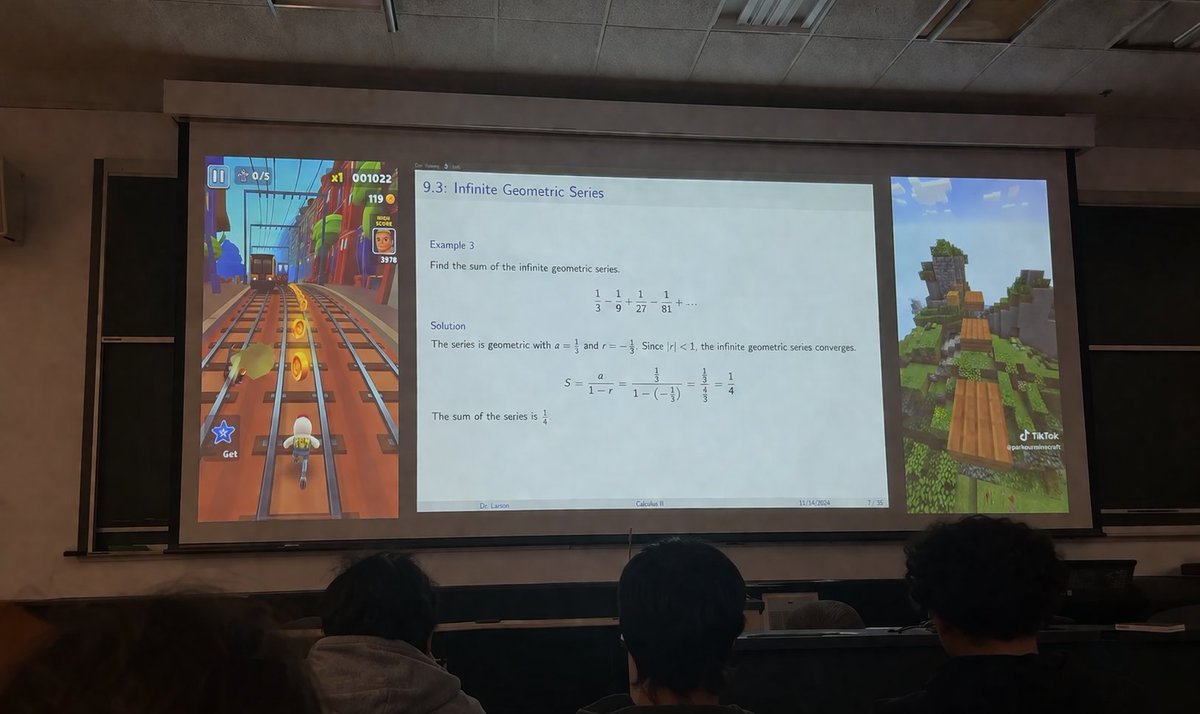
This Sora 2 prompt generates a viral-worthy image: a lecture hall projector shows gaming videos beside a math lecture, framed by students' silhouettes.
PROMPT · EN
一张从昏暗的大学阶梯教室观众席拍摄的写实照片,镜头越过前景中三名学生的后脑勺,望向巨大的投影屏幕。投影屏幕呈现出分为三个独立垂直面板的布局。左侧面板显示垂直的 argleft game: 地铁跑酷游戏画面,画面中一个角色在铁轨上奔跑并收集金币,带有显示分数为 "001022" 的 UI 元素。宽大的中央面板显示一张学术演示 Slides,标题为 "argslide topic: 9.3:无穷几何级数"。幻灯片包含数学文本:"例 3:求无穷几何级数的和。1/3 - 1/9 + 1/27 - 1/81 + ... 解:该级数为几何级数,其中 a = 1/3 且 r = -1/3。由于 |r| < 1,该无穷几何级数收敛。S = a / (1 - r) = (1/3) / (1 - (-1/3)) = (1/3) / (4/3) = 1/4。级数之和为 1/4。" 幻灯片页脚显示 "argprofessor name: Larson 博士"、"argcourse name: 微积分 II"、"2024 年 11 月 14 日" 以及 "7 / 35"。右侧面板显示垂直的 argright game: 我的世界跑酷游戏画面,展示了草地景观上方的浮动木块,右下角带有 TikTok 水印。房间装有吊顶,屏幕边缘后方可见黑板。
About this prompt
This Sora 2 prompt generates a viral-worthy image: a lecture hall projector shows gaming videos beside a math lecture, framed by students' silhouettes. Use it as a Concept Art starting point for GPT Image 2: keep the visual structure and style constraints intact, then swap in your own subject, brand, or scene.
Start by replacing left game, slide topic, professor name, and course name, then keep the camera, composition, and material cues in the same order. This makes the output easier to compare across variations.
How to use this prompt
- Copy the prompt from this page.
- Open your preferred AI image model (e.g., Sora 2).
- Paste the prompt and tweak the variables in curly braces: left game, slide topic, professor name, course, right game.
- Generate the image, then download and share your brainrot creation.


