
AI Logo & Lesson Chalkboard — Sora 2 Prompt
Generate a photorealistic classroom chalkboard with a custom colorful logo and neatly structured, handwritten lesson notes.
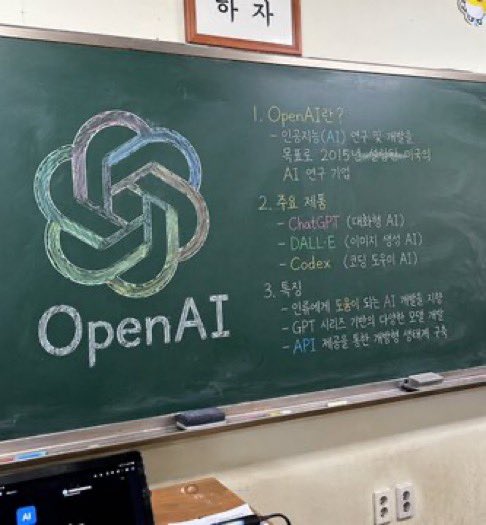
A photorealistic, slightly angled snapshot of a green classroom chalkboard. On the left side of the board is a large, meticulously drawn chalk illustration of the argcompany name: OpenAI logo, rendered in blended pastel colors like green, blue, and purple, with the word "arglogo text: OpenAI" written in neat white chalk beneath it. The right side of the board features handwritten text organized into exactly 3 numbered sections. Section 1 is titled "argsection one title: 1. OpenAI란?" followed by a brief explanatory paragraph. Section 2 is titled "argsection two title: 2. 주요 제품" and lists 3 bullet points including ChatGPT, DALL-E, and Codex. Section 3 is titled "argsection three title: 3. 특징" and contains 3 bullet points describing features. The chalkboard has a silver metal frame and a chalk ledge holding 2 rectangular erasers and scattered pieces of chalk. Below the board is an off-white wall with a double electrical outlet. In the bottom left foreground, the top edge of a dark laptop screen is partially visible, and above the chalkboard, the bottom edge of a framed sign is cut off by the frame.
About this prompt
Generate a photorealistic classroom chalkboard with a custom colorful logo and neatly structured, handwritten lesson notes. Use it as a Concept Art starting point for GPT Image 2: keep the visual structure and style constraints intact, then swap in your own subject, brand, or scene.
Common directions include gptimage2api prompts, gptimage2api, and en. Treat these tags as creative cues; the prompt structure and preview image are the more useful guide.
Start by replacing company name, logo text, section one title, and section two title, then keep the camera, composition, and material cues in the same order. This makes the output easier to compare across variations.
How to use this prompt
- Copy the full prompt template from this page.
- Select Sora 2 or your preferred high-fidelity video/image model.
- Replace the placeholder variables (e.g.,
company name,logo text,section titles) with your specific content. - Adjust the lesson details for sections 1-3 to match your topic.
- Generate and refine. If the text is unclear, try re-running or simplifying the text inputs.


