
Sora2 Hub
Sora2 Hub
  • Prompt Library
  • Pricing
  • Showcase
  • Blog
Sora2 Hub
Sora2 Hub
Sora2 Hub

Sora2 Hub

Professional AI creation platform powered by Sora 2, Veo 3.1, and Nano Banana Pro. Create stunning videos and studio-grade images with advanced control, HD quality, and no watermarks.

Email:support@sora2hub.org

AI Video Generator

  • Text to Video
  • Image to Video
  • Veo 3.1
  • Sora 2
  • Kling 3.0
  • Kling 2.6
  • Kling 2.5
  • Runway
  • Wan 2.6
  • Seedance 2.0
  • Hailuo 2.3
  • Grok Imagine
  • HappyHorse-1.0

AI Image Generator

  • Text to Image
  • Image to Image
  • Nano Banana Pro
  • Nano Banana
  • 4o Image
  • Flux Kontext
  • Z Image
  • Seedream 4.5
  • Seedream 5.0 Lite
  • Nano Banana 2
  • GPT Image 2
  • AI Image Upscaler

AI Effects

  • AI Age Filter
  • AI Gender Swap
  • AI Kiss
  • AI Hug
  • Ghibli Image
  • AI Mermaid Filter
  • AI Bodyshake
  • Smiling Filter
  • AI Fat
  • Action Figure

Product

  • Features
  • Showcases
  • Pricing

Company

  • About
  • Contact

© 2025 • Sora2 Hub ORG All rights reserved.

  • Privacy Policy
  • Terms of Service
  • Refund Policy
  1. Home
  2. /
  3. Prompts
  4. /
  5. GPT Image 2
  6. /
  7. Dense vs MoE Infographic — AI Architecture Comparison Prompt
GPT Image 2AI Prompt

Dense vs MoE Infographic — AI Architecture Comparison Prompt

Generate a side-by-side infographic comparing Dense and Mixture of Experts neural networks, highlighting key differences in architecture and efficiency.
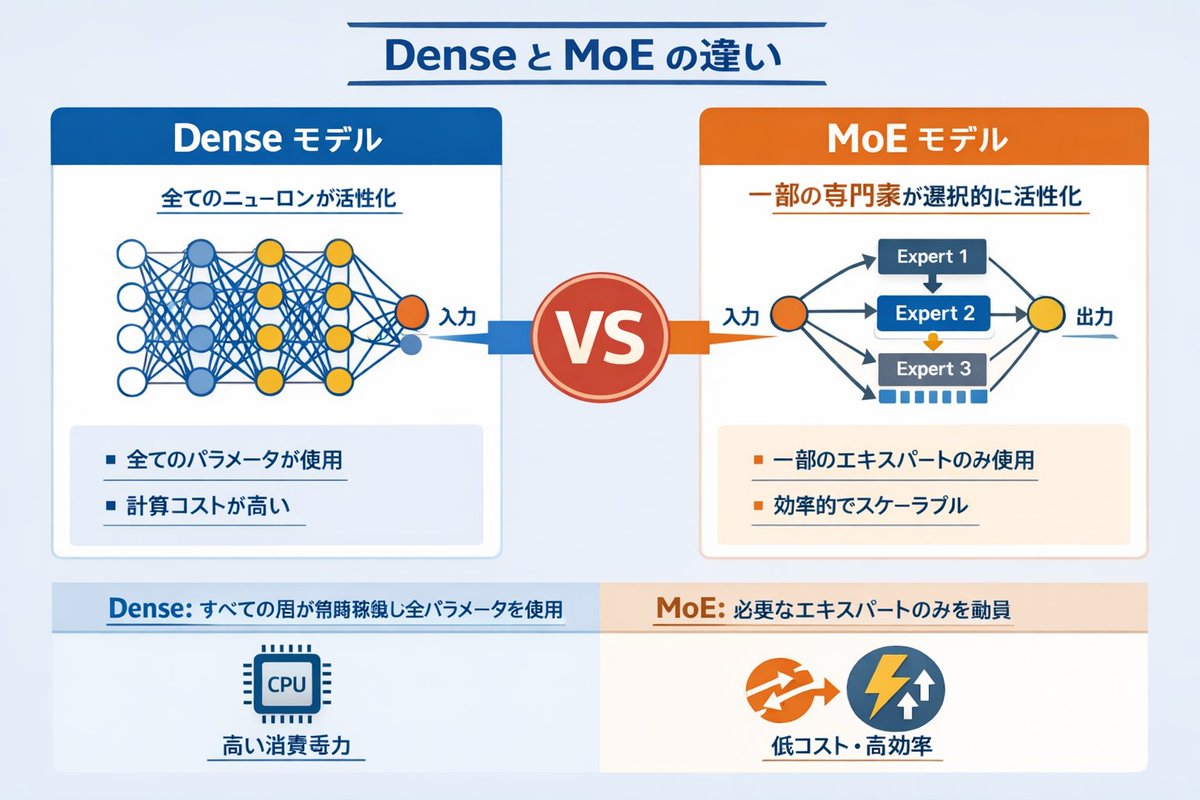
Dense vs MoE Infographic — AI Architecture Comparison Prompt
PROMPT · EN
type
信息图对比图
header
title
{argument name="main title" default="Dense 与 MoE 的区别"}
layout
structure
两列式布局,中间由 VS 徽章分隔,底部设有分栏页脚
sections
item 1
position
左侧栏
theme_color
蓝色
header
{argument name="left model name" default="Dense 模型"}
subtitle
所有神经元均被激活
diagram
type
全连接神经网络
elements
item 1
1 个橙色输入节点,标注为“输入”
item 2
4 个隐藏层,节点数分别为 4、5、4 和 2
item 3
节点颜色为白色、蓝色和黄色
item 4
所有相邻节点间密集的交叉连接线
bullet_points
count
2
items
item 1
{argument name="left bullet point" default="使用所有参数"}
item 2
计算成本高
item 2
position
右侧栏
theme_color
橙色
header
{argument name="right model name" default="MoE 模型"}
subtitle
选择性激活部分专家
diagram
type
混合专家网络
elements
item 1
1 个橙色输入节点,标注为“输入”
item 2
3 个矩形块,分别标注为 Expert 1、Expert 2、Expert 3
item 3
1 个黄色输出节点,标注为“输出”
item 4
连接输入到专家、以及专家到输出的分支箭头
bullet_points
count
2
items
item 1
{argument name="right bullet point" default="仅使用部分专家"}
item 2
高效且可扩展
item 3
position
中心
element
带有 VS 文字的红色圆形徽章
connections
指向左侧的蓝色箭头,指向右侧的橙色箭头
item 4
position
页脚左侧
background
浅蓝色
text
Dense:所有层常驻运行并使用全部参数
icon
1 个 CPU 芯片图形
label
高功耗
item 5
position
页脚右侧
background
浅橙色
text
MoE:仅调用必要的专家
icons
2 个圆形图形(橙色箭头、蓝色闪电)
label
低成本、高效率

About this prompt

Generate a side-by-side infographic comparing Dense and Mixture of Experts neural networks, highlighting key differences in architecture and efficiency. Use it as a Concept Art starting point for GPT Image 2: keep the visual structure and style constraints intact, then swap in your own subject, brand, or scene.

This prompt is organized as structured JSON with fields such as type, header, and layout. Keeping that hierarchy helps the model separate the subject, layout, interface elements, and detail constraints.

Start with small changes to subject, scene, camera, and color, then generate a few variations to compare composition and detail without turning the page copy into keyword stuffing.

How to use this prompt

  1. Copy the full prompt code above.
  2. Paste it into a text-to-image AI tool like Sora 2 or DALL·E.
  3. Replace argument placeholders (e.g., model names, bullet points) with your desired content.
  4. Generate the infographic and make adjustments if needed.
  5. Download the image for presentations, articles, or social media.

FAQ

Vania

@VantageAdol→

Published
Apr 25, 2026
Language
EN
Model
GPT Image 2
Category
Concept Art
GPT Image 2Concept Artgpt-image-2twitter
Views
5.1K
Copies
579
Likes
258

Share

More from GPT Image 2

Browse all
Minimalist Mother's Day Wallpaper — Sora 2 Prompt with Calligraphy & Carnations

Minimalist Mother's Day Wallpaper — Sora 2 Prompt with Calligraphy & Carnations

@EdimakorJP
Luxury Tennis Fashion Poster — Bold Studio Shoot Sora Prompt

Luxury Tennis Fashion Poster — Bold Studio Shoot Sora Prompt

@blueski68251660
Shenzhen Golden Hour City Prompt: Futuristic Heritage Poster

Shenzhen Golden Hour City Prompt: Futuristic Heritage Poster

@ivanalog_com

Create faster with Sora2Hub prompts.

Use curated prompt pages as searchable entry points, then jump straight into generation with the right model context.

Explore prompts

