
GPT Image 2AI Prompt

Dual-Axis Crime Data Infographic Prompt

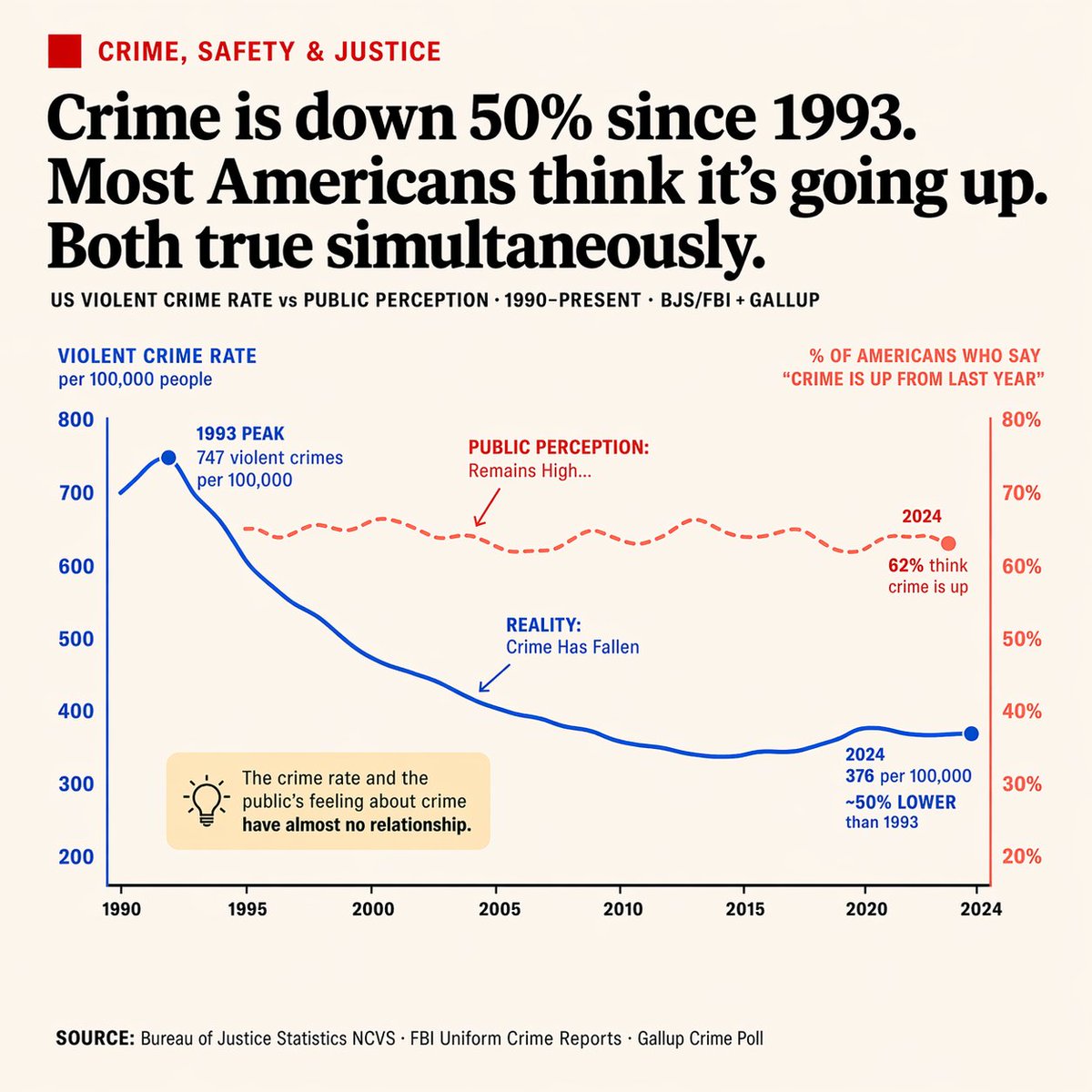
Generate a clean, newspaper-style chart contrasting US violent crime rates with public perception. Includes annotations, a callout box, and customizable data points.
Dual-Axis Crime Data Infographic Prompt
PROMPT · EN
type
editorial infographic dual-axis line chart
style
clean, newspaper-style, off-white background, highly legible typography
header
category
CRIME, SAFETY & JUSTICE (red text with red square icon)
headline
{argument name="main headline" default="Crime is down 50% since 1993. Most Americans think it's going up. Both true simultaneously."}
sub_headline
US VIOLENT CRIME RATE vs PUBLIC PERCEPTION · 1990-PRESENT · BJS/FBI + GALLUP
chart
x_axis
Years 1990 to 2024 with 8 tick marks
left_y_axis
color
blue
label
{argument name="left axis label" default="VIOLENT CRIME RATE per 100,000 people"}
range
200 to 800
right_y_axis
color
red
label
{argument name="right axis label" default="% OF AMERICANS WHO SAY 'CRIME IS UP FROM LAST YEAR'"}
range
20% to 80%
data_series
item 1
name
Reality
style
solid blue line
trend
peaks early then drops significantly
annotations
item 1
1993 PEAK 747 violent crimes per 100,000 (with blue dot)
item 2
REALITY: Crime Has Fallen (with blue arrow pointing to line)
item 3
2024 376 per 100,000 ~50% LOWER than 1993 (with blue dot)
item 2
name
Public Perception
style
dashed red line
trend
remains relatively flat and high
annotations
item 1
PUBLIC PERCEPTION: Remains High... (with red arrow pointing to line)
item 2
2024 62% think crime is up (with red dot)
callout_box
position
bottom left inside chart area
style
light yellow rectangle
icon
lightbulb
text
{argument name="callout text" default="The crime rate and the public's feeling about crime have almost no relationship."}
footer
text
SOURCE: {argument name="footer source" default="Bureau of Justice Statistics NCVS · FBI Uniform Crime Reports · Gallup Crime Poll"}

About this prompt

Generate a clean, newspaper-style chart contrasting US violent crime rates with public perception. Includes annotations, a callout box, and customizable data points. Use it as a Concept Art starting point for GPT Image 2: keep the visual structure and style constraints intact, then swap in your own subject, brand, or scene.

This prompt is organized as structured JSON with fields such as type, style, header, chart, callout box, and footer. Keeping that hierarchy helps the model separate the subject, layout, interface elements, and detail constraints.

Start with small changes to subject, scene, camera, and color, then generate a few variations to compare composition and detail without turning the page copy into keyword stuffing.

How to use this prompt

  1. Copy the prompt JSON. 2. Choose a visual AI model (e.g., Sora 2, Midjourney). 3. Edit the 'argument' variables for a custom headline or axis labels. 4. Generate the image for a publication-ready infographic.


FAQ

More from GPT Image 2

Browse all

Create faster with Sora2Hub prompts.

Use curated prompt pages as searchable entry points, then jump straight into generation with the right model context.

Explore prompts
