
Sora2 Hub
Sora2 Hub
  • Prompt Library
  • Pricing
  • Showcase
  • Blog
Sora2 Hub
Sora2 Hub
Sora2 Hub

Sora2 Hub

Professional AI creation platform powered by Sora 2, Veo 3.1, and Nano Banana Pro. Create stunning videos and studio-grade images with advanced control, HD quality, and no watermarks.

Email:support@sora2hub.org

AI Video Generator

  • Text to Video
  • Image to Video
  • Veo 3.1
  • Sora 2
  • Kling 3.0
  • Kling 2.6
  • Kling 2.5
  • Runway
  • Wan 2.6
  • Seedance 2.0
  • Hailuo 2.3
  • Grok Imagine
  • HappyHorse-1.0

AI Image Generator

  • Text to Image
  • Image to Image
  • Nano Banana Pro
  • Nano Banana
  • 4o Image
  • Flux Kontext
  • Z Image
  • Seedream 4.5
  • Seedream 5.0 Lite
  • Nano Banana 2
  • GPT Image 2
  • AI Image Upscaler

AI Effects

  • AI Age Filter
  • AI Gender Swap
  • AI Kiss
  • AI Hug
  • Ghibli Image
  • AI Mermaid Filter
  • AI Bodyshake
  • Smiling Filter
  • AI Fat
  • Action Figure

Product

  • Features
  • Showcases
  • Pricing

Company

  • About
  • Contact

© 2025 • Sora2 Hub ORG All rights reserved.

  • Privacy Policy
  • Terms of Service
  • Refund Policy
  1. Home
  2. /
  3. Prompts
  4. /
  5. GPT Image 2
  6. /
  7. F1 Race Infographic Dashboard — Dark Mode Neon
GPT Image 2AI Prompt

F1 Race Infographic Dashboard — Dark Mode Neon

Create a sleek, high-tech F1 broadcast dashboard with race winners, podiums, highlights, and standings in dark mode with neon cyan accents.
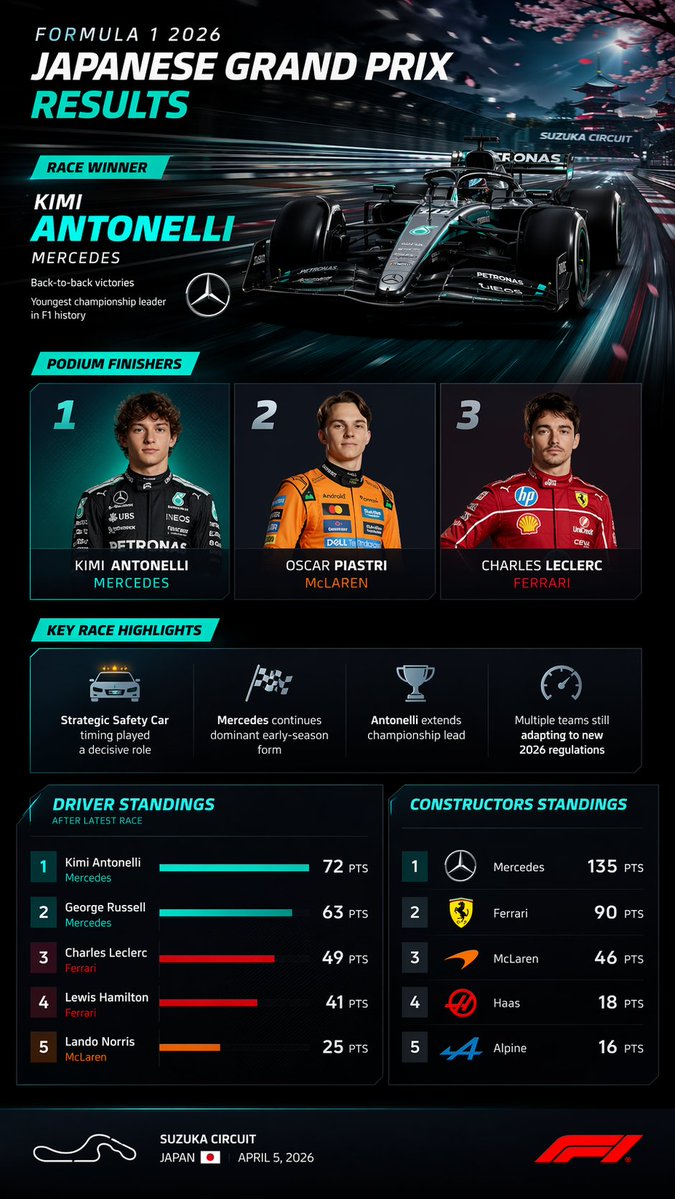
F1 Race Infographic Dashboard — Dark Mode Neon
PROMPT · EN
type
sports broadcast infographic dashboard
theme
dark mode, sleek, modern, neon cyan accents, high-tech F1 graphics
header
title
FORMULA 1 {argument name="year" default="2026"} {argument name="race name" default="JAPANESE GRAND PRIX"} RESULTS
winner_callout
label
RACE WINNER
driver
{argument name="winner name" default="KIMI ANTONELLI"}
team
{argument name="winning team" default="MERCEDES"}
stats
item 1
Back-to-back victories
item 2
Youngest championship leader in F1 history
logo
Mercedes star
background_image
Sleek black and teal F1 car speeding on a track, heavy motion blur, cherry blossoms and a Japanese pagoda in the background, 'SUZUKA CIRCUIT' text on an overhead gantry.
layout
sections
item 1
title
PODIUM FINISHERS
position
middle-top
count
3
labels
item 1
1 - Photo of young male driver in black Mercedes suit, KIMI ANTONELLI, MERCEDES
item 2
2 - Photo of young male driver in orange McLaren suit, OSCAR PIASTRI, McLAREN
item 3
3 - Photo of young male driver in red Ferrari suit, CHARLES LECLERC, FERRARI
item 2
title
KEY RACE HIGHLIGHTS
position
middle
count
4
labels
item 1
Safety Car icon: Strategic Safety Car timing played a decisive role
item 2
Checkered flag icon: Mercedes continues dominant early-season form
item 3
Trophy icon: Antonelli extends championship lead
item 4
Speedometer icon: Multiple teams still adapting to new 2026 regulations
item 3
title
DRIVER STANDINGS
position
bottom-left
count
5
labels
item 1
1 Kimi Antonelli Mercedes 72 PTS
item 2
2 George Russell Mercedes 63 PTS
item 3
3 Charles Leclerc Ferrari 49 PTS
item 4
4 Lewis Hamilton Ferrari 41 PTS
item 5
5 Lando Norris McLaren 25 PTS
visuals
Horizontal bar charts for each driver matching team colors
item 4
title
CONSTRUCTORS STANDINGS
position
bottom-right
count
5
labels
item 1
1 Mercedes 135 PTS
item 2
2 Ferrari 90 PTS
item 3
3 McLaren 46 PTS
item 4
4 Haas 18 PTS
item 5
5 Alpine 16 PTS
visuals
Team logos next to each rank
footer
content
White outline of track layout, {argument name="circuit name" default="SUZUKA CIRCUIT"}, JAPAN with flag, APRIL 5, 2026, red F1 logo.

About this prompt

Create a sleek, high-tech F1 broadcast dashboard with race winners, podiums, highlights, and standings in dark mode with neon cyan accents. Use it as a Concept Art starting point for GPT Image 2: keep the visual structure and style constraints intact, then swap in your own subject, brand, or scene.

This prompt is organized as structured JSON with fields such as type, theme, header, layout, and footer. Keeping that hierarchy helps the model separate the subject, layout, interface elements, and detail constraints.

Start with small changes to subject, scene, camera, and color, then generate a few variations to compare composition and detail without turning the page copy into keyword stuffing.

How to use this prompt

  1. Copy the full JSON prompt from the page.
  2. Paste it into your preferred AI image generator (Sora 2, Midjourney, etc.).
  3. Edit the argument fields—year, race name, winner, and team—to match your desired Grand Prix.
  4. Submit the prompt and let the AI render your custom F1 results dashboard.
  5. Refine by adjusting team colors or stats if the output needs minor tweaks.

FAQ

呆大人

@prompts→

Published
Apr 30, 2026
Language
EN
Model
GPT Image 2
Category
Concept Art
GPT Image 2Concept Artgpt-image-2gptimage2api promptsgptimage2apien
Views
161
Copies
18
Likes
6

Share

More from GPT Image 2

Browse all
Minimalist Skincare Brand Manual — Sora 2 Prompt

Minimalist Skincare Brand Manual — Sora 2 Prompt

@FranromeGraph
Cyberpunk Catgirl Soda Splash — Sora 2 Prompt

Cyberpunk Catgirl Soda Splash — Sora 2 Prompt

@kuso_seisakusyo
Minimalist Japanese Electric Nail Clipper Product Landing Page — Sora 2 Prompt

Minimalist Japanese Electric Nail Clipper Product Landing Page — Sora 2 Prompt

@eisho_m

Create faster with Sora2Hub prompts.

Use curated prompt pages as searchable entry points, then jump straight into generation with the right model context.

Explore prompts

