
Sora2 Hub
Sora2 Hub
  • Prompt Library
  • Pricing
  • Showcase
  • Blog
Sora2 Hub
Sora2 Hub
Sora2 Hub

Sora2 Hub

Professional AI creation platform powered by Sora 2, Veo 3.1, and Nano Banana Pro. Create stunning videos and studio-grade images with advanced control, HD quality, and no watermarks.

Email:support@sora2hub.org

AI Video Generator

  • Text to Video
  • Image to Video
  • Veo 3.1
  • Sora 2
  • Kling 3.0
  • Kling 2.6
  • Kling 2.5
  • Runway
  • Wan 2.6
  • Seedance 2.0
  • Hailuo 2.3
  • Grok Imagine
  • HappyHorse-1.0

AI Image Generator

  • Text to Image
  • Image to Image
  • Nano Banana Pro
  • Nano Banana
  • 4o Image
  • Flux Kontext
  • Z Image
  • Seedream 4.5
  • Seedream 5.0 Lite
  • Nano Banana 2
  • GPT Image 2
  • AI Image Upscaler

AI Effects

  • AI Age Filter
  • AI Gender Swap
  • AI Kiss
  • AI Hug
  • Ghibli Image
  • AI Mermaid Filter
  • AI Bodyshake
  • Smiling Filter
  • AI Fat
  • Action Figure

Product

  • Features
  • Showcases
  • Pricing

Company

  • About
  • Contact

© 2025 • Sora2 Hub ORG All rights reserved.

  • Privacy Policy
  • Terms of Service
  • Refund Policy
  1. Home
  2. /
  3. Prompts
  4. /
  5. GPT Image 2
  6. /
  7. Cute Sci-Fi Gacha Game UI Mockup Prompt
GPT Image 2AI Prompt

Cute Sci-Fi Gacha Game UI Mockup Prompt

Generates a polished mobile game UI for a robot blind box or gacha app, featuring a glassmorphism design with neon accents and customizable characters.
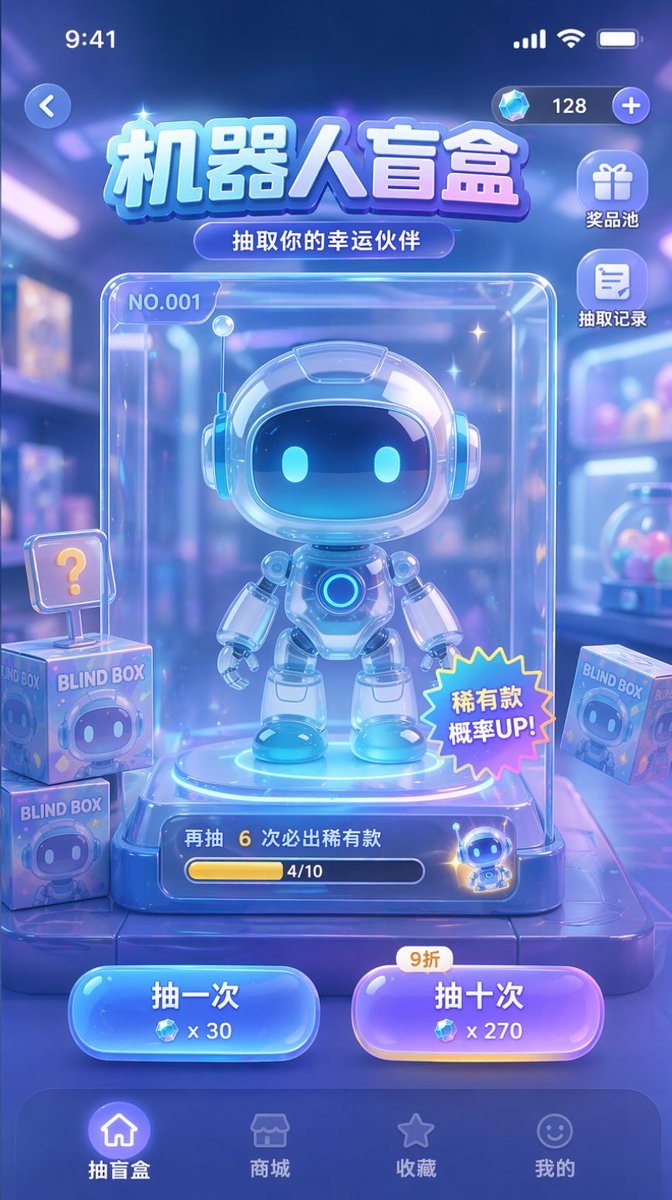
Cute Sci-Fi Gacha Game UI Mockup Prompt
PROMPT · EN
type
mobile game UI mockup
theme
sci-fi, cute, glassmorphism, neon blue and purple color palette
header
status_bar
standard iOS status bar at top
top_controls
back button on left, currency display with diamond icon and '128' on right
title
{argument name="main title" default="机器人盲盒"}
subtitle
{argument name="subtitle" default="抽取你的幸运伙伴"}
layout
side_menu
position
top right below currency
count
2
items
item 1
icon
gift
label
奖品池
item 2
icon
document
label
抽取记录
centerpiece
description
clear glass display case containing the main prize
subject
{argument name="robot character description" default="cute chibi-style robot with glowing blue eyes and white glossy armor"}
case_details
item 1
label 'NO.001' in top left
item 2
starburst sticker '稀有款 概率UP!' on bottom right
item 3
progress bar at bottom with text '再抽 6 次必出稀有款' and '4/10'
background_elements
description
blurred toy store background
floating_items
count
3
description
square boxes labeled 'BLIND BOX' with robot faces, one with a '?' sign
action_buttons
position
bottom center above nav bar
count
2
buttons
item 1
color
blue
text
{argument name="left button text" default="抽一次"}
cost
x 30
item 2
color
purple
text
{argument name="right button text" default="抽十次"}
cost
x 270
tag
9折
bottom_navigation
count
4
items
item 1
icon
home
label
抽盲盒
state
active
item 2
icon
store
label
商城
item 3
icon
star
label
收藏
item 4
icon
smiley
label
我的

About this prompt

Generates a polished mobile game UI for a robot blind box or gacha app, featuring a glassmorphism design with neon accents and customizable characters. Use it as a Concept Art starting point for GPT Image 2: keep the visual structure and style constraints intact, then swap in your own subject, brand, or scene.

This prompt is organized as structured JSON with fields such as type, theme, header, and layout. Keeping that hierarchy helps the model separate the subject, layout, interface elements, and detail constraints.

Start with small changes to subject, scene, camera, and color, then generate a few variations to compare composition and detail without turning the page copy into keyword stuffing.

How to use this prompt

  1. Copy the entire prompt and paste it into your chosen AI model interface (e.g., Sora, Midjourney, or DALL-E).
  2. Find and customize the argument variables like {argument name="main title"} with your preferred text (e.g., change "机器人盲盒" to "Robo Box").
  3. Modify the default character description in the prompt to feature your own robot design or theme.
  4. Adjust the action button texts, costs, or reward probabilities to match your game's specific mechanics.
  5. Generate the image and review the mockup. You can tweak variables and regenerate to refine the layout and details.


FAQ

summer song

@prompts→

Published
Apr 30, 2026
Language
EN
Model
GPT Image 2
Category
Concept Art
GPT Image 2Concept Artgpt-image-2gptimage2api promptsgptimage2apien
Views
4.7K
Copies
429
Likes
241

Share

More from GPT Image 2

Browse all
Sacred Dragon Dome Ceiling Mural — Sora 2 Prompt

Sacred Dragon Dome Ceiling Mural — Sora 2 Prompt

@KanaWorks_AI
Photorealistic Fashion Magazine Cover — Sora 2 Prompt

Photorealistic Fashion Magazine Cover — Sora 2 Prompt

@aichof21
Luxury Tennis Fashion Poster — Bold Studio Shoot Sora Prompt

Luxury Tennis Fashion Poster — Bold Studio Shoot Sora Prompt

@blueski68251660

Create faster with Sora2Hub prompts.

Use curated prompt pages as searchable entry points, then jump straight into generation with the right model context.

Explore prompts
