
Sora2 Hub
Sora2 Hub
  • Prompt Library
  • Pricing
  • Showcase
  • Blog
Sora2 Hub
Sora2 Hub
Sora2 Hub

Sora2 Hub

Professional AI creation platform powered by Sora 2, Veo 3.1, and Nano Banana Pro. Create stunning videos and studio-grade images with advanced control, HD quality, and no watermarks.

Email:support@sora2hub.org

AI Video Generator

  • Text to Video
  • Image to Video
  • Veo 3.1
  • Sora 2
  • Kling 3.0
  • Kling 2.6
  • Kling 2.5
  • Runway
  • Wan 2.6
  • Seedance 2.0
  • Hailuo 2.3
  • Grok Imagine
  • HappyHorse-1.0

AI Image Generator

  • Text to Image
  • Image to Image
  • Nano Banana Pro
  • Nano Banana
  • 4o Image
  • Flux Kontext
  • Z Image
  • Seedream 4.5
  • Seedream 5.0 Lite
  • Nano Banana 2
  • GPT Image 2
  • AI Image Upscaler

AI Effects

  • AI Age Filter
  • AI Gender Swap
  • AI Kiss
  • AI Hug
  • Ghibli Image
  • AI Mermaid Filter
  • AI Bodyshake
  • Smiling Filter
  • AI Fat
  • Action Figure

Product

  • Features
  • Showcases
  • Pricing

Company

  • About
  • Contact

© 2025 • Sora2 Hub ORG All rights reserved.

  • Privacy Policy
  • Terms of Service
  • Refund Policy
  1. Home
  2. /
  3. Prompts
  4. /
  5. GPT Image 2
  6. /
  7. AI Benchmark Report Photo — Sora 2 Prompt
GPT Image 2AI Prompt

AI Benchmark Report Photo — Sora 2 Prompt

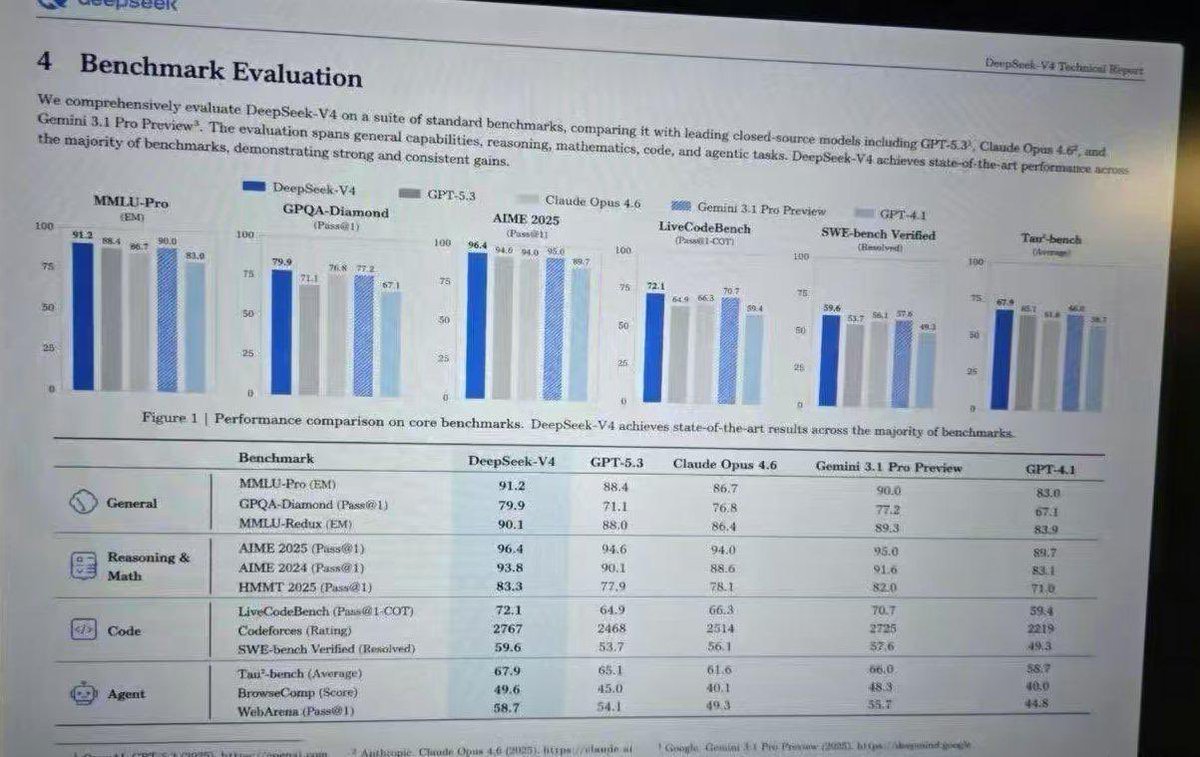
Generate a realistic screenshot of an academic AI benchmark report with bar charts and detailed performance tables.
AI Benchmark Report Photo — Sora 2 Prompt
PROMPT · EN
type
photograph of a computer monitor displaying an academic technical report
style
slightly angled screen photo, visible moire pattern, LCD pixel grid, slight glare, LaTeX document formatting, serif fonts
document_header
left
4 Benchmark Evaluation
right
{argument name="report title" default="DeepSeek-V4 Technical Report"}
introductory_text
Paragraph summarizing comprehensive evaluation of {argument name="main model name" default="DeepSeek-V4"} against {argument name="competitor model 1" default="GPT-5.3"}, {argument name="competitor model 2" default="Claude Opus 4.6"}, and {argument name="competitor model 3" default="Gemini 3.1 Pro Preview"}.
visualizations
legend
5 items with color codes: dark blue, grey, light grey, blue striped, light blue
bar_charts
count
6
labels
item 1
MMLU-Pro (EM)
item 2
GPQA-Diamond (Pass@1)
item 3
AIME 2025 (Pass@1)
item 4
LiveCodeBench (Pass@1-COT)
item 5
SWE-bench Verified (Resolved)
item 6
Tau-bench (Average)
caption
Figure 1 | Performance comparison on core benchmarks. DeepSeek-V4 achieves state-of-the-art results across the majority of benchmarks.
data_table
columns
item 1
Benchmark
item 2
{argument name="main model name" default="DeepSeek-V4"}
item 3
{argument name="competitor model 1" default="GPT-5.3"}
item 4
{argument name="competitor model 2" default="Claude Opus 4.6"}
item 5
{argument name="competitor model 3" default="Gemini 3.1 Pro Preview"}
item 6
GPT-4.1
categories
count
4
rows
item 1
label
General
icon
globe/network
sub_items
3
item 2
label
Reasoning & Math
icon
calculator/clipboard
sub_items
3
item 3
label
Code
icon
code brackets
sub_items
3
item 4
label
Agent
icon
robot face
sub_items
3

About this prompt

Generate a realistic screenshot of an academic AI benchmark report with bar charts and detailed performance tables. Use it as a Concept Art starting point for GPT Image 2: keep the visual structure and style constraints intact, then swap in your own subject, brand, or scene.

This prompt is organized as structured JSON with fields such as type, style, document header, introductory text, visualizations, and data table. Keeping that hierarchy helps the model separate the subject, layout, interface elements, and detail constraints.

Start with small changes to subject, scene, camera, and color, then generate a few variations to compare composition and detail without turning the page copy into keyword stuffing.

How to use this prompt

  1. Copy the full prompt JSON from the page. 2. Select your preferred AI image model (e.g., Sora 2). 3. Edit the 'argument' fields like model names or report title to customize the report. 4. Generate and refine until the screen photo has the desired moiré pattern and LaTeX formatting.


FAQ

Anneshu Nag

@prompts→

Published
Apr 30, 2026
Language
EN
Model
GPT Image 2
Category
Concept Art
GPT Image 2Concept Artgpt-image-2gptimage2api promptsgptimage2apien
Views
104
Copies
10
Likes
4

Share

More from GPT Image 2

Browse all
Photorealistic Fashion Magazine Cover — Sora 2 Prompt

Photorealistic Fashion Magazine Cover — Sora 2 Prompt

@aichof21
Cozy Anime Cat Holiday Bedroom — Sora 2 Prompt

Cozy Anime Cat Holiday Bedroom — Sora 2 Prompt

@miya_space
Celebrity Crossover — Sora 2 Prompt

Celebrity Crossover — Sora 2 Prompt

@Conor_D_Dart

Create faster with Sora2Hub prompts.

Use curated prompt pages as searchable entry points, then jump straight into generation with the right model context.

Explore prompts
