GPT Image 2AI Prompt
Cinematic Skybox Test Scene — Sora 2 Prompt
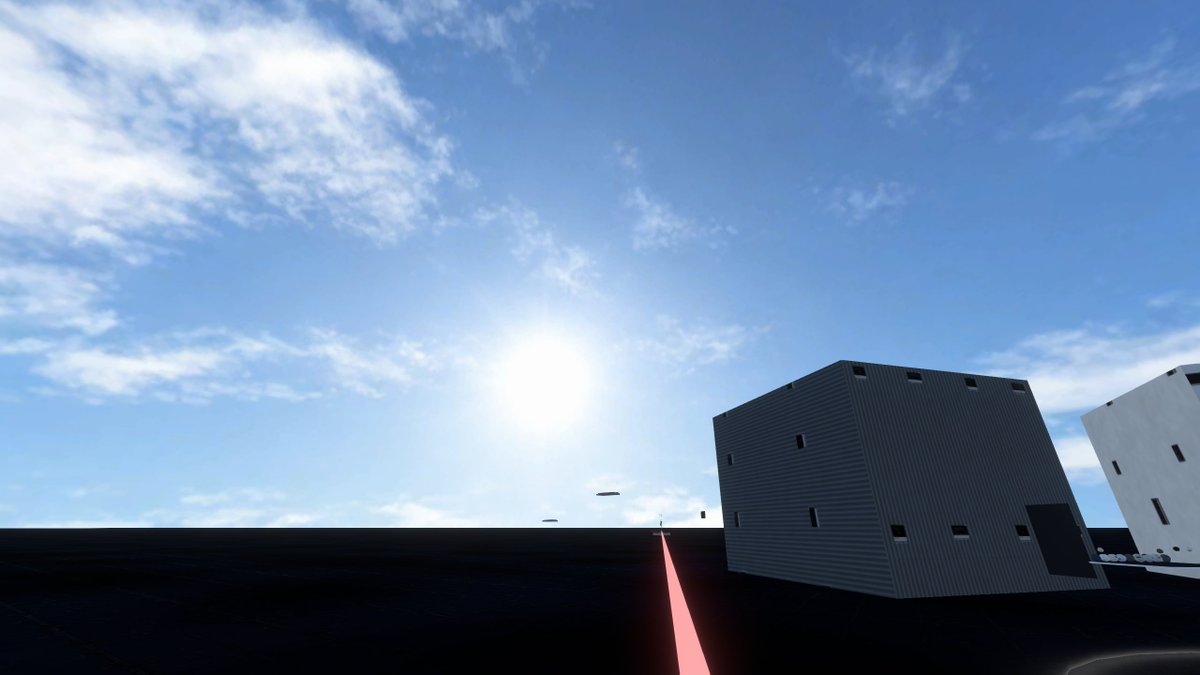
Create a photorealistic real-time-rendered game-engine skybox environment featuring a vast blue sky, dark platform, industrial buildings, and a glowing perspective guide line.
PROMPT · EN
Create a wide 16:9 photorealistic game-engine skybox test scene viewed from a low first-person camera on a vast flat, nearly black asphalt or matte platform under a huge open blue sky. The composition is dominated by the sky: bright midday sun glowing slightly left of center near the horizon line, strong lens bloom, pale blue atmospheric gradient, and scattered thin wispy white cirrus clouds across the upper left and upper right. The ground is a dark featureless plane with subtle reflections and faint grid-like seams, stretching to a straight distant horizon. On the right side, place two simple modern industrial cuboid buildings: one large dark gray corrugated metal box building tilted in perspective with small narrow black rectangular windows, a dark doorway, and a few roof vents; farther right, a white rectangular building partially cropped by the frame with sparse vertical black windows. Add a thin glowing pink-red line or laser strip running from the bottom center foreground toward the horizon beside the buildings, creating a strong perspective guide. Include a few tiny floating dark oval objects near the horizon beneath the sun. Use Unreal Engine / Unity-style real-time rendering, crisp shadows, high dynamic range lighting, realistic skybox atmosphere, minimal urban test environment, no people, no text, no vehicles, clean cinematic screenshot aesthetic. The customizable scene should use argsky condition: bright midday blue sky with wispy cirrus clouds, argground material: nearly black asphalt platform, argbuilding style: minimal corrugated industrial cuboid buildings, argaccent line color: glowing pink-red, and argcamera perspective: low first-person wide-angle view.
About this prompt
Create a photorealistic real-time-rendered game-engine skybox environment featuring a vast blue sky, dark platform, industrial buildings, and a glowing perspective guide line. Use it as a Concept Art starting point for GPT Image 2: keep the visual structure and style constraints intact, then swap in your own subject, brand, or scene.
Start by replacing sky condition, ground material, building style, and accent line color, then keep the camera, composition, and material cues in the same order. This makes the output easier to compare across variations.
How to use this prompt
- Copy the full prompt text and replace the default
{sky condition}argument with your desired sky type. - Paste it into your preferred AI image generator (e.g., Sora 2, Midjourney, DALL-E).
- Adjust optional elements like building style, ground material, or the accent line color to match your project's aesthetic.
- Generate the image and upscale or re-render for higher resolution if needed.