
GPT Image 2AI Prompt
SSR Gacha UI Screen — Landscape Game Design Prompt
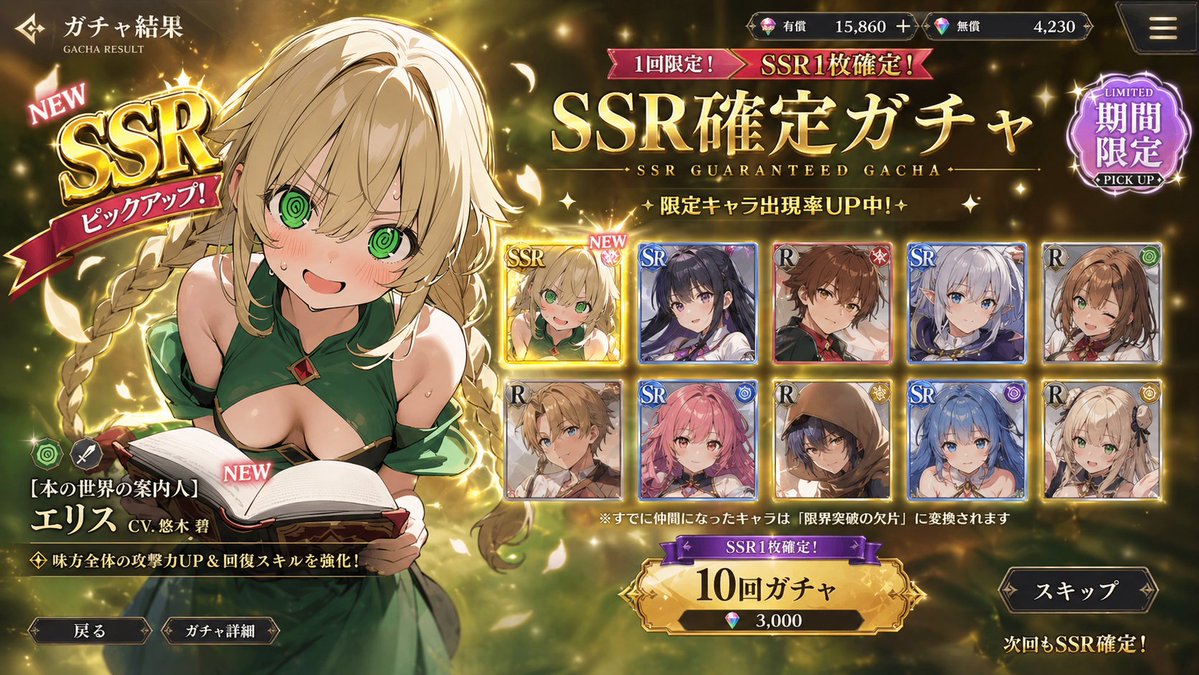
Generate a polished, modern social game gacha screen in landscape layout, featuring exclusive SSR banners, UI badges, and a results card grid.
PROMPT · EN
Create a modern social game UI gacha screen. Use a landscape layout, argrarity: SSR guaranteed gacha, and create a sense of exclusivity. Place UI badges like "argbadge: SSR," "NEW," and "Pickup" around the area, along with gacha buttons, skip buttons, and a card UI for the results list.
About this prompt
Generate a polished, modern social game gacha screen in landscape layout, featuring exclusive SSR banners, UI badges, and a results card grid. Use it as a Concept Art starting point for GPT Image 2: keep the visual structure and style constraints intact, then swap in your own subject, brand, or scene.
Start by replacing rarity and badge, then keep the camera, composition, and material cues in the same order. This makes the output easier to compare across variations.
How to use this prompt
- Copy the entire prompt text above.
- Paste it into your preferred AI image generation model (e.g., Sora 2, Midjourney).
- Customize the
rarityandbadgevariables to match your game's theme. - Generate the image and use it as a UI mockup or design reference.
- Refine by adding style keywords like "cinematic lighting" or "flat design" as needed.


