
Sora2 Hub
Sora2 Hub
  • Prompt Library
  • Pricing
  • Showcase
  • Blog
Sora2 Hub
Sora2 Hub
Sora2 Hub

Sora2 Hub

Professional AI creation platform powered by Sora 2, Veo 3.1, and Nano Banana Pro. Create stunning videos and studio-grade images with advanced control, HD quality, and no watermarks.

Email:support@sora2hub.org

AI Video Generator

  • Text to Video
  • Image to Video
  • Veo 3.1
  • Sora 2
  • Kling 3.0
  • Kling 2.6
  • Kling 2.5
  • Runway
  • Wan 2.6
  • Seedance 2.0
  • Hailuo 2.3
  • Grok Imagine
  • HappyHorse-1.0

AI Image Generator

  • Text to Image
  • Image to Image
  • Nano Banana Pro
  • Nano Banana
  • 4o Image
  • Flux Kontext
  • Z Image
  • Seedream 4.5
  • Seedream 5.0 Lite
  • Nano Banana 2
  • GPT Image 2
  • AI Image Upscaler

AI Effects

  • AI Age Filter
  • AI Gender Swap
  • AI Kiss
  • AI Hug
  • Ghibli Image
  • AI Mermaid Filter
  • AI Bodyshake
  • Smiling Filter
  • AI Fat
  • Action Figure

Product

  • Features
  • Showcases
  • Pricing

Company

  • About
  • Contact

© 2025 • Sora2 Hub ORG All rights reserved.

  • Privacy Policy
  • Terms of Service
  • Refund Policy
  1. Home
  2. /
  3. Prompts
  4. /
  5. GPT Image 2
  6. /
  7. Gym Equipment Analysis Diagram — Sora 2 Prompt
GPT Image 2AI Prompt

Gym Equipment Analysis Diagram — Sora 2 Prompt

Create a detailed, 4K analysis and usage guide diagram for any gym equipment, perfect for fitness professionals and content creators.
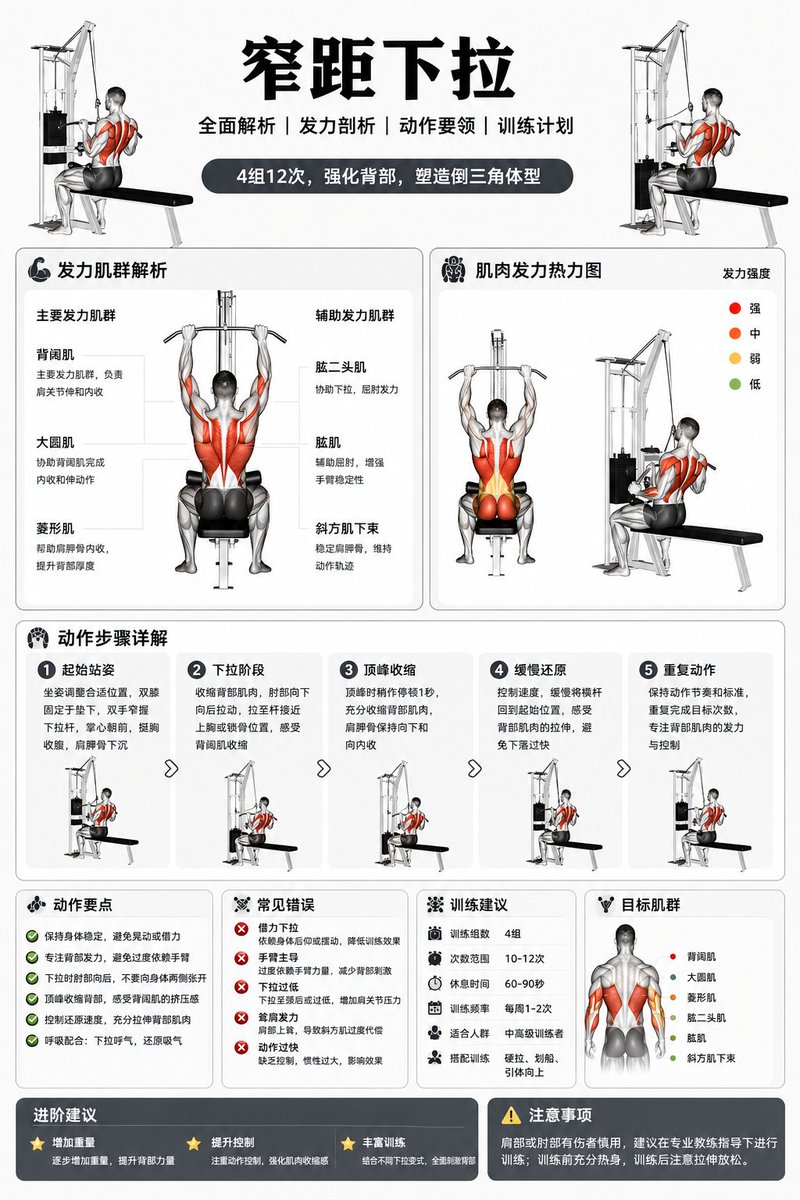
Gym Equipment Analysis Diagram — Sora 2 Prompt
1 / 2
PROMPT · EN
生成一份关于“argequipment name: 窄距下拉机”的分析与使用说明图。要求:3:4 比例,4k 分辨率。

About this prompt

Create a detailed, 4K analysis and usage guide diagram for any gym equipment, perfect for fitness professionals and content creators. Use it as a Concept Art starting point for GPT Image 2: keep the visual structure and style constraints intact, then swap in your own subject, brand, or scene.

Start by replacing equipment name, then keep the camera, composition, and material cues in the same order. This makes the output easier to compare across variations.

How to use this prompt

  1. Copy the Prompt: Copy the entire prompt body above.
  2. Choose a Model: Use a capable AI image generator like Sora 2 or a similar advanced model.
  3. Customize Variables: Replace the default equipment name in the curly braces {} with your specific machine (e.g., "Cable Crossover Machine").
  4. Set Parameters: Ensure the AI model is configured for a 3:4 aspect ratio and 4K resolution output.
  5. Generate & Refine: Run the prompt. Experiment with the equipment name to create guides for different machines.


FAQ

TETE

@TETEMemos→

Published
Apr 30, 2026
Language
EN
Model
GPT Image 2
Category
Concept Art
GPT Image 2Concept Artgpt-image-2twitter
Views
50
Copies
4
Likes
2

Share

More from GPT Image 2

Browse all
Indonesian Bird Contest Meme — Low-Quality Phone Photo

Indonesian Bird Contest Meme — Low-Quality Phone Photo

@NyaiiBubu
Anime Idol Profile Page — Lavender Art Style Prompt

Anime Idol Profile Page — Lavender Art Style Prompt

@uzuyanurp
8-Panel Romantic Manga: Shy Maid Robot & Master — Sora 2 Prompt

8-Panel Romantic Manga: Shy Maid Robot & Master — Sora 2 Prompt

@yume00112211

Create faster with Sora2Hub prompts.

Use curated prompt pages as searchable entry points, then jump straight into generation with the right model context.

Explore prompts
