
Sora2 Hub
Sora2 Hub
  • Prompt Library
  • Pricing
  • Showcase
  • Blog
Sora2 Hub
Sora2 Hub
Sora2 Hub

Sora2 Hub

Professional AI creation platform powered by Sora 2, Veo 3.1, and Nano Banana Pro. Create stunning videos and studio-grade images with advanced control, HD quality, and no watermarks.

Email:support@sora2hub.org

AI Video Generator

  • Text to Video
  • Image to Video
  • Veo 3.1
  • Sora 2
  • Kling 3.0
  • Kling 2.6
  • Kling 2.5
  • Runway
  • Wan 2.6
  • Seedance 2.0
  • Hailuo 2.3
  • Grok Imagine
  • HappyHorse-1.0

AI Image Generator

  • Text to Image
  • Image to Image
  • Nano Banana Pro
  • Nano Banana
  • 4o Image
  • Flux Kontext
  • Z Image
  • Seedream 4.5
  • Seedream 5.0 Lite
  • Nano Banana 2
  • GPT Image 2
  • AI Image Upscaler

AI Effects

  • AI Age Filter
  • AI Gender Swap
  • AI Kiss
  • AI Hug
  • Ghibli Image
  • AI Mermaid Filter
  • AI Bodyshake
  • Smiling Filter
  • AI Fat
  • Action Figure

Product

  • Features
  • Showcases
  • Pricing

Company

  • About
  • Contact

© 2025 • Sora2 Hub ORG All rights reserved.

  • Privacy Policy
  • Terms of Service
  • Refund Policy
  1. Home
  2. /
  3. Prompts
  4. /
  5. GPT Image 2
  6. /
  7. Paris Night Fashion Photography Prompt with Face Reference
GPT Image 2AI Prompt

Paris Night Fashion Photography Prompt with Face Reference

Transform your face into a cinematic fashion portrait set in a dramatic Paris night, complete with Eiffel Tower and Bugatti, using this customizable AI prompt.
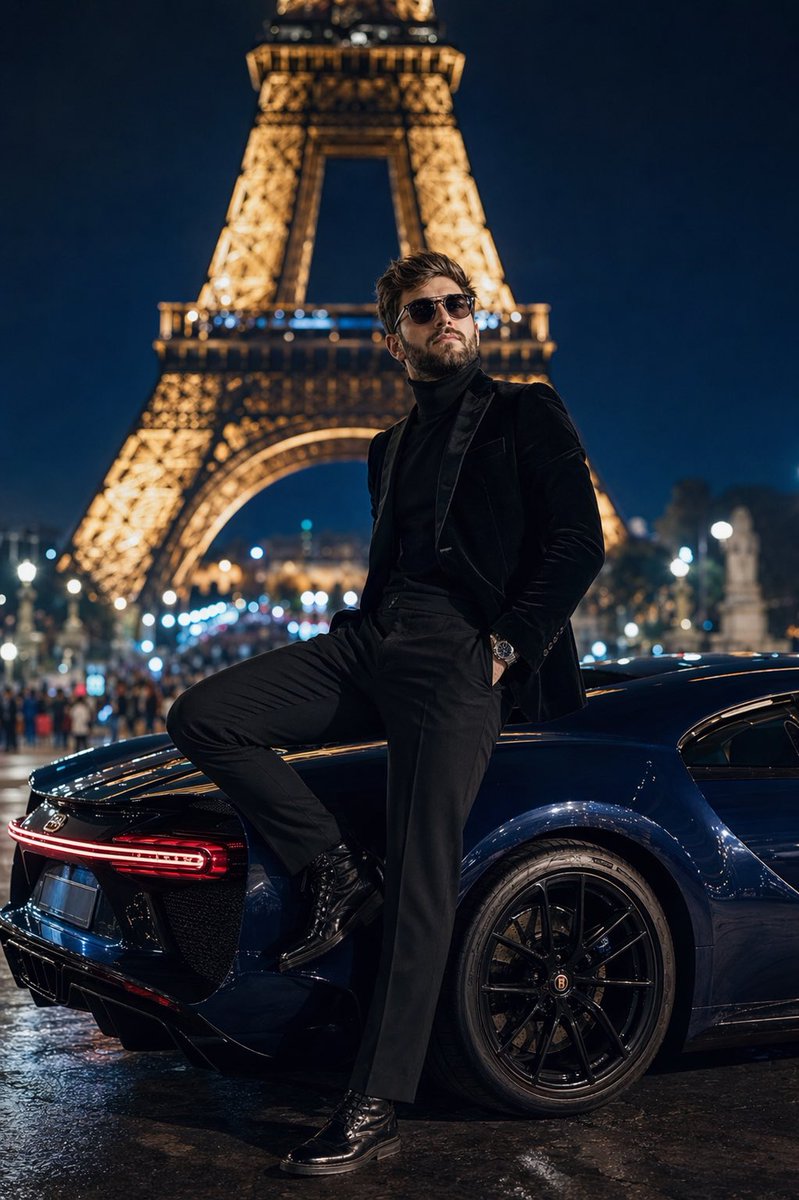
Paris Night Fashion Photography Prompt with Face Reference
PROMPT · EN
采用 50mm 镜头、f/1.4 光圈拍摄的低角度地面全身照,主角为 arguploaded face reference: 上传的人脸参考(整洁的胡须、大背头、佩戴时尚飞行员墨镜、身着剪裁考究的现代高定服装),站在夜晚的 arglocation: 特罗卡迪罗广场 平台上。他身穿 argoutfit: 黑色丝绒修身西装外套,内搭黑色羊绒高领毛衣,搭配剪裁合身的黑色长裤和擦得锃亮的黑色皮靴,正凝视着背景中灯火辉煌的埃菲尔铁塔。他身后是一辆深宝石蓝色的 Bugatti Chiron,车身映照着周围的城市灯光。他的一只脚踩在后轮胎上,身体随意地向后倚靠。构图采用浅景深,将远处的巴黎街灯和人群虚化为奶油般的焦外成像。城市路灯的聚光效果营造出戏剧性的高对比度阴影。8k 分辨率,照片级真实感,电影级高定时尚杂志风格。

About this prompt

Transform your face into a cinematic fashion portrait set in a dramatic Paris night, complete with Eiffel Tower and Bugatti, using this customizable AI prompt. Use it as a Concept Art starting point for GPT Image 2: keep the visual structure and style constraints intact, then swap in your own subject, brand, or scene.

Start by replacing uploaded face reference, location, and outfit, then keep the camera, composition, and material cues in the same order. This makes the output easier to compare across variations.

How to use this prompt

  1. Copy the entire prompt below.
  2. Open your preferred AI image generator (Midjourney, DALL·E, Sora) and upload your face reference image.
  3. Replace the placeholder {uploaded face reference} with the link or filename of your image, and adjust {location} or {outfit} if desired.
  4. Paste the customized prompt into the prompt field and click generate.
  5. Review the result and refine by tweaking camera angles or lighting descriptions for perfection.

FAQ

Duet | AI

@Sheldon056→

Published
Apr 25, 2026
Language
EN
Model
GPT Image 2
Category
Concept Art
GPT Image 2Concept Artgpt-image-2twitter
Views
186
Copies
21
Likes
7

Share

More from GPT Image 2

Browse all
Sacred Dragon Dome Ceiling Mural — Sora 2 Prompt

Sacred Dragon Dome Ceiling Mural — Sora 2 Prompt

@KanaWorks_AI
AI-Generated Crossover Fighter Screenshot — Sora 2 Prompt

AI-Generated Crossover Fighter Screenshot — Sora 2 Prompt

@momoringo_sub
Dark Anime Devil Girl Mario Kart Poster — Sora 2 Prompt

Dark Anime Devil Girl Mario Kart Poster — Sora 2 Prompt

@opener_ai

Create faster with Sora2Hub prompts.

Use curated prompt pages as searchable entry points, then jump straight into generation with the right model context.

Explore prompts

