
DIY Smart Doorbell Enclosure — 3D Exploded Product Render
Create a photorealistic 5-view exploded array of a customizable smart doorbell enclosure, showcasing detailed external features and internal electronics for industrial design visualization.
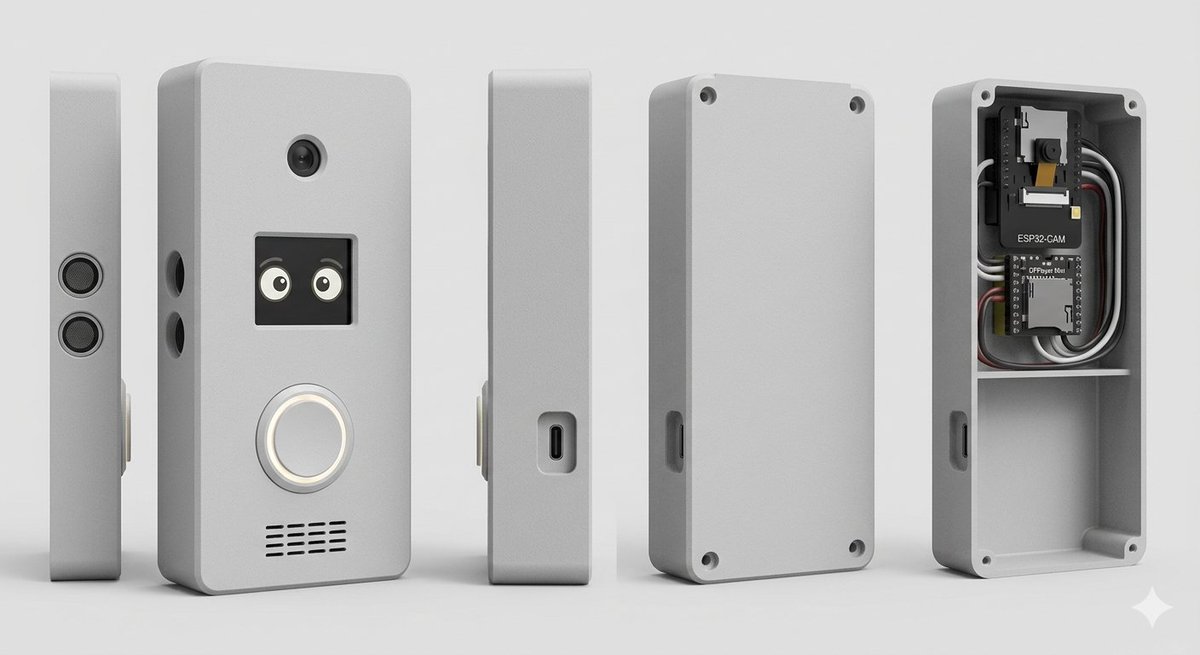
目标:创建一个简洁的定制 DIY 智能门铃 / 对讲机外壳的摄影棚产品渲染图,以爆炸式多视图产品阵列形式呈现。 画布:宽屏 16:9 构图,浅灰色无缝摄影棚背景,柔和的地面阴影,正交产品渲染外观,无人像,无品牌水印。 主体:一个带有圆角的紧凑型矩形电子产品外壳,哑光 argenclosure color: 浅灰色 塑料材质,边缘略带倒角,逼真的 3D CAD 渲染效果,具有细微的粗糙质感。 布局:从左到右均匀排列 5 个独立的外壳视图:1) 一个非常薄的左侧轮廓,垂直站立,带有两个堆叠的圆形扬声器或传感器格栅;2) 正面主视图,垂直站立,略微倾斜,带有可见的功能细节;3) 一个狭窄的侧面轮廓,带有凹陷的 USB-C 接口;4) 后盖板垂直站立,带有四个角部螺丝孔和一个侧面切口;5) 打开的后壳/外壳内部,显示安装在顶部隔间中的电子元件和一个空的下部隔间。 正面细节:在正面主视图上,包含 4 组可见的功能特征:顶部中心附近的一个小圆形摄像头镜头;下方一个方形黑色显示屏/窗口,显示两只可爱的卡通眼睛;显示屏下方一个大的圆形发光门铃按钮,带有白色光环;以及底部附近由多排短黑色缝隙组成的水平扬声器格栅。在主体左边缘增加两个小圆孔。 内部电子元件:在打开的后壳中,包含 2 个电路板和可见的布线:顶部电路板标记为 argcamera module label: ESP32-CAM,带有小型摄像头模块;下部电路板标记为 argcontroller board label: DFPlayer Mini。在电路板周围添加整齐排列的黑色、白色、灰色和红色导线。内部应有一个水平隔板,将电子元件舱与下方较大的空腔隔开。在打开的外壳内部添加四个角部螺丝柱/孔。 风格:逼真的 3D 产品可视化,高细节工业设计概念,来自左上方的柔和摄影棚灯光,柔和的环境光遮蔽,清晰的边缘,逼真的塑料材质,中性灰配色,浅而清晰的阴影,居中构图。 约束:使用 5 个产品视图,保持所有物体垂直,无人手,除两个电路板标签外无额外文字,无 Logo,无装饰性背景物体。
About this prompt
Create a photorealistic 5-view exploded array of a customizable smart doorbell enclosure, showcasing detailed external features and internal electronics for industrial design visualization. Use it as a Concept Art starting point for GPT Image 2: keep the visual structure and style constraints intact, then swap in your own subject, brand, or scene.
Start by replacing enclosure color, camera module label, and controller board label, then keep the camera, composition, and material cues in the same order. This makes the output easier to compare across variations.
How to use this prompt
- Copy the full prompt from sora2hub.com.
- Choose your preferred AI video or image generation model (e.g., Sora 2, Runway, Midjourney).
- Customize the variables in curly braces
{}to change the enclosure color, circuit board labels, or other details. - Paste the prompt into the model's input field and generate the render.
- Iterate by adjusting lighting, color, or layout parameters to perfect your concept.


