
GPT Image 2AI Prompt
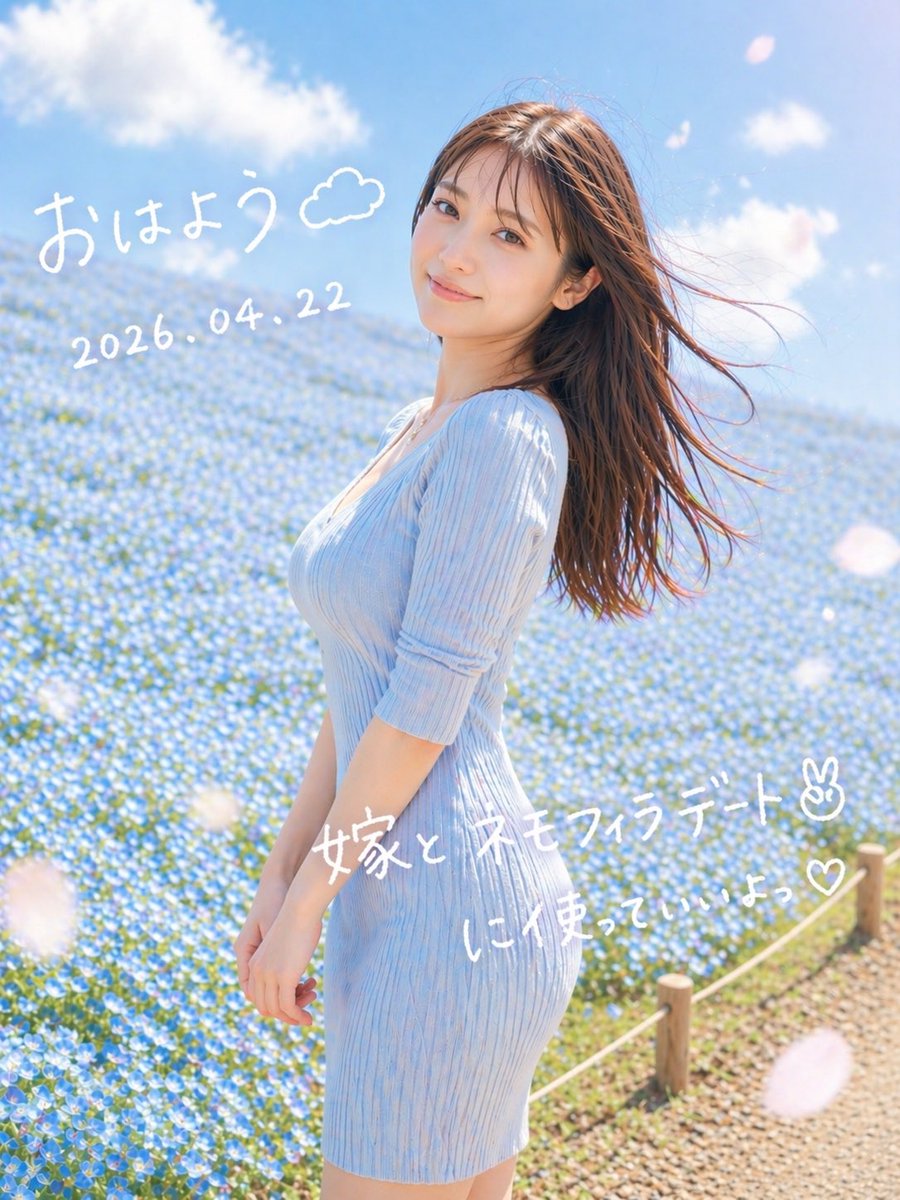
Dreamy Nemophila Portrait w/ Japanese Text — Sora 2 Prompt
Create dreamy, romantic spring portraits with customizable Japanese text overlays—ideal for social media visuals, couple photos, and whimsical edits.
PROMPT · EN
一张梦幻般的竖版春日人像摄影,一位年轻女性侧身站在广阔的蓝色粉蝶花田中,背景是明亮的蓝天和柔和的白云。她身穿一件 argdress color: 淡天蓝色 的修身罗纹针织连衣裙,袖长及肘,一头棕色长直发在风中向右飘动。构图从大腿中部向上取景,人物略微偏向右侧,背景铺满花海,右下角可见碎石路旁带有木桩的小绳围栏。采用柔和的自然晨光、通透的高调曝光、淡雅的色调、浅景深、细腻的镜头光晕,以及浪漫的社交媒体快照美学。在前景中加入几片虚化的大型白色花瓣。在图像上直接叠加手写风格的白色日文:左上角为“arggreeting text: おはよう”并配有一个涂鸦小云朵;下方为日期“argdate text: 2026.04.22”;中右下方为“argmain note text: 嫁と ネモフィラデート✌︎”;其下方为“argsub note text: に使っていいよっ♡”。保持手写字体随性、俏皮且略带不规则感,如同用马克笔在照片上书写的效果。
About this prompt
Create dreamy, romantic spring portraits with customizable Japanese text overlays—ideal for social media visuals, couple photos, and whimsical edits. Use it as a Concept Art starting point for GPT Image 2: keep the visual structure and style constraints intact, then swap in your own subject, brand, or scene.
Start by replacing dress color, greeting text, date text, and main note text, then keep the camera, composition, and material cues in the same order. This makes the output easier to compare across variations.
How to use this prompt
- Copy the prompt template from this page.
- Open your preferred AI image generation model (Sora, Midjourney, etc.).
- Adjust the customizable variables (e.g.,
dress color,greeting text,date) to your liking. - Paste the prompt and generate your dreamy spring portrait.
- Iterate on the output by tweaking variable values for different looks.


