
Korean Idol Boyfriend POV Portrait — Sora 2 Prompt
Create a dreamy, intimate portrait of a Korean idol with soft black mist filter, warm window light, and a boyfriend POV, perfect for romantic cinematic scenes.
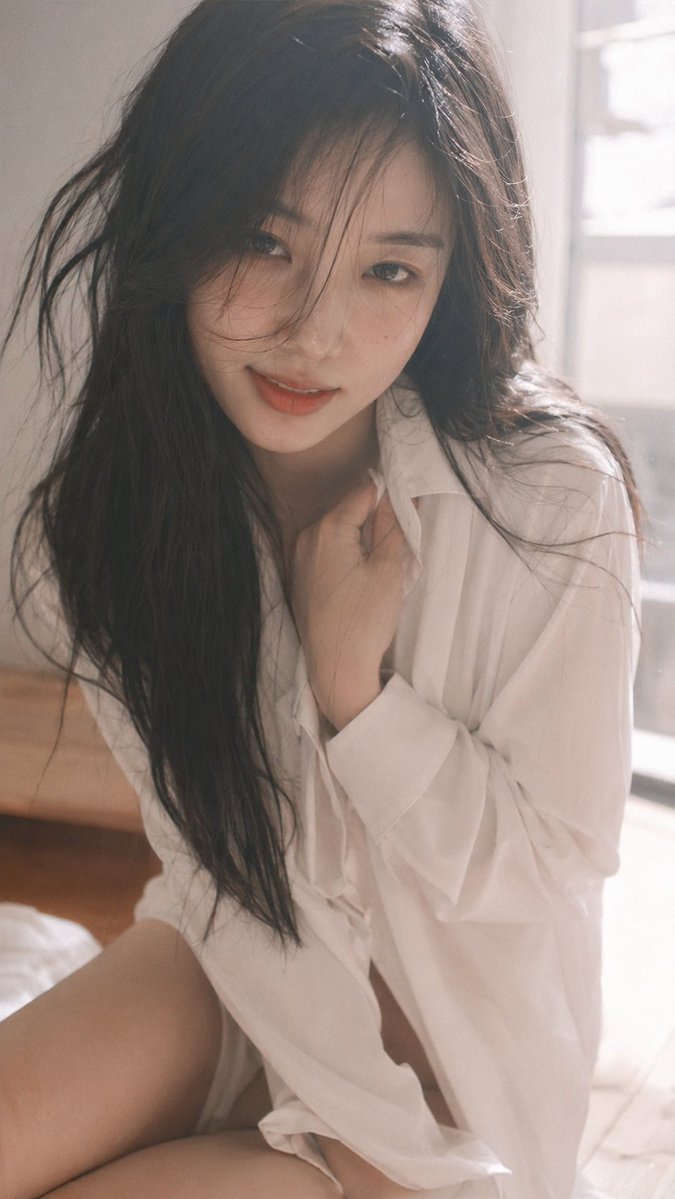
9:16 vertical — Korean idol intimate portrait, single subject, boyfriend POV soft black mist filter, glowing highlights, gentle bloom, slight overexposure, soft haze, lowered contrast, creamy tones close distance framing, intimate perspective, slight handheld feeling young Korean female idol, natural soft makeup, dewy realistic skin texture, subtle imperfections outfit: oversized white shirt slightly loose and relaxed + short bottoms, soft fabric, naturally draped, no revealing elements hair: long dark hair, slightly messy, soft movement around face pose: sitting or leaning slightly forward toward camera, upper body subtly angled; one hand resting lightly near collarbone or gently holding shirt edge, the other relaxed; shoulders loose, slight natural body curve expression: soft playful smile, slightly parted lips, warm eye contact with camera, hint of teasing intimacy camera: close-up to mid-body framing, eye-level or slightly lower angle, as if viewer is right in front of her lighting: warm diffused window light, soft highlight bloom on skin, gentle shadows, slight lens flare or light leak mood: intimate, romantic, subtly seductive, “caught in a private moment” feeling quality: ultra-realistic, fine film grain, slight motion blur, imperfect framing, dreamy cinematic softness
About this prompt
Create a dreamy, intimate portrait of a Korean idol with soft black mist filter, warm window light, and a boyfriend POV, perfect for romantic cinematic scenes. Use it as a Concept Art starting point for an AI model: keep the visual structure and style constraints intact, then swap in your own subject, brand, or scene.
Common directions include chatgpt, 韩系, 私密, and 男友视角. Treat these tags as creative cues; the prompt structure and preview image are the more useful guide.
Start with small changes to subject, scene, camera, and color, then generate a few variations to compare composition and detail without turning the page copy into keyword stuffing.
How to use this prompt
- Copy the full prompt from above.
- Paste it into your preferred text-to-image model (best results with Sora 2 or similar high-detail AI).
- In the model, set the aspect ratio to 9:16 for the vertical portrait orientation.
- Optionally adjust parameters like style strength or film grain to match your desired level of softness.
- Generate the image and iterate by modifying lighting or pose keywords if needed.


