
Sora2 Hub
Sora2 Hub
  • Prompt Library
  • Pricing
  • Showcase
  • Blog
Sora2 Hub
Sora2 Hub
Sora2 Hub

Sora2 Hub

Professional AI creation platform powered by Sora 2, Veo 3.1, and Nano Banana Pro. Create stunning videos and studio-grade images with advanced control, HD quality, and no watermarks.

Email:support@sora2hub.org

AI Video Generator

  • Text to Video
  • Image to Video
  • Veo 3.1
  • Sora 2
  • Kling 3.0
  • Kling 2.6
  • Kling 2.5
  • Runway
  • Wan 2.6
  • Seedance 2.0
  • Hailuo 2.3
  • Grok Imagine
  • HappyHorse-1.0

AI Image Generator

  • Text to Image
  • Image to Image
  • Nano Banana Pro
  • Nano Banana
  • 4o Image
  • Flux Kontext
  • Z Image
  • Seedream 4.5
  • Seedream 5.0 Lite
  • Nano Banana 2
  • GPT Image 2
  • AI Image Upscaler

AI Effects

  • AI Age Filter
  • AI Gender Swap
  • AI Kiss
  • AI Hug
  • Ghibli Image
  • AI Mermaid Filter
  • AI Bodyshake
  • Smiling Filter
  • AI Fat
  • Action Figure

Product

  • Features
  • Showcases
  • Pricing

Company

  • About
  • Contact

© 2025 • Sora2 Hub ORG All rights reserved.

  • Privacy Policy
  • Terms of Service
  • Refund Policy
  1. Home
  2. /
  3. Prompts
  4. /
  5. GPT Image 2
  6. /
  7. Official Character Sheet Prompt: Multi-View & Expression
GPT Image 2AI Prompt

Official Character Sheet Prompt: Multi-View & Expression

Generate a professional concept art character design sheet with multi-view angles, expression variations, and tech breakdowns on a clean white background.
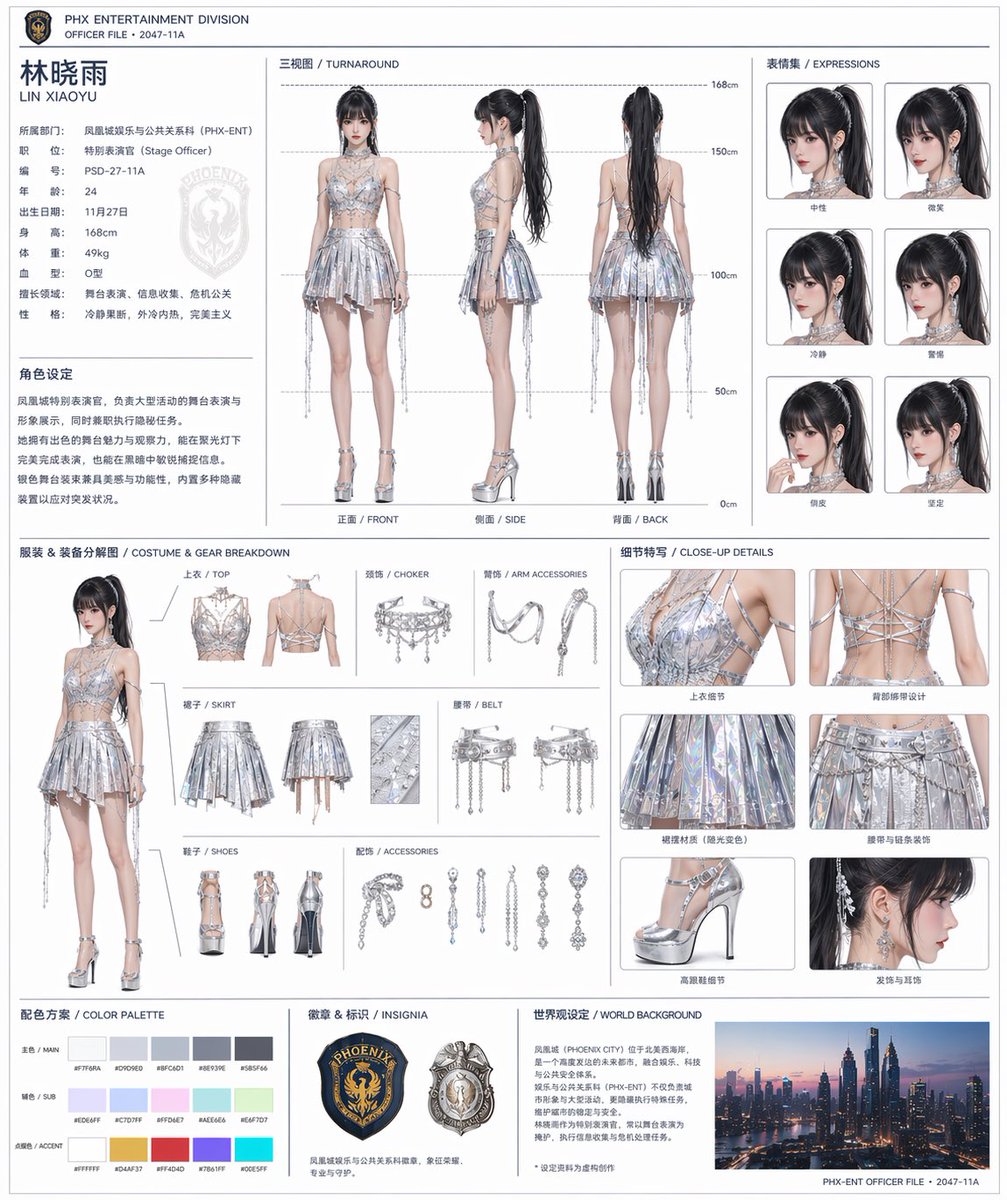
Official Character Sheet Prompt: Multi-View & Expression
PROMPT · EN
基于此角色及背景,请创作一份如同官方设定文档般的角色设定集。・包含正面、侧面及背面的三视图 ・添加角色表情变化 ・展示服装或装备的细节拆解 ・添加配色方案 ・包含简短的世界观描述 ・整体布局整洁(白色背景,图表风格) 高分辨率,专业概念艺术风格

About this prompt

Generate a professional concept art character design sheet with multi-view angles, expression variations, and tech breakdowns on a clean white background. Use it as a Concept Art starting point for GPT Image 2: keep the visual structure and style constraints intact, then swap in your own subject, brand, or scene.

Start with small changes to subject, scene, camera, and color, then generate a few variations to compare composition and detail without turning the page copy into keyword stuffing.

How to use this prompt

  1. Copy the full prompt below.
  2. Paste it into your preferred AI image generator (Midjourney, DALL·E 3, or Stable Diffusion).
  3. Replace bracketed placeholders like [Character Name] with your own details.
  4. Generate the image. For best results, use a model that supports multi-panel layouts or stitch outputs together.
  5. Refine with style references or negative prompts if needed.

FAQ

Blinkoo

@HNicotine1233→

Published
Apr 25, 2026
Language
EN
Model
GPT Image 2
Category
Concept Art
GPT Image 2Concept Artgpt-image-2twitter
Views
980
Copies
69
Likes
23

Share

More from GPT Image 2

Browse all
Cubist Minimalist Fashion Portrait — Sora 2 Prompt

Cubist Minimalist Fashion Portrait — Sora 2 Prompt

@ChillaiKalan__
Cozy Anime Cat Holiday Bedroom — Sora 2 Prompt

Cozy Anime Cat Holiday Bedroom — Sora 2 Prompt

@miya_space
Cyberpunk Catgirl Soda Splash — Sora 2 Prompt

Cyberpunk Catgirl Soda Splash — Sora 2 Prompt

@kuso_seisakusyo

Create faster with Sora2Hub prompts.

Use curated prompt pages as searchable entry points, then jump straight into generation with the right model context.

Explore prompts

