
Sora2 Hub
Sora2 Hub
  • Prompt Library
  • Pricing
  • Showcase
  • Blog
Sora2 Hub
Sora2 Hub
Sora2 Hub

Sora2 Hub

Professional AI creation platform powered by Sora 2, Veo 3.1, and Nano Banana Pro. Create stunning videos and studio-grade images with advanced control, HD quality, and no watermarks.

Email:support@sora2hub.org

AI Video Generator

  • Text to Video
  • Image to Video
  • Veo 3.1
  • Sora 2
  • Kling 3.0
  • Kling 2.6
  • Kling 2.5
  • Runway
  • Wan 2.6
  • Seedance 2.0
  • Hailuo 2.3
  • Grok Imagine
  • HappyHorse-1.0

AI Image Generator

  • Text to Image
  • Image to Image
  • Nano Banana Pro
  • Nano Banana
  • 4o Image
  • Flux Kontext
  • Z Image
  • Seedream 4.5
  • Seedream 5.0 Lite
  • Nano Banana 2
  • GPT Image 2
  • AI Image Upscaler

AI Effects

  • AI Age Filter
  • AI Gender Swap
  • AI Kiss
  • AI Hug
  • Ghibli Image
  • AI Mermaid Filter
  • AI Bodyshake
  • Smiling Filter
  • AI Fat
  • Action Figure

Product

  • Features
  • Showcases
  • Pricing

Company

  • About
  • Contact

© 2025 • Sora2 Hub ORG All rights reserved.

  • Privacy Policy
  • Terms of Service
  • Refund Policy
  1. Home
  2. /
  3. Prompts
  4. /
  5. GPT Image 2
  6. /
  7. Japanese Hair Style Diagnosis Chart — Salon-Quality Infographic Prompt
GPT Image 2AI Prompt

Japanese Hair Style Diagnosis Chart — Salon-Quality Infographic Prompt

Create an elegant, editorial-style hair style diagnosis infographic for beauty salons, featuring a professional layout with categorized recommendations.
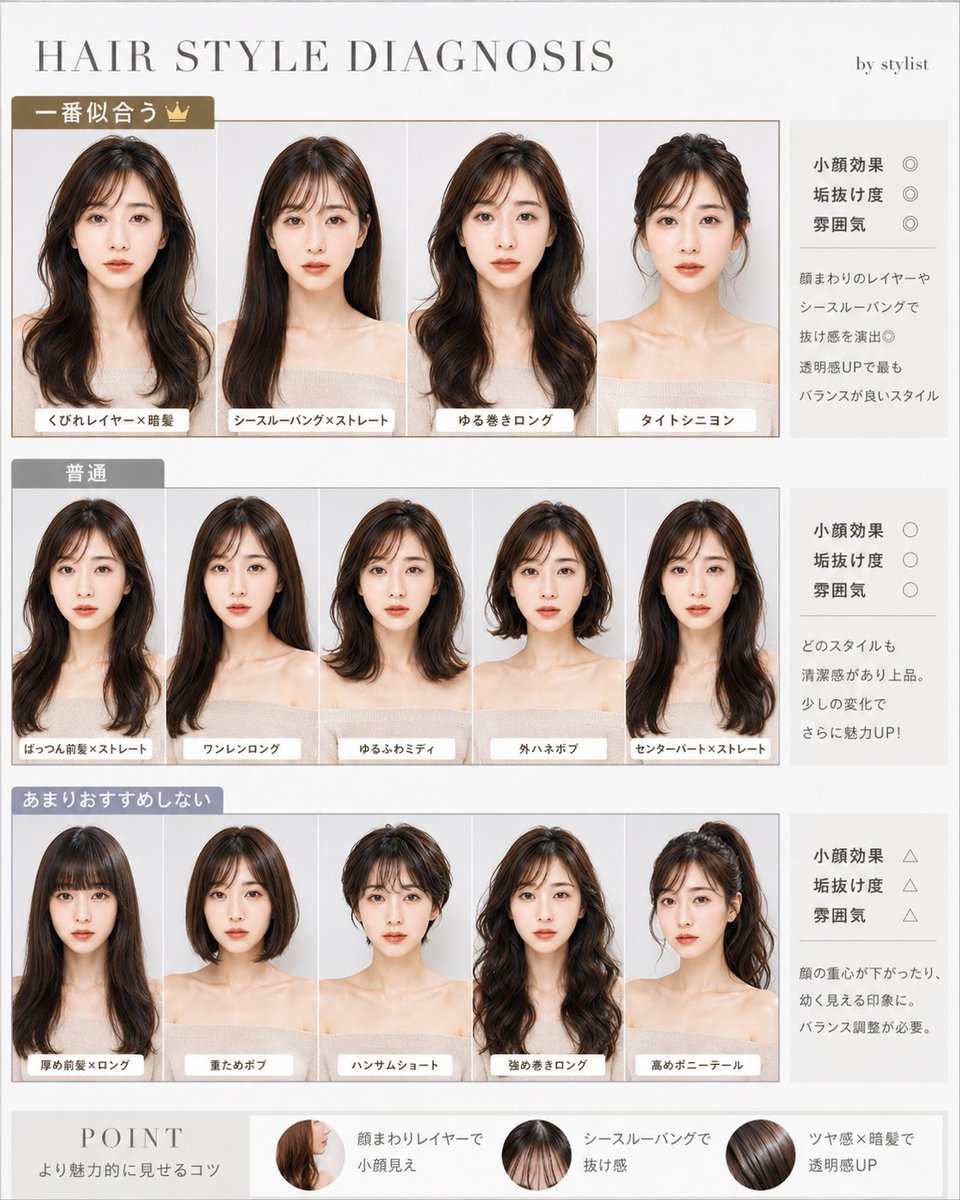
Japanese Hair Style Diagnosis Chart — Salon-Quality Infographic Prompt
PROMPT · EN
type
美容沙龙发型诊断信息图
language
日文可见排版,主标题为英文
canvas
A4 纵向页面,暖米白色背景,简洁的编辑排版,细米色与灰色分隔线,高端沙龙手册美学
title
{argument name="main title" default="HAIR STYLE DIAGNOSIS"}
subtitle
造型师出品
subject
同一位年轻女性模特重复出现在所有发型示例中,胸部以上正面摄影棚肖像,裸肩或米色吊带造型,中性柔和光线,面部刻意用平滑的米色模糊矩形遮盖,自然棕色发色变化
style
将写实美容摄影合成到精致的诊断图表中,柔和的米褐色与灰色调,优雅的衬线字体标题,带有圆角白色标签的小型日文标注
layout
top_header
position
顶部
content
左侧为大间距衬线标题,右侧为小型造型师署名文本
sections
item 1
title
最适合 👑
position
上部主行
count
4
accent
棕金色分区标签
items
item 1
label
层次感卷发 × 深色发
description
长款深棕色层次感发型,带有修饰脸型的曲线和柔和波浪
item 2
label
空气刘海 × 直发
description
长款顺滑直发,搭配轻盈的空气刘海
item 3
label
慵懒长卷发
description
长款慵懒卷发,带有蓬松的侧面层次
item 4
label
紧致低发髻
description
紧致的低发髻盘发,发丝梳理整齐
right_panel
rating_labels
item 1
小颜效果 ◎
item 2
时尚度 ◎
item 3
氛围感 ◎
note
通过脸周层次和空气刘海营造通透感,是平衡感最佳的造型◎
item 2
title
普通
position
中部主行
count
5
accent
灰色分区标签
items
item 1
label
齐刘海 × 直发
description
长直发搭配齐刘海
item 2
label
长款一刀切
description
无刘海的一刀切长直发
item 3
label
蓬松中长发
description
中等长度蓬松卷发
item 4
label
外翘波波头
description
发尾外翘的短款波波头
item 5
label
中分 × 直发
description
中分长直发
right_panel
rating_labels
item 1
小颜效果 ○
item 2
时尚度 ○
item 3
氛围感 ○
note
每种造型都显得干净优雅。稍作调整魅力值倍增!
item 3
title
不太推荐
position
下部主行
count
5
accent
蓝灰色分区标签
items
item 1
label
厚刘海 × 长发
description
长发搭配厚重刘海
item 2
label
厚重波波头
description
厚重的圆润波波头
item 3
label
帅气短发
description
顶部蓬松的帅气短发
item 4
label
强力卷长发
description
带有明显强力卷度的长发
item 5
label
高马尾
description
高马尾盘发
right_panel
rating_labels
item 1
小颜效果 △
item 2
时尚度 △
item 3
氛围感 △
note
容易导致面部重心下移或显得稚气。需要进行平衡调整。
bottom_point_bar
title
POINT
subtitle
提升魅力的秘诀
count
3
tips
item 1
label
脸周层次显脸小
visual
脸周层次发丝的圆形小图
item 2
label
空气刘海显轻盈
visual
空气刘海的圆形小图
item 3
label
光泽感 × 深色发提升通透感
visual
光泽感深棕色发丝的圆形小图
image_requirements
所有发型缩略图严格对齐,带有细白色边框,每张肖像底部都有一个白色圆角日文标签,右侧评估框为浅灰色并带有评分符号,底部 POINT 条横跨全宽,高分辨率沙龙营销素材,无额外人物,除文字外无任何 Logo

About this prompt

Create an elegant, editorial-style hair style diagnosis infographic for beauty salons, featuring a professional layout with categorized recommendations. Use it as a Concept Art starting point for GPT Image 2: keep the visual structure and style constraints intact, then swap in your own subject, brand, or scene.

This prompt is organized as structured JSON with fields such as type, language, canvas, title, subtitle, subject, and style. Keeping that hierarchy helps the model separate the subject, layout, interface elements, and detail constraints.

Start with small changes to subject, scene, camera, and color, then generate a few variations to compare composition and detail without turning the page copy into keyword stuffing.

How to use this prompt

  1. Copy the prompt and paste it into a compatible AI image generator like Sora 2.
  2. Select your preferred model and aspect ratio (A4 portrait recommended).
  3. Customize the main title text within the "main title" argument if desired.
  4. Generate the image and review the structured infographic output.
  5. Use the result as a digital or print asset for client consultations and marketing.

FAQ

サボテン|AI活用Tips

@saboten_ai_→

Published
May 15, 2026
Language
EN
Model
GPT Image 2
Category
Concept Art
GPT Image 2Concept Artgpt-image-2twitter
Views
2.4K
Copies
192
Likes
115

Share

More from GPT Image 2

Browse all
Minimalist Skincare Brand Manual — Sora 2 Prompt

Minimalist Skincare Brand Manual — Sora 2 Prompt

@FranromeGraph
Dynamic Nike Ad Poster — Sora 2 Prompt with Sydney Sweeney

Dynamic Nike Ad Poster — Sora 2 Prompt with Sydney Sweeney

@im_shahid7
AI-Generated Japanese Travel Ad Grid — Sora Prompt

AI-Generated Japanese Travel Ad Grid — Sora Prompt

@jblogpham

Create faster with Sora2Hub prompts.

Use curated prompt pages as searchable entry points, then jump straight into generation with the right model context.

Explore prompts

