
GPT Image 2AI Prompt
Programmer Dog Comic Strip — B&W Manga Prompt
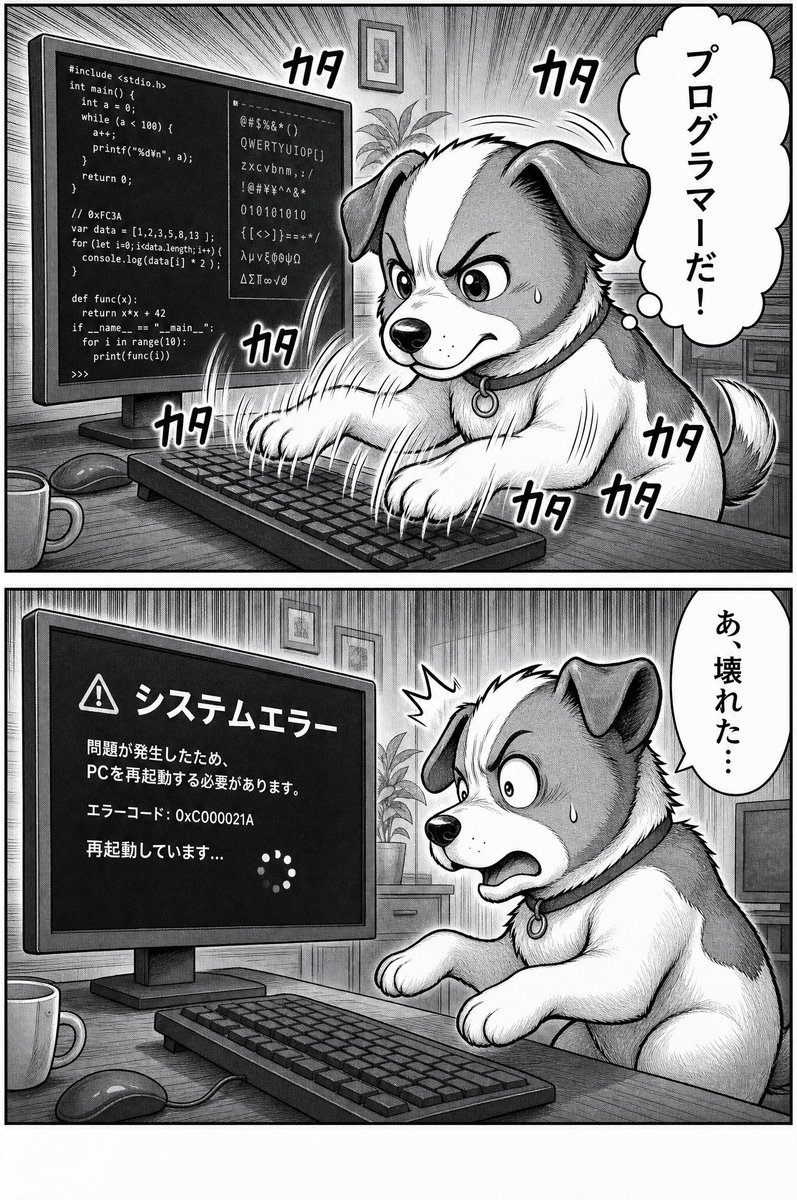
Create a two-panel black-and-white manga comic of a dog frantically coding at a desktop PC, triggering a Japanese system error screen.
PROMPT · EN
目标:创作一页黑白漫画,内容为一只狗狗在台式电脑前疯狂编程,随后导致系统报错。 画布:垂直漫画页,灰度显示,采用传统的漫画墨线与网点纸风格,具有厚重的分镜边框和细致的排线。使用上下排列的 2 个横向分镜,中间由宽大的白色间隙隔开。 布局:第 1 格占据上半部分,第 2 格占据下半部分。两个分镜均展示同一个家庭办公室书桌的侧斜视角:左侧是一台大型台式显示器,前景是键盘,桌上有鼠标和马克杯,背景有盆栽和墙上的装饰画。 第 1 格:一只毛茸茸的中型犬,长着垂耳,口鼻部和胸部为白色,耳朵和身体有深色斑块。它坐在书桌前,用两只前爪在键盘上疯狂敲击。狗狗头部区域被一个位于分镜中心的纯灰色垂直长方形遮挡,遮住了大部分脸部,但露出了耳朵、爪子、身体和尾巴。显示器上显示着混合的编程代码和乱码,包括类 C 语言、类 JavaScript 代码、类 Python 代码、二进制数字和随机字符。添加从显示器和打字动作中放射出的戏剧性漫画速度线。包含 7 个清晰可见的日语打字拟声词「カタ」:一个在狗狗/显示器区域左上方,一个在顶部中右侧,一个在显示器/键盘下方,一个在键盘左侧边缘,三个聚集在狗狗右下身和尾巴周围。在右侧添加一个垂直云朵状气泡,内含日语文字:「プログラマーだ!」 第 2 格:同一只狗狗表现出惊慌失措的样子,向后仰身离开键盘,双眼圆睁,张大嘴巴,爪子抬起,脸颊上有汗滴,头部附近有一个小型的惊吓爆发特效。显示器现在显示一个深色的系统错误界面,带有一个警告三角形图标和日语文字。显示器文字必须严格使用: 「システムエラー」, 「問題が発生したため、PCを再起動する必要があります。」, 「エラーコード: 0xC000021A」, 「再起動しています...」,以及一个由小圆点组成的圆形加载转圈。在右侧添加一个垂直对话气泡,内含日语文字:「あ、壊れた…」。 视觉风格:高细节黑白漫画,拟人化的动物角色,密集的交叉排线,网点纸阴影,强烈的动感线条,醒目的手写体日语拟声词,略带喜剧色彩,显示器和气泡中的文字清晰易读。 可自定义主题:狗狗角色应为 arganimal character: 一只毛茸茸的垂耳狗。漫画的第一个气泡应显示 argfirst bubble text: プログラマーだ!。第二个气泡应显示 argsecond bubble text: あ、壊れた…。显示器错误标题应为 argerror headline: システムエラー。错误代码应为 argerror code: 0xC000021A。 约束:图像必须仅为黑白,保持两格布局,总共仅使用 2 个对话/思考气泡,第一格中必须有且仅有 7 个打字拟声词,不得增加额外分镜,不得使用彩色,不得添加水印。
About this prompt
Create a two-panel black-and-white manga comic of a dog frantically coding at a desktop PC, triggering a Japanese system error screen. Use it as a Concept Art starting point for GPT Image 2: keep the visual structure and style constraints intact, then swap in your own subject, brand, or scene.
Start by replacing animal character, first bubble text, second bubble text, and error headline, then keep the camera, composition, and material cues in the same order. This makes the output easier to compare across variations.
How to use this prompt
- Copy the full prompt text into your AI image generator.
- Select a model optimized for detailed illustration and comic styles.
- Customize the
animal character,bubble text, orerror codevariables to change the story. - Generate the image and review the two-panel layout for accuracy.
- Re-run or adjust settings if the text or details aren't clear.


