
GPT Image 2AI Prompt
Anime Double Exposure Poster — Cinematic Sakura Portrait Prompt
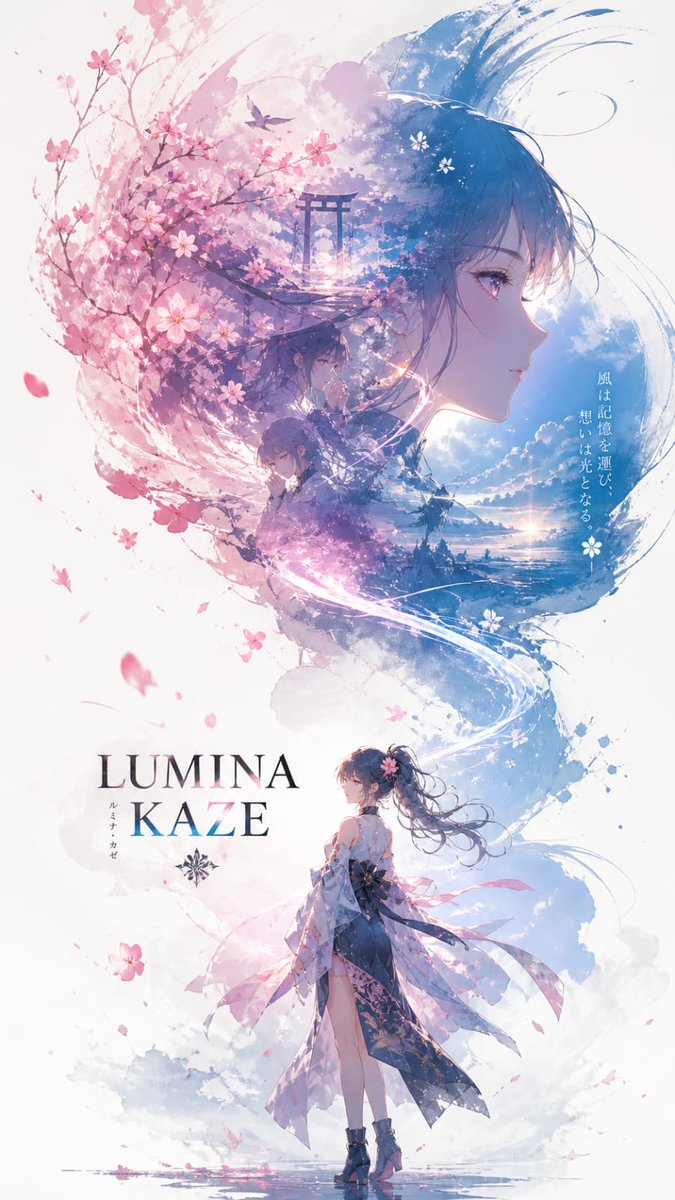
Create a breathtaking cinematic poster featuring a dual-exposed anime portrait with flowing cherry blossoms and ethereal light effects.
1 / 2
PROMPT · EN
一张角色宣传海报,标题为“argtitle: INPUT NAME”,采用电影级竖版主视觉构图(9:16)。上半部分呈现出一个由流动的风和樱花粒子构成的 argsubject: 动漫少女 面部轮廓,轮廓巨大且散发着柔和的光芒,营造出梦幻、细腻且略带透明的质感。
下半部分展示了角色全身,姿态从容优雅,身着 argclothing: 优雅的现代和风服饰,轻盈的布料随风飘动。
在轮廓内部运用双重曝光叙事:漂浮的樱花、记忆碎片、柔和的天空渐变、充满情感的特写瞬间,以及融入水彩薄雾中的自然元素。
左侧采用温暖的粉色调与花卉能量,右侧则以清冷的天蓝色保持平衡。一条纤细的发光微风线条将顶部的轮廓与下方的角色连接起来。
边缘柔和且具有绘画感,逐渐淡入白色的留白空间,呈现出空灵的动漫美学。
About this prompt
Create a breathtaking cinematic poster featuring a dual-exposed anime portrait with flowing cherry blossoms and ethereal light effects. Use it as a Concept Art starting point for GPT Image 2: keep the visual structure and style constraints intact, then swap in your own subject, brand, or scene.
Start by replacing title, subject, and clothing, then keep the camera, composition, and material cues in the same order. This makes the output easier to compare across variations.
How to use this prompt
- Copy the entire prompt and paste it into your preferred AI image generator.
- Choose a model that excels at cinematic and anime styles, like Sora 2 or similar advanced models.
- Customize the
title,subject, andclothingvariables in the curly braces{}to match your character concept. - Adjust the color palette mentions (warm pink vs. cool sky blue) in the prompt body if you want a different mood.
- Generate the image and experiment with multiple variations to find the most stunning composition.


