Sora2 Hub
Sora2 Hub
  • Prompt Library
  • Pricing
  • Showcase
  • Blog
Sora2 Hub
Sora2 Hub
Sora2 Hub

Sora2 Hub

Professional AI creation platform powered by Sora 2, Veo 3.1, and Nano Banana Pro. Create stunning videos and studio-grade images with advanced control, HD quality, and no watermarks.

Email:support@sora2hub.org

AI Video Generator

  • Text to Video
  • Image to Video
  • Veo 3.1
  • Sora 2
  • Kling 3.0
  • Kling 2.6
  • Kling 2.5
  • Runway
  • Wan 2.6
  • Seedance 2.0
  • Hailuo 2.3
  • Grok Imagine
  • HappyHorse-1.0

AI Image Generator

  • Text to Image
  • Image to Image
  • Nano Banana Pro
  • Nano Banana
  • 4o Image
  • Flux Kontext
  • Z Image
  • Seedream 4.5
  • Seedream 5.0 Lite
  • Nano Banana 2
  • GPT Image 2
  • AI Image Upscaler

AI Effects

  • AI Age Filter
  • AI Gender Swap
  • AI Kiss
  • AI Hug
  • Ghibli Image
  • AI Mermaid Filter
  • AI Bodyshake
  • Smiling Filter
  • AI Fat
  • Action Figure

Product

  • Features
  • Showcases
  • Pricing

Company

  • About
  • Contact

© 2025 • Sora2 Hub ORG All rights reserved.

  • Privacy Policy
  • Terms of Service
  • Refund Policy
  1. Home
  2. /
  3. Prompts
  4. /
  5. GPT Image 2
  6. /
  7. Ethereal Anime Portrait — Dreamy Backlit Glow Prompt
GPT Image 2AI Prompt

Ethereal Anime Portrait — Dreamy Backlit Glow Prompt

Generate a soft-focus, cinematic anime character portrait with floating hair, rim light, and painterly glow—ideal for fan art and ethereal mood boards.
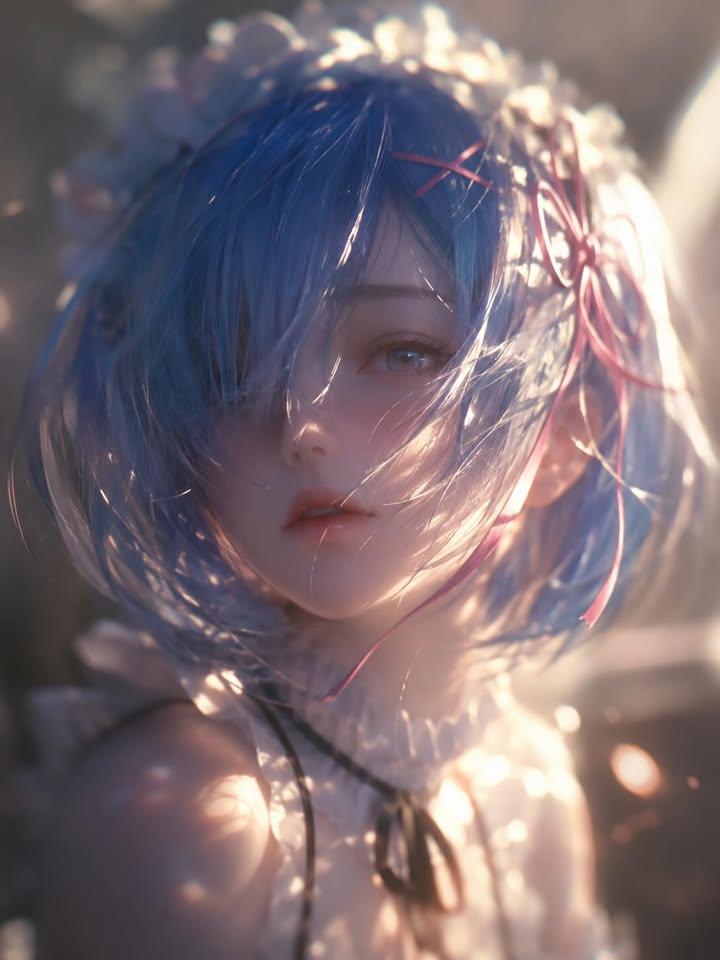
Ethereal Anime Portrait — Dreamy Backlit Glow Prompt
PROMPT · EN
逆光雾化,漫反射模糊,柔焦,argsubject: 空灵纯洁的少女或少年 特写镜头,灵感源自《葬送的芙莉莲》中的角色 argcharacter name: 芙莉莲。模糊的肖像与背景,强调飘逸动态发丝的混沌之美。极具吸引力的外观,梦幻且难以捉摸的氛围,伦勃朗光效,高饱和度,反射与折射,丰富的纹理细节,发光晕染扩散,低噪点,细腻的胶片颗粒质感,极简主义风格,柔焦美学,情感印象派,前卫视觉艺术美学,电影级奢华构图,大师级电影美学。CGI,Unreal Engine 5 渲染,Octane Render。

About this prompt

Generate a soft-focus, cinematic anime character portrait with floating hair, rim light, and painterly glow—ideal for fan art and ethereal mood boards. Use it as a Concept Art starting point for GPT Image 2: keep the visual structure and style constraints intact, then swap in your own subject, brand, or scene.

Start by replacing subject and character name, then keep the camera, composition, and material cues in the same order. This makes the output easier to compare across variations.

How to use this prompt

  1. Copy the full prompt text from sora2hub.com.
  2. Select a high-quality diffusion model (e.g., Midjourney v6, DALL·E 3, or Stable Diffusion XL).
  3. Replace the subject and character name variables with your desired anime character or OC.
  4. Adjust lighting or style keywords (e.g., Rembrandt lighting, film grain) to taste.
  5. Generate and upscale—iterate on seed or minor wording tweaks for the best result.
FAQ

Anissa

@SimplyAnnisa→

Published
May 15, 2026
Language
EN
Model
GPT Image 2
Category
Concept Art
GPT Image 2Concept Artgpt-image-2twitter
Views
469
Copies
41
Likes
37

Share

More from GPT Image 2

Browse all
Sacred Dragon Dome Ceiling Mural — Sora 2 Prompt

Sacred Dragon Dome Ceiling Mural — Sora 2 Prompt

@KanaWorks_AI
Dynamic Nike Ad Poster — Sora 2 Prompt with Sydney Sweeney

Dynamic Nike Ad Poster — Sora 2 Prompt with Sydney Sweeney

@im_shahid7
Sleeping Anime Star Witch — Dreamy Cosmic Sora 2 Prompt

Sleeping Anime Star Witch — Dreamy Cosmic Sora 2 Prompt

@prompts

Create faster with Sora2Hub prompts.

Use curated prompt pages as searchable entry points, then jump straight into generation with the right model context.

Explore prompts