
Sora2 Hub
Sora2 Hub
  • Prompt Library
  • Pricing
  • Showcase
  • Blog
Sora2 Hub
Sora2 Hub
Sora2 Hub

Sora2 Hub

Professional AI creation platform powered by Sora 2, Veo 3.1, and Nano Banana Pro. Create stunning videos and studio-grade images with advanced control, HD quality, and no watermarks.

Email:support@sora2hub.org

AI Video Generator

  • Text to Video
  • Image to Video
  • Veo 3.1
  • Sora 2
  • Kling 3.0
  • Kling 2.6
  • Kling 2.5
  • Runway
  • Wan 2.6
  • Seedance 2.0
  • Hailuo 2.3
  • Grok Imagine
  • HappyHorse-1.0

AI Image Generator

  • Text to Image
  • Image to Image
  • Nano Banana Pro
  • Nano Banana
  • 4o Image
  • Flux Kontext
  • Z Image
  • Seedream 4.5
  • Seedream 5.0 Lite
  • Nano Banana 2
  • GPT Image 2
  • AI Image Upscaler

AI Effects

  • AI Age Filter
  • AI Gender Swap
  • AI Kiss
  • AI Hug
  • Ghibli Image
  • AI Mermaid Filter
  • AI Bodyshake
  • Smiling Filter
  • AI Fat
  • Action Figure

Product

  • Features
  • Showcases
  • Pricing

Company

  • About
  • Contact

© 2025 • Sora2 Hub ORG All rights reserved.

  • Privacy Policy
  • Terms of Service
  • Refund Policy
  1. Home
  2. /
  3. Prompts
  4. /
  5. GPT Image 2
  6. /
  7. AI Engineering Assembly Sequence Prompt
GPT Image 2AI Prompt

AI Engineering Assembly Sequence Prompt

Generate professional 16:9 engineering workflow documentation showing logical assembly sequences with stress analysis and tool marks.
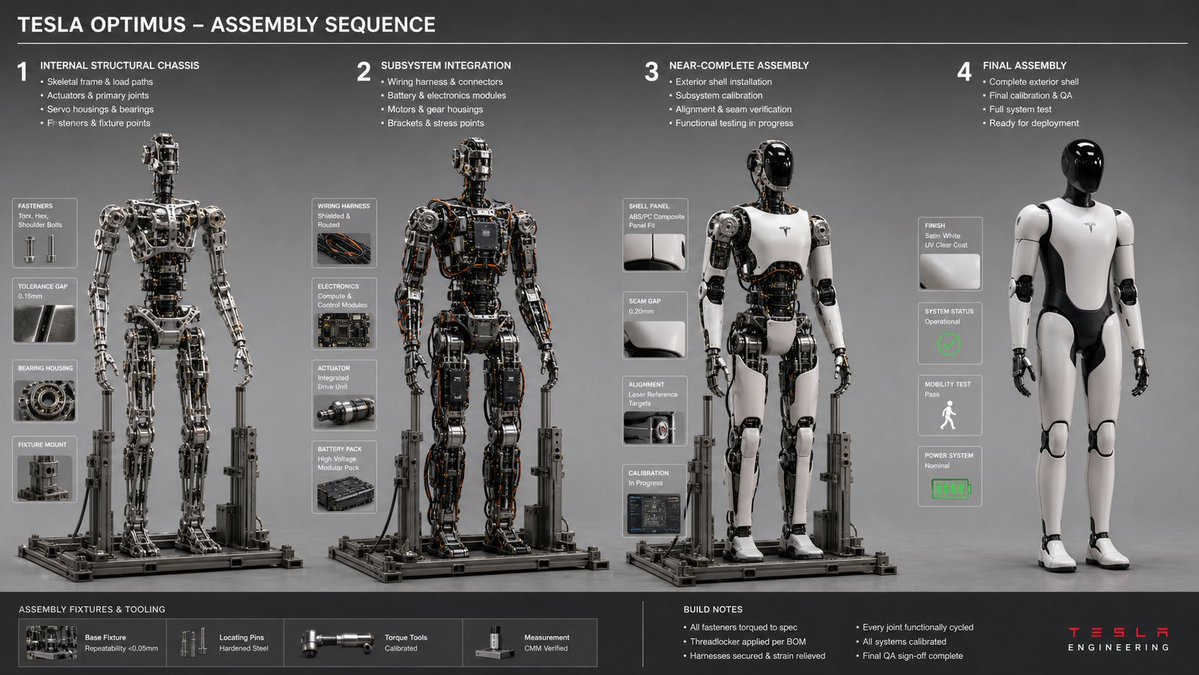
AI Engineering Assembly Sequence Prompt
PROMPT · EN
16:9,针对 argobject: Tesla Optimus Robot 执行此操作 <assembly_seq> 对象:[插入对象] 阶段:4 规则:AI 从内部底盘到外部壳体推断逻辑构建序列。推断:紧固件类型、夹具/固定装置阴影、工具痕迹、公差间隙、工作区碎片。双重推断:装配顺序 → 应力点 → 工具/手部(若存在)的磨损模式。布局:水平序列,一致的照明,等轴测或 3/4 视图。 </assembly_seq> <render> 风格:工程工作流文档,中性灰色背景,清晰对焦 ::3 </render>

About this prompt

Generate professional 16:9 engineering workflow documentation showing logical assembly sequences with stress analysis and tool marks. Use it as a Concept Art starting point for GPT Image 2: keep the visual structure and style constraints intact, then swap in your own subject, brand, or scene.

Start by replacing object, then keep the camera, composition, and material cues in the same order. This makes the output easier to compare across variations.

How to use this prompt

  1. Copy the full prompt text.
  2. In your AI model (like Sora 2), paste it into the generation field.
  3. Replace the default object "Tesla Optimus Robot" in the {argument} tag with your own subject (e.g., "Robotic Arm", "Drone Frame").
  4. Generate the image.
  5. Review the output for technical detail accuracy and iterate on the object description if needed.

FAQ

Gadgetify

@Gdgtify→

Published
May 15, 2026
Language
EN
Model
GPT Image 2
Category
Concept Art
GPT Image 2Concept Artgpt-image-2twitter
Views
2.5K
Copies
316
Likes
189

Share

More from GPT Image 2

Browse all
AI-Generated Crossover Fighter Screenshot — Sora 2 Prompt

AI-Generated Crossover Fighter Screenshot — Sora 2 Prompt

@momoringo_sub
Dynamic Nike Ad Poster — Sora 2 Prompt with Sydney Sweeney

Dynamic Nike Ad Poster — Sora 2 Prompt with Sydney Sweeney

@im_shahid7
Japanese Cinematic Poster Prompt — 4-Panel Agency Ad

Japanese Cinematic Poster Prompt — 4-Panel Agency Ad

@kantamizutamari

Create faster with Sora2Hub prompts.

Use curated prompt pages as searchable entry points, then jump straight into generation with the right model context.

Explore prompts

