GPT Image 2AI Prompt

Japanese YouTube Growth Thumbnail — Sora 2 Prompt

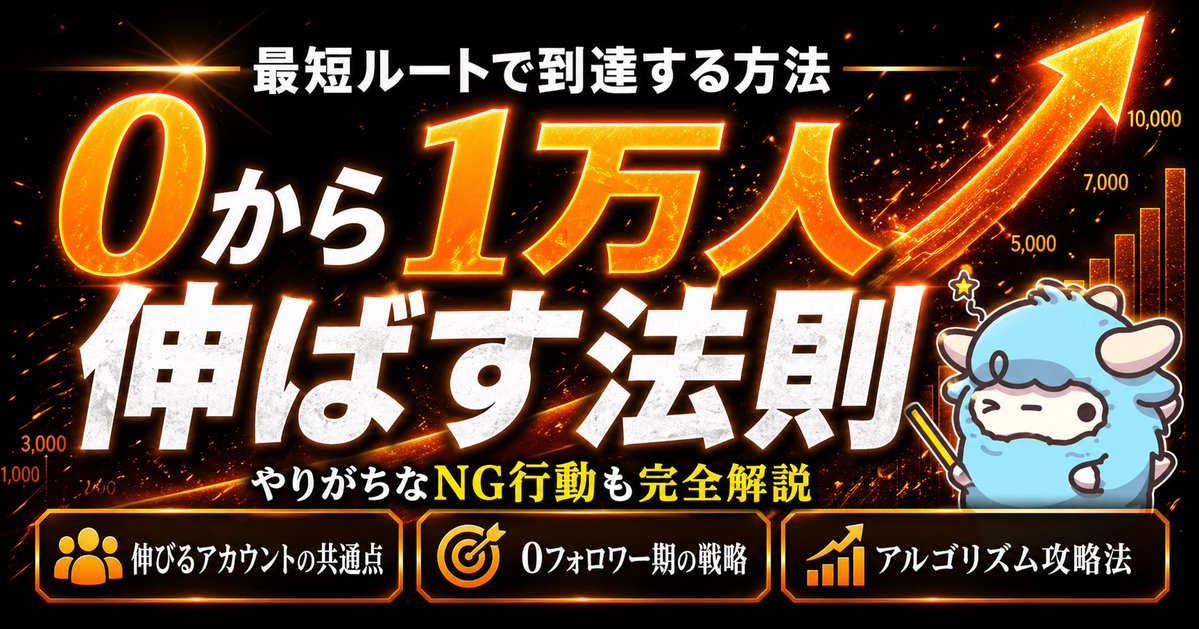
Generate a high-impact, fiery Japanese-style YouTube thumbnail perfect for viral social media growth tutorials.
Japanese YouTube Growth Thumbnail — Sora 2 Prompt
PROMPT · EN
type
日式 YouTube 缩略图
style
高冲击力、炫酷的增长营销缩略图,戏剧性、光泽感、火热、引人注目
canvas
aspect_ratio
16:9
background
黑色背景配橙色火花、发光粒子、光束和镜头光晕
headline
top_text
{argument name="headline text" default="最短ルートで到達する方法"}
main_text
item 1
从 0
item 2
到 1 万人
item 3
的增长法则
sub_text
深度解析常见的避坑指南
main_text_style
font
超粗日文展示字体
colors
item 1
白色
item 2
发光的橙金色
effects
厚重的黑色阴影、强烈的外部发光、橙色文字上的金属质感、白色文字上的轻微磨损纹理
graphics
count
6
items
item 1
type
巨大的向上箭头
position
右上角向斜上方扫过
color
亮橙金色
effect
强烈发光、火花轨迹
item 2
type
柱状图
position
角色右后方
count
4
labels
item 1
5,000
item 2
7,000
item 3
10,000
item 4
color
橙金色光芒
item 3
type
镜头光晕星芒
position
左上角
color
金橙色
item 4
type
对角线能量条
position
左下角至中心
color
橙色
item 5
type
小火花粒子
position
覆盖整个背景
color
橙色和金色
item 6
type
小星星图标
position
角色头顶上方
color
黄色光芒
character
count
1
subject
可爱的吉祥物绵羊头像
position
右下角
appearance
body_color
浅蓝色蓬松羊毛
face
奶油白色
outline
深棕色线条
expression
平静的闭眼微笑
accessories
右蹄拿着一根黄色指示棒
bottom_panels
count
3
style
带有明亮橙色发光边框的黑色圆角矩形框
items
item 1
icon
人群
text
高增长账号的共同点
position
左下角
item 2
icon
带箭头的靶心
text
0 粉丝期的策略
position
底部中心
item 3
icon
带箭头的上升柱状图
text
算法攻略法
position
右下角
color_palette
primary
item 1
黑色
item 2
白色
item 3
橙色
item 4
金色
accent
item 1
黄色
item 2
浅蓝色
composition
超大号的中心排版占据画面主体,重点突出“1 万人”和“增长法则”,右侧配有吉祥物,底部对齐三个信息标注框,整体设计呈现出病毒式传播的日式社交媒体或 YouTube 增长教程缩略图风格
quality
超清晰、高对比度、精致的缩略图设计、电影级发光效果

About this prompt

Generate a high-impact, fiery Japanese-style YouTube thumbnail perfect for viral social media growth tutorials. Use it as a Concept Art starting point for GPT Image 2: keep the visual structure and style constraints intact, then swap in your own subject, brand, or scene.

This prompt is organized as structured JSON with fields such as type, style, canvas, headline, graphics, character, and bottom panels. Keeping that hierarchy helps the model separate the subject, layout, interface elements, and detail constraints.

Start with small changes to subject, scene, camera, and color, then generate a few variations to compare composition and detail without turning the page copy into keyword stuffing.

How to use this prompt

  1. Copy the entire prompt body above.
  2. Open your preferred AI image generator (like Sora 2, Midjourney, or DALL-E).
  3. Paste the prompt into the input field. The prompt uses a structured JSON format for precise control.
  4. Tweak the headline text variable within the prompt to match your specific topic or video title.
  5. Generate the image and download your custom, high-engagement thumbnail.
FAQ

More from GPT Image 2

Browse all

Create faster with Sora2Hub prompts.

Use curated prompt pages as searchable entry points, then jump straight into generation with the right model context.

Explore prompts