
Sora2 Hub
Sora2 Hub
  • Prompt Library
  • Pricing
  • Showcase
  • Blog
Sora2 Hub
Sora2 Hub
Sora2 Hub

Sora2 Hub

Professional AI creation platform powered by Sora 2, Veo 3.1, and Nano Banana Pro. Create stunning videos and studio-grade images with advanced control, HD quality, and no watermarks.

Email:support@sora2hub.org

AI Video Generator

  • Text to Video
  • Image to Video
  • Veo 3.1
  • Sora 2
  • Kling 3.0
  • Kling 2.6
  • Kling 2.5
  • Runway
  • Wan 2.6
  • Seedance 2.0
  • Hailuo 2.3
  • Grok Imagine
  • HappyHorse-1.0

AI Image Generator

  • Text to Image
  • Image to Image
  • Nano Banana Pro
  • Nano Banana
  • 4o Image
  • Flux Kontext
  • Z Image
  • Seedream 4.5
  • Seedream 5.0 Lite
  • Nano Banana 2
  • GPT Image 2
  • AI Image Upscaler

AI Effects

  • AI Age Filter
  • AI Gender Swap
  • AI Kiss
  • AI Hug
  • Ghibli Image
  • AI Mermaid Filter
  • AI Bodyshake
  • Smiling Filter
  • AI Fat
  • Action Figure

Product

  • Features
  • Showcases
  • Pricing

Company

  • About
  • Contact

© 2025 • Sora2 Hub ORG All rights reserved.

  • Privacy Policy
  • Terms of Service
  • Refund Policy
  1. Home
  2. /
  3. Prompts
  4. /
  5. GPT Image 2
  6. /
  7. Xianxia TCM Meridian & Acupoint Infographic — Sora 2 Prompt
GPT Image 2AI Prompt

Xianxia TCM Meridian & Acupoint Infographic — Sora 2 Prompt

Create a scientifically accurate, ink-wash anime-style infographic of any Traditional Chinese Medicine meridian and its acupoints, featuring a customizable character.
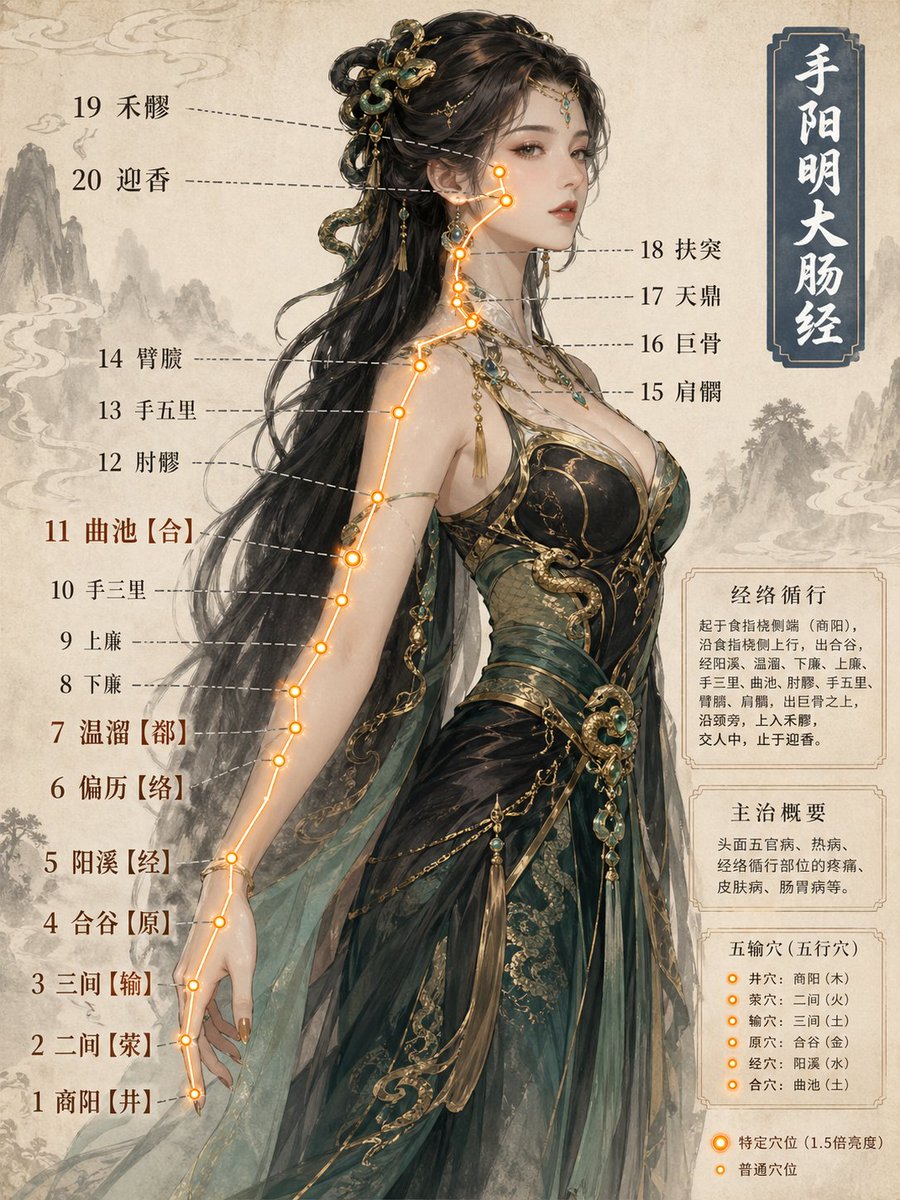
Xianxia TCM Meridian & Acupoint Infographic — Sora 2 Prompt
1 / 3
PROMPT · EN
一张关于 argmeridian name: 手太阴肺经 经络与穴位的科学信息图,采用仙侠风格的半写实动漫插画,融合水墨美学。角色设定:argcharacter prototype: 小乔,姿势经过专门设计,以展示相应的解剖区域,确保所有穴位清晰可见且无遮挡。穴位可视化:argacupoint light color: 阴经:蓝白色冷光 / 阳经:橙金色暖光 发光的穴位点,每个点都严格锚定在解剖标志上。彩色流线连接所有穴位,遵循标准的经络走向。穴位标签按经络顺序排列,线条不交叉。背景:暖色羊皮纸纹理,优雅的水墨风格。标题:顶部角落的竖排文字,背景为灰蓝色:“argfull meridian name: 手太阴肺经”。质量:小红书科学信息图标准,兼顾角色美感与解剖精确度。

About this prompt

Create a scientifically accurate, ink-wash anime-style infographic of any Traditional Chinese Medicine meridian and its acupoints, featuring a customizable character. Use it as a Concept Art starting point for GPT Image 2: keep the visual structure and style constraints intact, then swap in your own subject, brand, or scene.

Start by replacing meridian name, character prototype, acupoint light color, and full meridian name, then keep the camera, composition, and material cues in the same order. This makes the output easier to compare across variations.

How to use this prompt

  1. Copy this prompt template into a Sora 2 compatible AI model.
  2. Customize the variables: choose a meridian (e.g., '手太阴肺经'), a character prototype, and an acupoint light color scheme.
  3. Generate the image, ensuring the character's pose clearly displays the required anatomical area.
  4. Review the output for acupoint clarity and correct anatomical placement. Adjust the character's pose or description if points are obscured.
  5. Use the infographic for educational content, social media posts, or personal study reference.

FAQ

知识猫图解

@GeekCatX→

Published
Apr 30, 2026
Language
EN
Model
GPT Image 2
Category
Concept Art
GPT Image 2Concept Artgpt-image-2twitter
Views
483
Copies
49
Likes
39

Share

More from GPT Image 2

Browse all
Minimalist Japanese Electric Nail Clipper Product Landing Page — Sora 2 Prompt

Minimalist Japanese Electric Nail Clipper Product Landing Page — Sora 2 Prompt

@eisho_m
Photorealistic Fashion Magazine Cover — Sora 2 Prompt

Photorealistic Fashion Magazine Cover — Sora 2 Prompt

@aichof21
Ultra-Realistic 3D Exploded View Prompt: Sony BRAVIA 8K TV

Ultra-Realistic 3D Exploded View Prompt: Sony BRAVIA 8K TV

@Ankit_patel211

Create faster with Sora2Hub prompts.

Use curated prompt pages as searchable entry points, then jump straight into generation with the right model context.

Explore prompts

